  1. Home
  2. Photography
  3. Computing
  4. Emerging Tech
  5. News

Adobe to release Photoshop update with MacBook Pro Touch Bar support

Add as a preferred source on Google

One of the standout features of Apple’s new MacBook Pro computers is the all new Touch Bar, which replaces a row of function keys atop the keyboard with a long OLED screen that’s contextual depending on the application(s) you’re using.

Moments after the announcement of the new MacBook Pros, Apple invited an Adobe executive on stage to show off how Adobe is already working on utilizing the Touch Bar to create a “natural, expressive, and powerful new way of working with Photoshop.”

Recommended Videos

The first demonstration on stage shows Experience Design Manager of Adobe Photoshop Bradee Evans as she composites two images together using Photoshop’s integrated selection and mask tool. Rather than digging through the navigation and sub-menus within Photoshop, Evans shows how the Touch Bar makes it easy to access otherwise hidden tools.

Beyond bringing features out of Photoshop’s convoluted navigation system, the new Touch Bar also adds a more tactile element to moving sliders in Photoshop. Rather than using the mouse and trackpad to tweak exposure, saturation, and even brush sizes, Apple’s Touch Bar lets you slide your finger across a slider to adjust variables.

It’s a far cry from a full-out touchscreen MacBook Pro, and arguably a gimmicky addition to an otherwise unimpressive update, but it’s an evolutionary step in Apple’s notebook lineup nonetheless.

Although this wasn’t confirmed on stage at the keynote, it’s safe to assume Touch Bar functionality will make its way to other photography-centric apps in Adobe’s Creative Cloud collection, including Lightroom and Camera Raw.

Adobe says the new version of Photoshop, with Touch Bar support, should be available by the end of the year.

Gannon Burgett
Former Editor
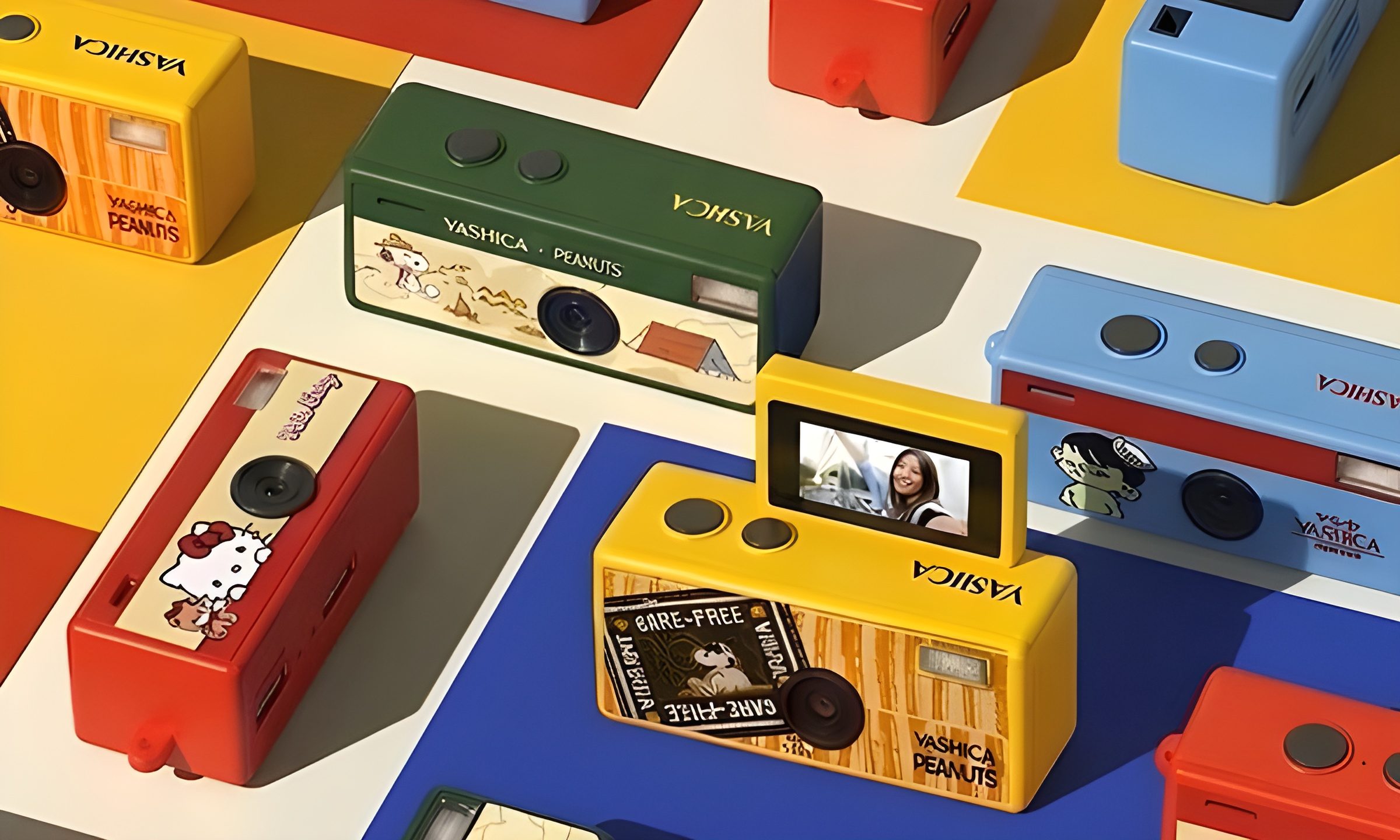
This new $30 keychain camera is coming for Kodak Charmera with a flip screen for selfies
Yashica's new camera makes toy photography more fun
YASHICA Funtastic Keychain Camera in multiple variants

Tiny digital cameras are all the rage, and Yashica is now offering a very cute toy photography experience of its own. The company’s new Funtastic Keychain Camera is exactly what the name suggests, a miniature digital camera small enough to clip onto your keys, bag, or lanyard. The popular Kodak Charmera is the obvious comparison, which brings a tiny blind-box keychain camera that became a viral collectible.

Now, Yashica's version lands in the same novelty-camera lane, but adds one very useful trick, which is a 180-degree flip screen.

Read more
Google releases big v4.0 update for its popular Snapseed editing app on Android
Electronics, Phone, Mobile Phone

After years of sitting on its hands, Google appears to have remembered it owns one of the best photo editing apps on mobile. Snapseed 4.0 is now rolling out to Android, bringing the platform up to speed after a stretch of iOS exclusivity that left Android users watching from the sidelines.

The story starts last June, when Google quietly broke Snapseed out of its long dormancy with a significant 3.0 update for iPhone. It was a surprise move that suggested the company was serious about the app again. Google then confirmed at the start of this year that Android wouldn't be left behind for long, and true to that word, the Play Store listing has now been updated to reflect version 4.0 — skipping straight past 3.0 for Android users and landing both platforms on the same version simultaneously.

Read more
Google Photos gets new editing tools that are all about subtle touch-ups
Google Photos just made your camera roll feel like it came with a makeup artist included, and the results are refreshingly understated.
Google Photos Touch Up feature in action.

Whether it is dark circles from a late night of work, a blemish that showed up uninvited, or something similar that could use additional brightness, Google Photos now has you covered.

Google has officially rolled out a new Touch Up suite inside its Photos app editor, integrating face retouching tools directly into the app for the first time. Previously, such adjustments were only available inside Google’s Camera app at the time of capture. 

Read more