Splitgate is the latest craze in the first-person shooter space, and it’s easy to see why. It’s a fun, fast-paced shooter that borrows elements from Portal and Halo, effectively blending old with new. Now that Splitgate has reached a much wider audience, you might be thinking about giving it a try. Fortunately, this game is free to play and is available on PC, PlayStation 4, PS5, Xbox One, and Xbox Series X|S.
Though, what about playing with friends on other platforms? After all, competitive shooters are much more fun with friends. Does Splitgate offer any sort of cross-platform support? This is a feature that has started being implemented in multiplayer games more frequently, so consumers have grown to expect it. Here, we’ll show you everything you need to know about Splitgate‘s cross-play support.
Recommended reading:
- Splitgate tips and tricks: How to master the portal-filled FPS
- The best Xbox One shooter games
- The best PS4 shooter games
Is Splitgate cross-platform?

Thankfully, Splitgate does offer cross-play for all platforms. This means you can pair up with anyone across any platform, making it easy for everyone to play together. And you’ll want to squad up with friends, regardless of their platform, since you get bonus XP when you have others in your group. By default, cross-play is enabled, which ensures wait times are as low as possible. You can disable this feature to restrict your search to only your own platform, but keep in mind that this could greatly increase wait times.
To disable cross-play, press the Menu button from the main Splitgate screen. From here, navigate to Settings, and then tab over to Privacy, where you’ll see a checkbox for cross-play. If you uncheck it and back out to the main menu, your search will be limited to the platform you’re on. Though, we almost always recommend leaving cross-play enabled.
How to add friends from other platforms
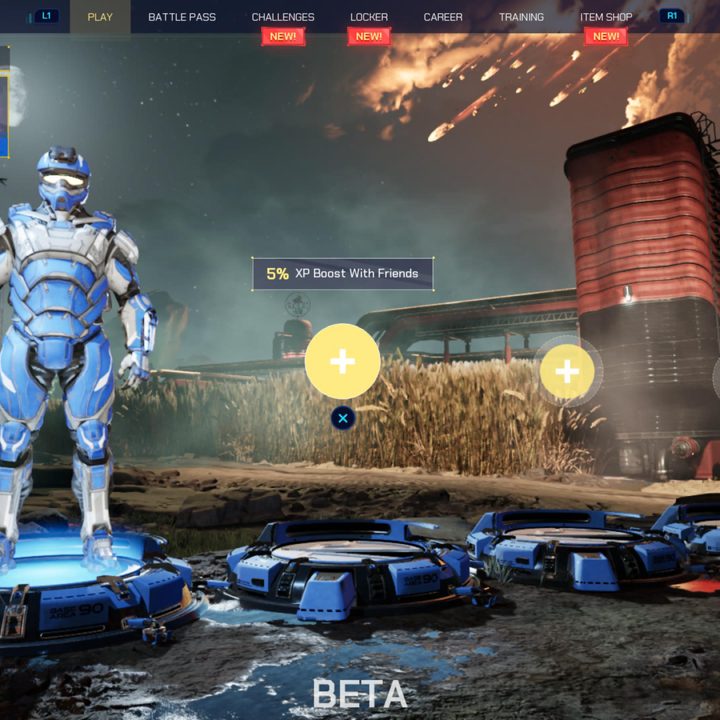
Although Splitgate offers cross-play, adding friends from other platforms isn’t as apparent as it could be. If your friends are on your platform already, it’s quite easy to get paired up with them, but otherwise, you might need an explainer. From the main menu, you’ll notice the game features slots for each friend that can join your squad — up to four-player teams total. Under each slot, it’ll have either an X on PlayStation or A on Xbox, so press that button on your platform to go to the Friends menu.
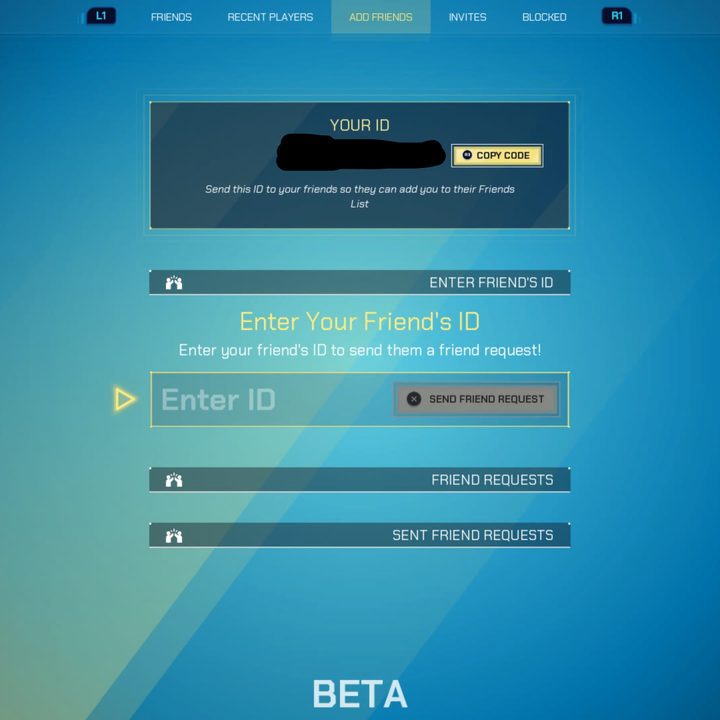
This menu has a lot of options you can tab through, which are shown at the top. Tab over to the Add Friends section, and you’ll be able to input an ID, regardless of the player’s platform. Your ID is shown at the top of the screen, so you can give that to a friend so they can add you instead. Navigate down to Enter Your Friend’s ID, where you can type in their code to get them added.
Once you’ve added your friend(s), tab back over to the Friends sub-menu, and you can then navigate between your platform’s friend list or your general Splitgate friends list (on all platforms). Select the friend and then press Invite to Party to send them an invite. You will now be in the same squad until you disband.