No one expects you to overthrow the Yaran dictator and liberate the nation all on your own. Sure, there are other guerilla fighters on the island and even some awesome animal Amigos who can join you in your fight, but there’s no substituting another real person by your side. Past Far Cry games have had various forms of multiplayer, including traditional PvP modes, isolated competitive co-op missions, and full-blown co-op play. This latest installment brings things back to basics with a simple, yet fully robust, co-op multiplayer function.
If you want to dive right into multiplayer co-op, there are a few hurdles you need to clear before you can team up with a friend or stranger for some destructive fun. Once you do get connected, though, the entire world will be open for your enjoyment. That includes all the missions, even story-focused ones, so you can effectively play the majority of Far Cry 6 as a co-operative experience. If you’re eager to liberate the island with a pal by your side, here’s how to play co-op multiplayer in Far Cry 6.
Further reading
- Far Cry 6 beginner’s guide: Tips and tricks for overthrowing the government of Yara
- Far Cry 6 Amigos companions guide: How to unlock, perks, abilities, and more
- The best weapons in Far Cry 6 and how to get them
How to play co-op in Far Cry 6
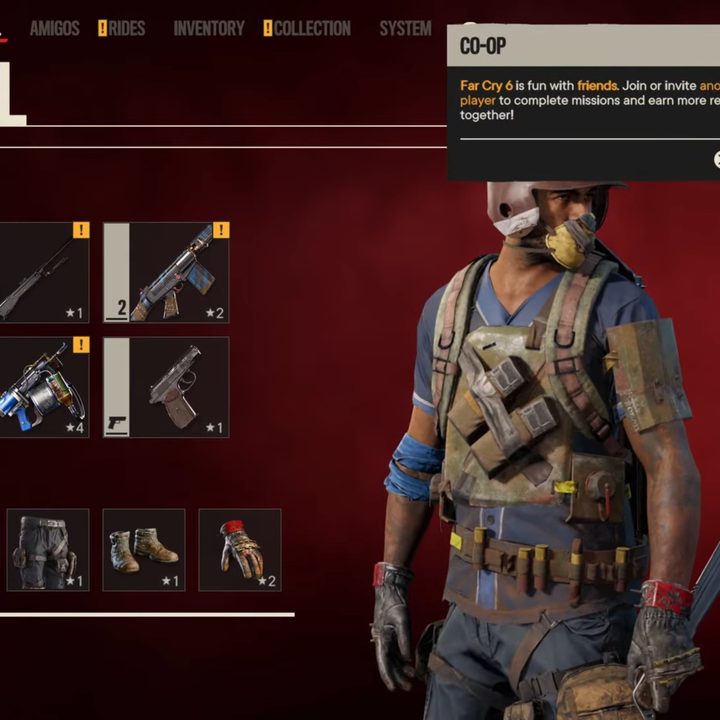
The first step to playing co-op in Far Cry 6 is actually unlocking it. There won’t be any menu option to look for or the option to join a game when you first boot it up — the game requires you to progress through the main story at least a little bit before letting you loose with a friend. Thankfully, you won’t have to wait long. Once you beat the main mission called Du or Die, the fourth mission, the option will open up. The game will also inform you that this function has been unlocked.
How to play with friends
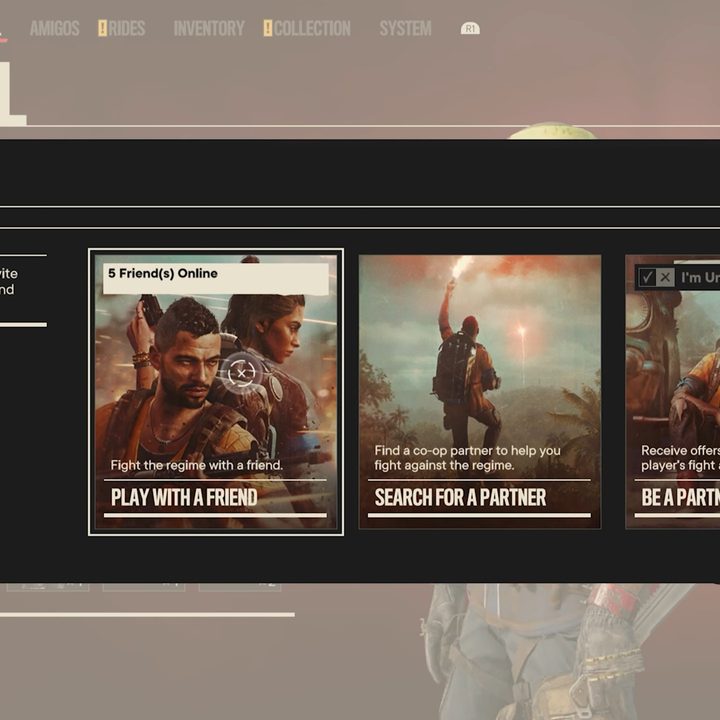
If you have a specific friend in mind that you want to team up with, all you need to do is open up your menu and select the Two Silhouettes Co-Op icon at the top right. From there, you can choose Play With A Friend to open up your friends list and invite the person of your choice. Once they accept, they will automatically pop into your game as you’re playing.
How to play matchmaking
There are two options for playing with a random co-op partner in Far Cry 6. First is to use the Search for a Partner option in the co-op menu. This will bring in anyone open to joining a game in progress to your game.
The other is to select Be a Partner. In this instance, you would take the role of the co-op player. By setting yourself to Available, you will get a notification when there’s a game you can join and allow you to go over and join them.
How progression works in co-op
This is where things get a little unfortunate. If you’re the host of a multiplayer co-op session, as in you sent the invitation or selected Search for a Partner, then any progress you make while in co-op will persist. That includes story mission progress, side missions completed, everything. If you are invited to a friend’s game or use the Be a Partner function, then only a fraction of things will carry over. As a co-op partner, you will keep any supplies, Amigo Abilities, items, guerrilla experience, and upgrades you get while in another player’s world. Keep that in mind when deciding whether or not you want to host a match or join someone else.
Does Far Cry 6 have cross-play co-op?
Unfortunately, Far Cry 6 does not support any form of cross-play for the co-op mode. It does, however, have cross-generation play, at least. That means if you want to play with a friend, you will both need to be on either a PlayStation 5 and/or PS4, Xbox One and/or Xbox Series X/S, or PC.