Streaming on Twitch has been a hobby of mine for a while, and it’s probably the single most important thing convincing me to stick with my RTX 3060 Ti, thanks to two key technologies that Nvidia has made: NVENC and Nvidia Broadcast. The RTX 3060 Ti is one of the best graphics cards on its own, but it’s these two features that have made the difference for me.
These aren’t crucial to my streaming experience, but the quality of life improvements these two features provide make it difficult for me to even think about switching back to AMD graphics.
NVENC makes my CPU obsolete
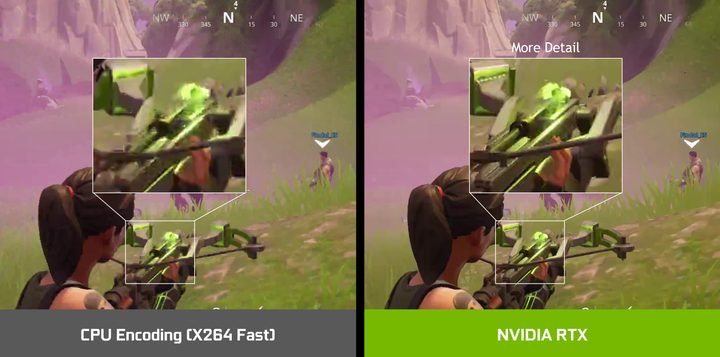
I had been an AMD user for years until I switched to the GTX 1080 Ti in 2020 and upgrading to the RTX 3060 Ti in 2021 for better power efficiency. I was also upgrading my CPU around the same time, going from a Ryzen 7 3700X to a Ryzen 9 3950X for streaming. I was excited to finally have one of the best CPUs for streaming, and I started tweaking my settings in Open Broadcaster Software for the best quality and performance. But my CPU usage was super high, the performance was bad in my games, and I was dropping frames on stream.
Then I remembered that I had an Nvidia GPU, and I had heard that NVENC (Nvidia’s GPU streaming codec) had gotten really good, so I decided to check it out. I looked up Nvidia’s guide on how to configure NVENC in OBS, configured OBS, and tested it out. The results were nothing short of amazing: the footage looked good, the performance was great, and I wasn’t dropping any frames. There was basically no performance penalty for using NVENC, and neither my CPU nor my GPU was working any harder to use NVENC. It was a no-brainer for me to switch from CPU to GPU encoding.
While CPU encoding can have very high quality, it’s also a very inefficient way of recording footage. GPU-accelerated encoding by contrast is slightly worse in quality but way more efficient. My specific situation was actually great for GPU encoding because my ITX PC didn’t have the thermal headroom to afford to be inefficient. I just wish I had heard about NVENC before spending hundreds on a Ryzen 9 3950X that doesn’t get to flex its muscles.
Nvidia Broadcast makes my keyboard silent
Like many gamers, I use a mechanical keyboard, which is great to type on but not very enjoyable to listen to. Whenever I was recording or streaming, I’d have to be very careful about whether or not my mic was on because it would always pick up my keyboard, as well as other background noises. I’d usually use push to talk or hard unmute my mic whenever I wanted to speak.
That was the case until I started using an app called Nvidia Broadcast, which has several features including a green screen effect without needing an actual green screen, AI-enhanced audio output, and AI-powered background noise removal, which is exactly what I was interested in. I turned the feature on, and my mic no longer picked up my keyboard or any other annoying background noises.
You might think a feature like this would be too overzealous and would require me to speak loudly or in a certain way, but I’ve never experienced any kind of annoyance with Nvidia Broadcast so far, and I’ve been using it for almost two years. On the other hand, it is a bit lenient and always picks up whenever I clear my throat (which is quite often), so I am still reaching for the mute button every now and then.
That’s not to say Broadcast isn’t amazing; totally removing the clicking of my keyboard from my streams is a massive improvement in quality for the few viewers I have.
If you’re a streamer, consider Nvidia
I think these two features alone make Nvidia GPUs extremely compelling for streamers, and I could get more use out of Broadcast and its green screen technology if I ever decided to plug in one of the best webcams for streaming. I didn’t get an Nvidia GPU for these features, but I’m not eager to switch back to AMD.
However, AMD is catching up to Nvidia on the encoding front. The newest version of AMD’s AMF encoder is purportedly on par with Nvidia’s, but very few applications (including OBS) have gotten an update to utilize the new encoder. In fact, this version of AMF isn’t even all that new; it’s been out for four months. I’m not about to switch to AMD to use an encoder that has no real support and no timeline for when that support will finally come.
There are also alternatives to Nvidia Broadcast’s noise removal feature. RNNoise is an open-source noise removal program that appears to perform similarly to Nvidia Broadcast. However, in order to use RNNoise, you have to rely on the open source software ecosystem, and right now there just aren’t any convenient solutions using RNNoise. For example, someone developed an OBS plugin that added RNNoise but literally said “No help provided. If you can figure out how to build and use it, have fun!” Nvidia Broadcast is a simple app I can download, install, and turn on in a few clicks.
Personally, it’s Nvidia Broadcast in particular that makes it difficult to me to go back to AMD. I can deal with having a lower-quality GPU encoder or encoding with my CPU at a low-quality setting, but I don’t want my viewers to hear my keyboard all the time. This is a really simple but big quality of life improvement that I will continue to take advantage of, and it’s even more important if you have a camera.
AMD GPUs have a little ways to go before they’re as good as Nvidia’s for streaming. I don’t doubt they’ll get there eventually, but in the meantime, I’ll be sticking with my RTX 3060 Ti.