
Nvidia’s RTX 4090 connectors are melting, and we still don’t know the exact cause. However, new information emerged that might help in tracking down the root of the problem.
Meanwhile, Nvidia has finally spoken up about the matter, but the message is not quite what many may have been hoping for.
The power connectors on Nvidia’s beastly flagship RTX 4090 are melting, and the number of such cases continues going up. While the owners of these unfortunate GPUs are forced to go through the return process and wait for replacement, Nvidia and its partners continue looking into the problem to try to find a fix. So far, the only fixes and possible causes we’ve gotten were from unaffiliated tech enthusiasts and publications.
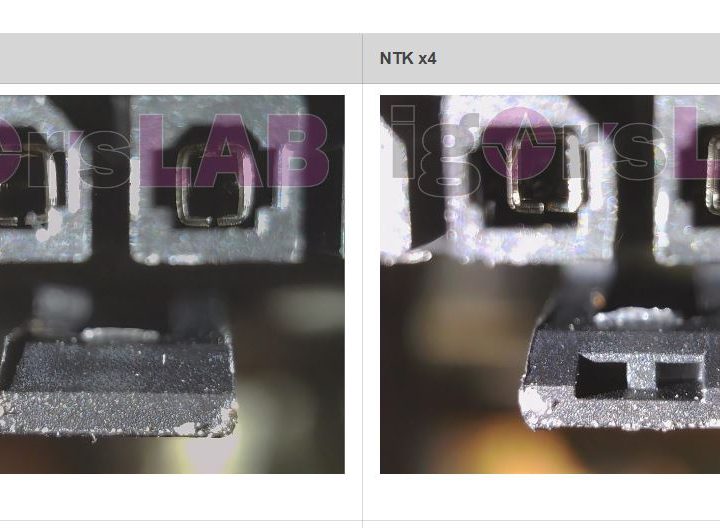
Igor’s Lab has taken a particular interest in this case. After initially finding that the cable appears to be rather poor quality, which could contribute to the problem, it continued investigating the issues. Its latest discovery is that there are two manufacturers that made the official Nvidia adapter and, apparently, only the models made by one manufacturer appear to cause problems.
It seems that the 600-watt cable that comes with the RTX 4090 was manufactured by one of two companies: Astron or NTK. According to Igor’s Lab, the NTK cable seems to be of better quality. The latching system seems to be an improvement over Astron, and the NTK cable uses a one-spring contact design versus the two-spring design offered by Astron.
On the other hand, the NTK connector requires more force when plugging it in, but that might not be a bad thing. Corsair’s power supply unit (PSU) expert Jon Gerow (JonnyGuru) concluded that a lot of the problems with melting RTX 4090 connectors are down to user error — in other words, the cable is just not correctly plugged in. Having to use a bit more force could ensure that the cable is properly seated.
Semi-update from @nvidia on the melting 4090 power adapter situation…
"We continue to investigate the reports, however we don’t have further details to share yet. NVIDIA and our partners are committed to supporting our customers and ensuring an expedited RMA process for them"
— KitGuru (@kitgurupress) November 11, 2022
With that said, Igor’s Lab is not making any judgment calls as to which cable is better or responsible for the disaster. Only Nvidia can say with absolute certainty what’s going on, and so far, it doesn’t seem quite ready to do that.
As reported by Kit Guru, Nvidia made a quick statement that unfortunately doesn’t clear up much at all. The company says it can’t share further details, but it’s investigating the problem and expediting the return process for those affected by this issue. For the time being, we may have to just follow tech gurus. If you own an RTX 4090, make sure that the cable is plugged in properly with as little bending involved as possible — it should help.


