

There was a time in our digital lives when reaching for a cable was a straightforward affair. If we needed to connect a CD player to our amplifier, an optical cable was the right tool for the job. If we bought a new printer, a USB-A to USB-B cable of the right length would almost certainly guarantee success. Even in the early days of the HDMI cable revolution, connecting a Blu-ray player to a TV was a simple matter of finding the most affordable cable we could — in the mid-2000s, I bought several $5 HDMI cables from Monoprice and they all worked just fine.
But the age of easy connectivity is now behind us, and every year it seems to get worse. As our devices become more capable, they place an increasing set of demands on the cables that connect them. And some of our existing cables — and many we might buy in-store or online — can’t meet those demands.
Will that USB-C cable in your desk drawer let you charge your new Samsung phone using a 45-watt power adapter? Will it support fast data transfer speeds so you can move 4K videos from your action cam to your laptop before the battery dies? Will the HDMI cable that you’ve been using for years to connect your Roku to your TV work on your new PlayStation 5?
Unless you’re a cable connoisseur, there’s just no way to know without trying.
It doesn’t need to be this way.
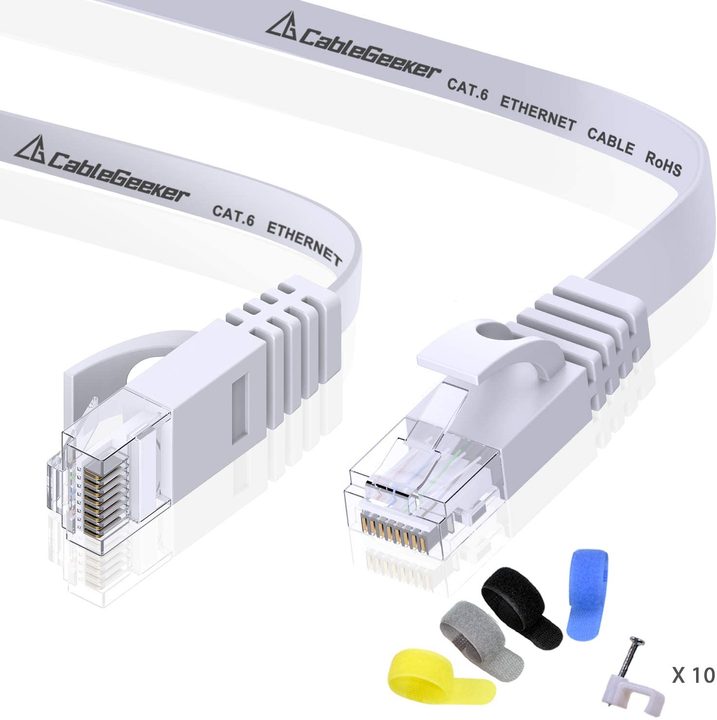
In the world of industrial and commercial cables, key information is printed on the insulating jacket. IT pros know that’s where you’ll find the category of an Ethernet cable (5, 5E, 6, 6A, etc.), which tells you if it’s right for your needs. The same goes for electrical and various other types of wiring.
So why don’t we do this for all cables? In fairness, portions of the electronics industry have taken stabs at it.
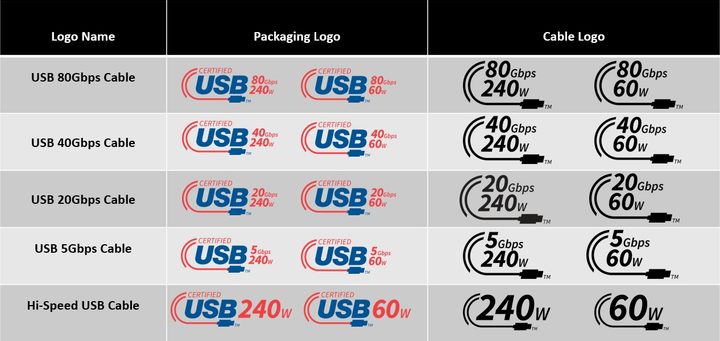
The USB Implementers Forum (USB-IF) oversees the development of the ever-expanding USB specification. It has come up with a standard set of icons that can fit on cable plugs — a logical place to put them — which detail a cable’s power and/or data capability.
VESA, which fulfills this role for DisplayPort technology, has also instituted a recommended labeling practice.
The HDMI Licensing Administrator (which oversees the latest HDMI standards), has a similar program, but it mostly applies to how HDMI cables are packaged and advertised. It recommends — but doesn’t require — that certified HDMI cables declare their bandwidth (speed) capability on the jacket, not the plug.
In spite of these efforts, we still live in a chaotic cable world. The biggest reason is that there’s no way to enforce even the most obviously useful standards for cabling. If you’ve ever tried to plug a USB cable into a port, only to have to flip it around and try again, you know exactly what I mean. It’s always been up to the individual manufacturers.

Another reason for confusion — and this mostly applies to USB-C cables — is that the humble USB-C port can support a variety of underlying technologies, each with its own cable requirements. A 2020 Apple MacBook Air has two USB-C ports. They aren’t labeled, so you might not know that they support charging, DisplayPort, Thunderbolt 3 (up to 40Gb/s), USB 4 (up to 40Gb/s), and USB 3.1 Gen 2 (up to 10Gb/s).
Assuming you’ve taken the time to learn all about your laptop’s capabilities, now you need to find the right kind of cable. Any USB-C cable will fit in the port, but only a cable compatible with DisplayPort or Thunderbolt will let you run a display. Thunderbolt cables usually have a lightning-shaped icon on the plug, often accompanied by a 3 or 4 to indicate the version.
Apple, one of the biggest proponents of Thunderbolt technology, doesn’t follow this helpful guideline. Its Thunderbolt 3, Thunderbolt 4, and Thunderbolt 5 cables have identical markings, even though each has different power and data maximum thresholds.
So where does this leave us?
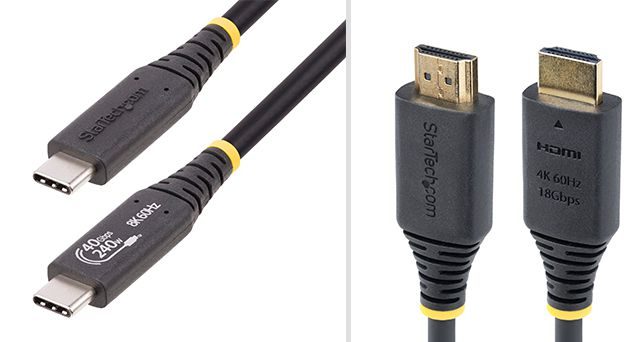
The good news is that reputable companies are increasingly getting the memo. Some like StarTech.com, not only use the USB-IF icons on their USB cables, but go further with plug-printed “Quick Identification” markers on their HDMI cables, too.
But it’s still very much buyer beware. Until these labels become the norm, we’ll have to resort to testing which of our cables work for different uses and then labeling them (or organizing them) ourselves.


