  1. Home
  2. Computing
  3. News

Digital Trends may earn a commission when you buy through links on our site. Why trust us?

NordVPN’s new free tool shows how much your location data is exposed online

Your IP address gives away more than you think.

Add as a preferred source on Google
nordvpn-my-location-tool
NordVPN

Your location data can reveal a lot more than you might think. It goes beyond just pinpointing where you are right now. Over time, it can map out your daily routines, the places you visit regularly, and even when your home is likely empty.

To help you see exactly what you’re giving away, NordVPN has launched My Location, a free browser-based tool that instantly shows your physical location and the virtual location visible to every website you visit.

What’s the difference between your real and virtual location?

Your real location is determined through device-based methods like GPS or your browser’s geolocation API. That’s the data apps typically request when they ask for location access. Your virtual location, on the other hand, comes from your IP address. That’s the identifier attached to your internet traffic, and websites use it by default to estimate where your connection is coming from.

Recommended Videos

These two can differ significantly, and understanding that gap matters. Websites can use your location for targeted advertising or regional price discrimination, showing you different prices based on your region. In more serious cases, a time-stamped location history can enable surveillance or stalking.

NordVPN CTO, Marijus Briedis, puts it plainly: “Once this data is exposed or shared too broadly, it can be used for profiling, targeting, and other purposes far beyond the original reason it was collected.”

How to use NordVPN’s My Location tool safely?

To use Nord’s free tool, head to My Location page and click on “Test Location Access.” Your browser will ask if you want to share your location with NordVPN. You should select “Allow this time” to grant the tool one-time access to your browser’s geolocation API. It will map out your physical location alongside your IP-based virtual one.

Privacy-wise, you’re covered because NordVPN confirms it does not log or store any location data the tool reveals. Beyond the tool itself, Briedis recommends reviewing your app permissions regularly, such as only allowing location access while actively using an app, and disabling geotagging in your camera settings.

While a VPN won’t block GPS-based tracking, it can mask your virtual location by changing the IP address websites see. For a head start on protecting your virtual footprint, you can check out some of the best free VPNs worth trying.

Manisha Priyadarshini
Manisha Priyadarshini is a tech and entertainment writer with over nine years of editorial experience.
Lenovo’s next ThinkCenter desktop is ready to hit the shelves, but the price will make you blink twice
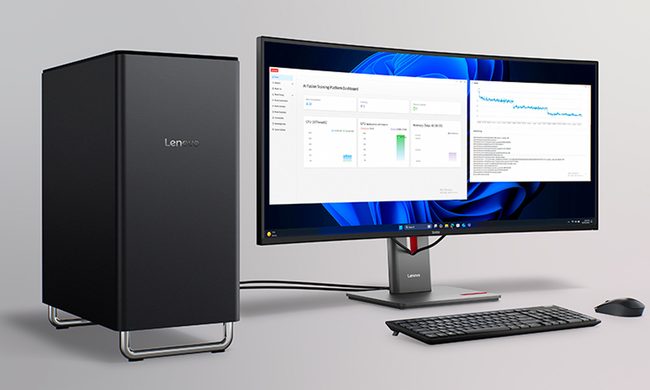
The ThinkCentre X is finally heading to the US with up to 256GB RAM, dual RTX 5060 Ti GPUs, and a price tag that rivals a used car.
Lenovo ThinkCentre X workstation with monitor

If the phrase "future-proof desktop" means never worrying about running out of RAM again, Lenovo may have just built the ultimate machine. The company is preparing to launch its new ThinkCentre X workstation desktop in the US after making it available in several international markets. Built for AI workloads, professional content creation, and demanding enterprise applications, the desktop can be configured with up to 256GB of DDR5 memory, Intel's latest Core Ultra 9 processor, and support for dual GeForce RTX 5060 Ti 16GB GPUs.

A workstation built for serious workloads

Read more
A metallic Hall effect keyboard and a 59g mouse are Lenovo’s latest upgrades for snazzy gaming setups
The Legion R7 RT75 keyboard and Y7MG mouse bring 8K polling to both sides of your gaming setup
Computer, Computer Hardware, Computer Keyboard

Magnetic gaming keyboards and lightweight mice are hardly unusual anymore, but Lenovo is trying to push both ideas a little further with its latest Legion peripherals. The new lineup includes the Legion R7 RT75 keyboard and Legion Y7MG mouse, and both support an 8,000Hz polling rate for players who want every input delivered to their PC as quickly as possible.

Of course, Lenovo has styled these peripherals to be as bold and eye-catching as possible without getting in the way of practicality. The keyboard has a hefty metallic design with translucent keycaps and RGB lighting. Compared to that, the mouse is more tame and traditional in design, but it also has an RGB strip that appears to belong on an alien spaceship. (via NotebookCheck)

Read more
Shopping for back-to-school? These are the budget laptops I’d actually recommend
From a $359 Chromebook to the cheapest way into macOS, these are the budget picks worth your money.
Computer, Electronics, Laptop

The back-to-school season often turns into a laptop, especially the budget ones that aren't too heavy on your wallet. Due to the ongoing memory crisis, most manufacturers have already bumped up their laptop prices, including Apple. However, that doesn't mean that I won't help you get a new machine. So, for this one, I spent time digging through spec sheets, customer ratings, and price tags, finding devices that don't just look cheap in an Amazon listing, but actually hold up. 

From a flexible touchscreen Chromebook to the least expensive way into macOS, these six laptops balance price and performance well. I'd hand any one of them to a student heading back to campus this fall, depending on what they need and what their priorities are. 

Read more

