1. Home
  2. Computing
  3. Emerging Tech
  4. News

You can now choose how hard Claude thinks before answering your queries

For the first time, Claude users can decide whether their AI assistant thinks fast or thinks deep.

Add as a preferred source on Google
Page, Text, Business Card
Shikhar Mehrotra / Digital Trends

Anthropic just released Claude Opus 4.8, and while the benchmark improvements are quite real, the most meaningful change for everyday users is something far simpler. 

You can now tell Claude how hard to think before it responds to your query. Along with that, dynamic workflows are now available in research preview for Enterprise, Team, and Max plan users. 

Fast mode is available for Opus 4.8. It’s the same model at roughly 2.5x the speed, and we’ve made it three times cheaper than before.

Turn it on with /fast in Claude Code. On the API, contact your account manager to request access or join the waitlist: https://t.co/5SLFF77Whn

— Claude (@claudeai) May 28, 2026

What is effort control and why does it matter?

A new control sitting alongside the model selector on claude.ai page, where you interact with the AI model. It lets you choose the amount of effort Claude applies to any given query. 

Recommended Videos

There are five effort settings to choose from when using Opus 4.8: Low, Medium, High (Default), Extra, and Max. As the name suggests, low effort responses are faster, and therefore, better for quick or trivial questions, email drafts, or anything else that requires speed over depth. 

The High and Max settings, on the other hand, force Claude to think more deeply before responding. These effort levels are ideal for complex multi-step problems, detailed analysis or comparison, and anything where accuracy matters more than speed. However, as the AI model takes more time to respond, these effort levels exhaust your rate limits faster. 

The control is available on all plans. Until now, you only submitted a prompt, selected the AI model based on its known strengths, and Claude decided how much thinking to apply. Effort control effectively hands that decision to you. 

What else changed?

The most significant practical upgrade for developers is dynamic workflows. Claude Code can now plan a large task, spin up hundreds of parallel subagents in a single session, and verify its own outputs before reporting back. 

The Messages API now accepts system entries inside the messages array, allowing developers to update Claude’s instructions mid-task without breaking the prompt cache. This is especially useful for updating permissions, token budgets, or environment context. 

Anthropic also mentions that Opus 4.8 is around four times less likely than its predecessor to let flaws in code pass without noticing. The release arrives 41 days after Opus 4.7, reflecting an accelerating update frequency. 

Shikhar Mehrotra
For more than five years, Shikhar has consistently simplified developments in the field of consumer tech and presented them…
Lenovo’s next ThinkCenter desktop is ready to hit the shelves, but the price will make you blink twice
The ThinkCentre X is finally heading to the US with up to 256GB RAM, dual RTX 5060 Ti GPUs, and a price tag that rivals a used car.
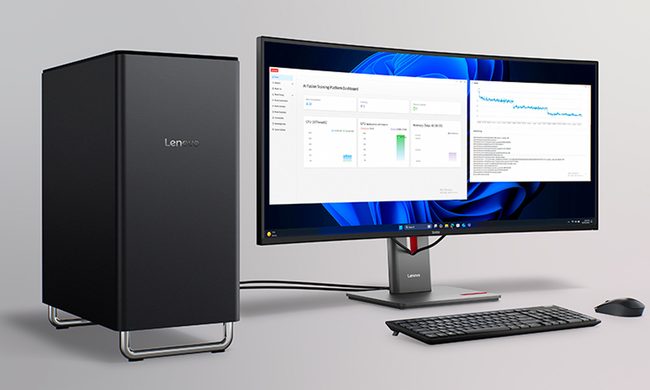
Lenovo ThinkCentre X workstation with monitor

If the phrase "future-proof desktop" means never worrying about running out of RAM again, Lenovo may have just built the ultimate machine. The company is preparing to launch its new ThinkCentre X workstation desktop in the US after making it available in several international markets. Built for AI workloads, professional content creation, and demanding enterprise applications, the desktop can be configured with up to 256GB of DDR5 memory, Intel's latest Core Ultra 9 processor, and support for dual GeForce RTX 5060 Ti 16GB GPUs.

A workstation built for serious workloads

Read more
A metallic Hall effect keyboard and a 59g mouse are Lenovo’s latest upgrades for snazzy gaming setups
The Legion R7 RT75 keyboard and Y7MG mouse bring 8K polling to both sides of your gaming setup
Computer, Computer Hardware, Computer Keyboard

Magnetic gaming keyboards and lightweight mice are hardly unusual anymore, but Lenovo is trying to push both ideas a little further with its latest Legion peripherals. The new lineup includes the Legion R7 RT75 keyboard and Legion Y7MG mouse, and both support an 8,000Hz polling rate for players who want every input delivered to their PC as quickly as possible.

Of course, Lenovo has styled these peripherals to be as bold and eye-catching as possible without getting in the way of practicality. The keyboard has a hefty metallic design with translucent keycaps and RGB lighting. Compared to that, the mouse is more tame and traditional in design, but it also has an RGB strip that appears to belong on an alien spaceship. (via NotebookCheck)

Read more
Shopping for back-to-school? These are the budget laptops I’d actually recommend
From a $359 Chromebook to the cheapest way into macOS, these are the budget picks worth your money.
Computer, Electronics, Laptop

The back-to-school season often turns into a laptop, especially the budget ones that aren't too heavy on your wallet. Due to the ongoing memory crisis, most manufacturers have already bumped up their laptop prices, including Apple. However, that doesn't mean that I won't help you get a new machine. So, for this one, I spent time digging through spec sheets, customer ratings, and price tags, finding devices that don't just look cheap in an Amazon listing, but actually hold up. 

From a flexible touchscreen Chromebook to the least expensive way into macOS, these six laptops balance price and performance well. I'd hand any one of them to a student heading back to campus this fall, depending on what they need and what their priorities are. 

Read more