Do you own an Android Wear smartwatch and seethe with jealousy when you see your Apple Watch-touting compatriot answer a call from his or her wrist? Fret not. Google is rolling out a big update — 1.4 Marshmallow — to Android Wear devices that’ll let you channel your inner Dick Tracy by making and listening to calls on supported smartwatches. But that’s not the only feature in tow. The new firmware adds voice dictation for third-party messaging apps such as WhatsApp, plus wacky new gestures with which to perform the various functions of your watch.
Updated on 02-08-2016 by Julian Chokkattu: Added in more upcoming features such as Doze and app permissions based on the release notes from Motorola.
While phone call support and new gestures are sure to keep a lot of users happy, there are a few under-the-hood updates that will be in the Marshmallow update for Android Wear smartwatches. Doze mode was introduced with Android 6.0 and reduces battery consumption when a device is on standby and hasn’t been used for a while, and according to the release notes from Motorola, the Moto 360 2nd generation will reap the benefits of Doze.
It’s unclear if the other Android Wear devices will receive Doze mode as a part of the update, but it’s highly likely that it is baked into the operating system itself as Google doesn’t allow OEMs to tweak or customize it. The release notes from Motorola also stated that the Moto 360 second generation will be able to handle app permissions, so you can control what you share with your apps. This was also introduced in Android 6.0, and will likely make its way to all Android Wear devices as well — as per the Google blog post.
The release notes don’t mention the Moto 360 first generation, so we’ll have to wait and see when and if the update will reach the device.
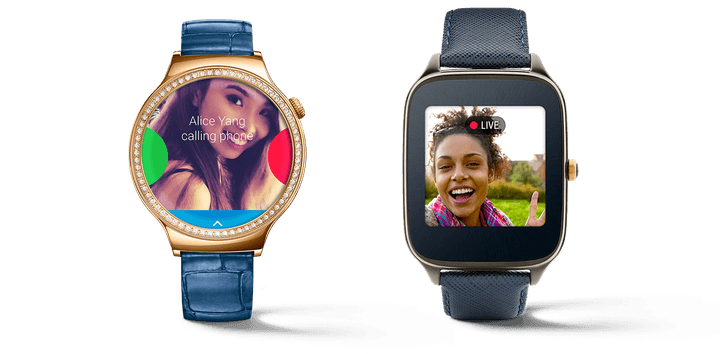
Phone call support is the undoubted highlight, and works exactly as you’d expect. If you’re the lucky owner of an Android Wear watch with a built-in speaker — i.e., the Huawei Watch or Asus ZenWatch 2 — you can initiate or receive calls from your wristwatch instead of your phone. The update lets you put that speaker to good use in other ways, too. You can listen to voicemails and audio from apps such as Glide.
Luckily for the many folks whose Android Wear watch lacks the aforementioned speaker, calling isn’t the only new luxury that the update affords. Third-party messaging services such as Telegram, WhatsApp, and Viber now sport wrist-based dictation via a new contextual command — saying “OK Google, send a WhatsApp message” will, for example, send a WhatsApp message. And last but not least, new gestures make it easier to expand and scroll through notifications one-handed … in theory.
The new gestures require a bit of explanation. To expand an Android Wear card, you hold your arm away from your body and push quickly downward, as if depressing a bicycle pump. Repeating that motion moves through the selected card’s actions (e.g., “Open on phone” or “Block app”). To go back to a previous screen, you hold your arm out and do the reverse: pivot upward. To return to the watch’s face, you shake your wrist in any direction. Finally, to open the settings menu from the watch face, you turn your wrist away from you and then quickly flick it quickly — quickly! — back toward you. Got it? Good.
Convoluted new gestures (to put it mildly) aside, update 1.4 Marshmallow is the latest in a series of significant, recent upgrades to Android Wear. In November, Google introduced cellular support for watches with the requisite radios, and in June, it added emoji drawing and Wi-Fi connectivity. With the successor to the Apple Watch rumored to be unveiled in Fall alongside the iPhone 7, the improvements can’t come soon enough.
Waiting frantically for the update? Google says it’ll roll out to all Android Wear watches over the next few weeks.