“The ToughPad’s high price makes it a hard sell in spite of its performance and durability.”
- Durable construction
- Useful buttons for system functions
- User serviceable and upgradable
- Strong performance for a tablet
- Extremely expensive
- Heavy and thick
- Below-average battery life
- Loud system fan
“Why you can trust Digital Trends – We have a 20-year history of testing, reviewing, and rating products, services and apps to help you make a sound buying decision. Find out more about how we test and score products.“
Thinness is the only philosophy that seems to matter in the world of tablets. Millimeters must be shaved off with every revision, no matter what the cost, both literally and figuratively. For the most part, this makes sense; a tablet that’s light and slim is easier to hold and lug around than one that’s not – but there is another way.
Panasonic’s ToughPad FZ-G1 represents an alternative path. Instead of slimming down, the ToughPad fattens up, and becomes more durable by doing so. Inside there’s no efficient ARM processor or Intel Atom hardware but a powerful Core i5 instead. Around its flanks, this tablet doesn’t make an effort to hide its girth. Instead, it embraces boxy-ness, and the plethora of ports and buttons that approach allows.
This durable and powerful tablet is not quite like anything else available, but its uniqueness comes at a steep MSRP of $2,399, well over twice the price of most competitors. Can the ToughPad make sense to anyone besides government contractors and construction foremen? Let’s find out.
A brick with Windows 8
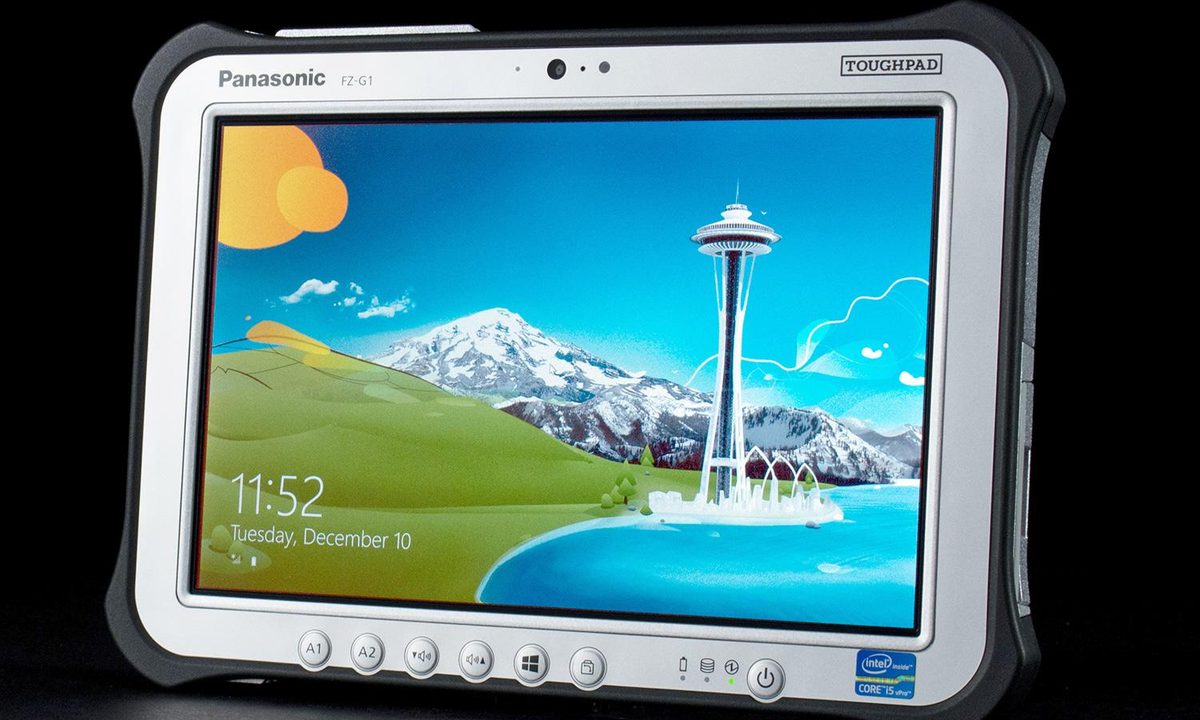
The ToughPad doesn’t have a design. Instead it’s a culmination of decisions, all of which were made with a specific goal in mind. This result is an ugly exterior, but to harp on its lack of aesthetics would be like insulting a bulldozer for its lack of elegance. It’s meant to be utilitarian.
This isn’t an iPad killer, but you could use the ToughPad to kill trespassers.
In the ToughPad’s case, what’s important is functionality and, in that area, this tablet excels. The inclusion of a single USB 3.0 and single HDMI port isn’t going to set records, but more ports (like Ethernet and Serial) are available as upgrades. And there are other features, like a mounting hardpoint that can be used to attach the tablet to a vehicle, a stylus tucked around the left corner, and a webcam with LED flash which is protected by a thick glass portal.
Unlike most tablets, the ToughPad is user-serviceable and partially upgradable. Panels are secured firmly by screws rather than latches or clips, which prevents water or dirt from getting inside. That doesn’t mean the tablet is waterproof, as the Core i5 processor inside requires ventilation. However, the rugged exterior does ward off dust, humidity, rain and other hazards well enough to be IP65 and MIL-spec certified.
And there’s something here that the iPad made into a taboo; multiple buttons! Besides the Windows key, which brings up the Start Screen, there’s also volume controls, a screen rotation lock and two action buttons, one for a customized control panel and the other for the virtual keyboard. Though hardly elegant, the buttons do make Windows easier to use.
A tablet you can use outdoors
Only one display option is available on this device; a 1920 x 1200 matte screen that makes reflections a non-issue. While the backlight’s maximum brightness of about 170 lux is not particularly brilliant, it’s more than enough to make the tablet usable in all lighting conditions.


Contrast ratio is also solid, reaching 560:1 at maximum brightness, which leads to reasonable image quality. The screen’s gamut is low, however, rendering only 72% of the sRGB spectrum. In subjective viewing, we felt this sapped movies and images of some vibrancy, but the problem was only noticeable in colorful scenes.
To our surprise, the tablet’s speakers are reasonably powerful, providing enough volume to fill a small room. There’s not much bass to speak of, and quality is tinny as a result, but the mid-range is mostly clear of distortion.
Faster than it looks
All versions of the ToughPad come with an Intel Core i5-3437U processor that runs at a base clock speed of 1.9 GHz, which can spike up to 2.4 GHz when Turbo Boost kicks in. That’s beefy hardware for a stand-alone tablet, and it led to strong results in benchmark tests. SiSoft Sandra’s Processor Arithmetic test spat out a score of 42.55, while 7-Zip generated a result of 6,432. That’s good enough to beat the HP Spectre 13t and Lenovo IdeaPad U410, but not enough to defeat the Dell XPS 12 or Lenovo ThinkPad T440s.
Storage performance also proved strong, with the standard 128GB solid state drive posting a PCMark 8 score of 4,928. That’s right in line with the best ultrabooks; Lenovo’s T440s scored 4,945 and the HP Spectre 13t scored 4,903. Samsung’s SmartPC Pro tablet virtually ties the ToughPad with its mark of 4,927.

3D performance, however, is a sore point. 3DMark’s Cloud Gate benchmark turned in a score of 3,516, which is lower than the HP Spectre 13t or Lenovo T440s, though it does beat the Samsung SmartPC Pro by about 500 points. The more demanding Fire Strike test came to a result of 421, which once again is lower than most ultrabooks but does barely beat Samsung’s SmartPC. If the lack of a keyboard didn’t make it obvious the ToughPad isn’t for games, its poor 3D performance dispels any such hope.
Barely adequate portability
The ToughPad weighs in at 2.5 pounds and is about eight-tenths of an inch thick. Such figures looks bad compared to an iPad, but they’re not so terrible relative to other Windows tablets. The Microsoft Surface Pro 2, for example, is just a half-pound lighter and about two-tenths of an inch thinner. Panasonic has managed to minimize the bulk usually associated with durability.
That has required some sacrifices, however, and one of them is the battery. Our normal web browsing test loop, which uses the Peacekeeper browser benchmark, ate through a full charge in four hours and thirty-one minutes. Samsung’s SmartPC Pro beats that figure by a half-hour, and a good ultrabook like the HP Spectre 13t can provide six hours of endurance. Panasonic’s tablet is undoubtedly below average.

With that said, though, our light-load test extended life to almost eight hours. Most people who arm themselves with the ToughPad won’t be using it every waking moment, so this tablet could last through a typical eight-hour workday. Panasonic also offers a plethora of accessories including a long-life battery pack and car adapters.
No bloat here
Buyers of durable tablets would not take kindly to bundled apps that interrupt work, so the ToughPad doesn’t have any. There’s an app for the integrated camera, a control panel for changing system settings (like brightness), and that’s it.
What’s that racket?
Placing an Intel Core processor in a tablet always requires some creative thinking. Panasonic’s tablet, which hasn’t been upgraded to the more efficient Intel 4th-gen chips, must deal with more heat than most. Noise is the inevitable result. At idle, the tablet’s fan produces a moderate but consistent 41.5 decibels of fan noise, but volume increases dramatically to 53.5 dB at full processor load. That’s the second-worst result we’ve ever recorded; only the Toshiba Kirabook is louder.
At least the fan’s racket keeps the system cool. At idle, the maximum external temperature is a reasonable 86.7 degrees Fahrenheit, but full load can raise that figure to 98.3 degrees. That’s no worse than average and a lot better than Samsung’s SmartPC Pro, which reached a blazing 117 degrees during our tests.
Conclusion
While there are many things to like about the Panasonic Toughbook FZ-G1, the price is impossible to ignore. Shopping around can reduce the price from the MSRP of $2,399 to about $2,200, but that’s still enough to buy two Surface Pros or Samsung Smart PCs. And then there are the options; it’s possible to exceed three grand without checking every box on the Toughbook’s menu.
The ace up Panasonic’s sleeve is durability, but whether that’s enough to make this tablet viable depends on your use. This isn’t a device meant for the average buyer who just wants to play Candy Crush on the couch or watch Netflix on a plane. Panasonic builds the ToughPad for people who want, even need, hardware that’s the antithesis of modern consumer electronics.
If that sounds like you, this tablet is exactly what you’ve been looking for. The average consumer, however, will be better off with an iPad, Samsung SmartPC, Nexus 7 or Microsoft Surface Pro, all of which are lighter, thinner and much less expensive.
Highs
- Durable construction
- Useful buttons for system functions
- User serviceable and upgradable
- Strong performance for a tablet
Lows
- Extremely expensive
- Heavy and thick
- Below-average battery life
- Loud system fan