  1. Home
  2. Mobile
  3. Legacy Archives

Apple Finally Allows Giving the Gift of App

Add as a preferred source on Google

When flowers are too cliché and a gift card just screams apathy, nothing says “last-minute but thoughtful” like an iPhone app. And at long last, now you can give them to friends just like movies and music.

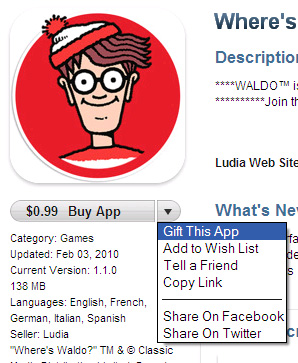
Apple quietly slipped the new ability into the app store on Monday, before bloggers picked up the subtle change in the terms of service and trumpeted it. The function appears when clicking the dropdown menu beside “Buy App.” Apparently, it works store-wide, and applies to all apps except official Apple OS updates.

Recommended Videos

As with most digital stores, all gifts are considered final, so you’re out of luck if that zombie shooter doesn’t go over too well with the parents, and you can’t give away apps you own, even if Oregon Trail has gotten a little stale after the third dysentery outbreak. Apple has also cut out regifting by preventing gift cards from being used to give apps: Cash only, please.

Nick Mokey
As Digital Trends’ Editor in Chief, Nick Mokey oversees an editorial team covering every gadget under the sun, along with…
Snapchat Planets Meaning: Order, Rankings, and How Friend Solar System Works
Snapchat Planets turns your best friends list into a solar system, and yes, your orbit says a lot
Snapchat Planets being shown on the Snapchat app on iPhone.

Snapchat+ includes several exclusive features, but few have generated as much curiosity as Snapchat Planets. Part of the app's Friend Solar System, it transforms your Best Friends list into a planetary ranking, assigning each of your top eight friends a planet based on how often you interact.

From Mercury, which represents your closest friend, to Neptune, which represents your eighth closest, the system offers a quick visual snapshot of your interactions. But what do the different planets actually mean, and how does Snapchat decide who gets which one?

Read more
How to use WhatsApp Web
We'll show you how to use WhatsApp on your desktop or laptop
WhatsApp Web

As one of the most popular messaging services, you’ve already heard of WhatsApp. From its humble beginnings in 2009—two years before Apple introduced iMessage—to its acquisition by Facebook (now Meta) in 2014, WhatsApp has become the dominant messaging platform around the globe.

In recent years, it's grown even more potent with new features like video messages, self-destructing voice messages, the ability to edit sent messages, and more. We even finally got an WhatsApp iPad app in May 2025.

Read more
What is WhatsApp? How to use the app, tips, tricks, and more
From setting it up to mastering hidden features, here is your complete guide to WhatsApp.
WhatsApp app store listing open on iPhone

There's no shortage of messaging apps out there. The past decade has given us more options than we know what to do with, largely because smartphones demanded something better than plain old SMS.

Both the App Store and the Play Store are packed with apps that promise to revolutionize the way we communicate. Most of them didn't make it. The truth is, a messaging app is only as good as the number of people using it, and most apps never cross that threshold.

Read more