
  1. Home
  2. Mobile
  3. Smart Home
  4. Legacy Archives

Cream, sugar, or Wi-Fi? The iKettle makes coffee at your iPhone or Android’s command

Add as a preferred source on Google

When we say the iKettle is hot, we mean really, really hot. So hot that it can effectively boil water at a maximum of 100 degrees. Scorching, right? Hold on, you’re probably thinking, that’s not especially clever, the kettle in my kitchen right now can do that. Yes, but can you order it to boil using your iPhone? We’ll wager you can’t, but the iKettle can!

Kettles may have only one simple task to perform, but very few can claim to be smart. The iKettle stands apart, as it’s the latest piece of technology – and a world first for kettles – to come with Wi-Fi and its own dedicated app for your smartphone. Once the kettle is safely connected to your Wi-Fi network, you can use the app to boil up some water regardless of where you are in the house, then keep the water warm if necessary.
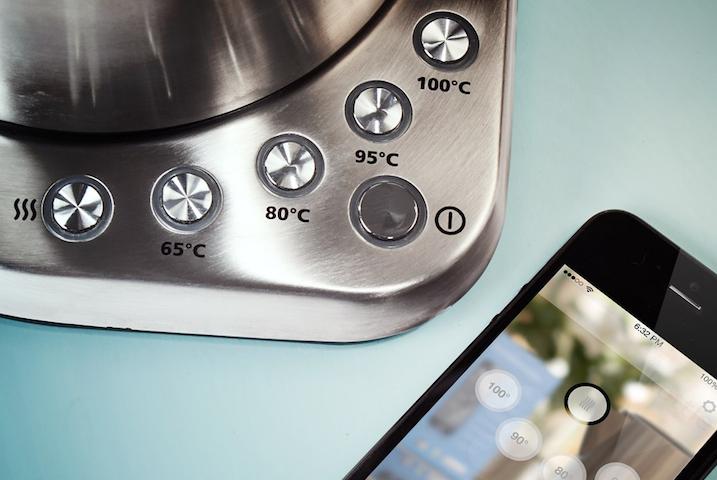
iKettle Base
Image used with permission by copyright holder

The iPhone or Android compatible app comes with an alarm, so when it wakes you up in the morning, you’re given the option to switch on the iKettle ready for a steaming morning beverage. The features keep on coming, as the iKettle can boil water and then maintain its temperature depending on your choice of hot drink. There are four settings: 65, 80, 95 and 100 degrees. Handy for milk, or if your tea goes all bitter when you use boiling water. 

Recommended Videos

It’s not just in the morning the iKettle’s app will help out, as with its remote capabilities, you can now watch more adverts on TV instead of popping to the kitchen when they come on. How’s that for a benefit? Of course, all this does depend on there being water inside the iKettle, as no matter how smart it may look, it can’t fill itself.

At the moment, the iKettle is an exclusive to Firebox.com in the UK, where it costs £100, or around $160, and it’s due for release at the end of November.

Andy Boxall
Andy has written about mobile technology for almost a decade. From 2G to 5G and smartphone to smartwatch, Andy knows tech.
How to reset an iPad: soft restart, force restart, and factory reset
From a quick reboot to a full wipe, here's every reset trick your iPad actually needs.
iPad Pro on table

Even the best hardware from Apple isn't immune to glitches. iPhones, iPads, and MacBooks are known to run for years without issues, but every so often, your iPad needs a reset to get back on track.

The good news is that resetting an iPad is one of the easiest things you can do on any Apple device. It takes just a few minutes and doesn't require any tech expertise. That said, there are three very different types of resets, and mixing them up can cause more problems than it solves. You don't want to wipe your entire iPad when all you needed was a quick restart.

Read more
The best funny and useful Siri commands for iOS and macOS
Siri Ai on iPhone

There was a time when Siri was the best voice assistant. Then it lost its crown to the likes of Google Assistant and Alexa. Now, with the rise of AI assistants like Google Gemini and ChatGPT Voice, the competition has become even more fierce. 

Thankfully, after letting Siri stagnate for years, Apple has finally given it the attention it deserved. And while there's still a long way to go, I cannot deny that I am enjoying using this new Siri, and it has become more useful in my daily life than ever before. 

Read more
The best note-taking apps for iOS and Android
I tested these apps for months so your notes never have to switch homes again.
iPhone showing note-taking apps

Choosing a note-taking app is not easy. What note-taking app you choose depends on your needs, the platform you use, and of course, the cost. The process becomes even more complicated as it seems that there’s a new shiny app released every other week. 

That’s why I always suggest choosing a note-taking app that has all the features you need and can last you for a long time. Also, don’t chase new apps. The real power of a note-taking app comes when all your notes live in one place, making it easy to spot connections between them.

Read more