  1. Home
  2. Mobile
  3. Apple
  4. Legacy Archives

New leak points to iPad split-screen multitasking in iOS 8

Add as a preferred source on Google

More leaks are coming out about the upcoming iOS 8, and today’s tidbit points to Apple positioning its iPads as bonafide laptop replacements. 

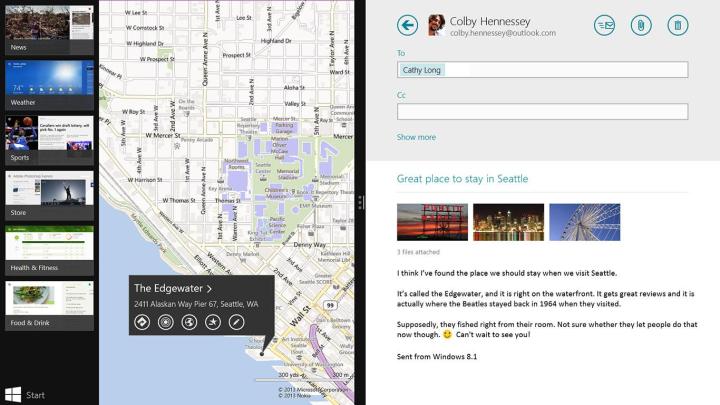
According to 9to5Mac, Apple will reportedly introduce a split-screen feature in the upcoming operating system, allowing users to interact with two applications at once. iOS 8, which is expected to be unveiled in the company’s WWDC conference next month, mimics Windows for Microsoft Surface tablets. The feature, which first appeared in Windows 8.1 as snap multitasking, is popular with business users, a segment where Apple’s dominance is being challenged.

Recommended Videos

Aside from letting users manipulate two apps side by side, the feature also allows interactions between apps, such as dragging a photo or a text file from one app to another. Currently, you can only open iPad apps individually in full-screen mode. It is possible to move, say, a block of text from one app to another, but this requires a more roundabout copy/pasting process.

So far, the feature is only expected to appear in iPads running on iOS 8. According to the site’s sources, the feature is designed for 9.7-inch iPads and will will work exclusively in landscape mode. No word yet on whether the feature will make its way to iPad minis and iPhones. 

Earlier leaks point to iOS 8 sporting new features such as health and fitness app Healthbook and a standalone iTunes Radio app. Improvements are also expected for CarPlay, notifications, Maps, TextEdit, Siri, and iCloud. Some of the feature may end up being delayed and bundled into iOS 8.1, which is reportedly already in development. The reason for the delay is said to be development for OSX 10.10, the company’s desktop operating system, which is also expected to be unveiled in the WWDC conference on June 2.  

Read our iOS 8 Rumor Roundup for a more complete look at what we know about Apple’s next OS.

Christian Brazil Bautista
Christian Brazil Bautista is an experienced journalist who has been writing about technology and music for the past decade…
The best funny and useful Siri commands for iOS and macOS
Siri Ai on iPhone

There was a time when Siri was the best voice assistant. Then it lost its crown to the likes of Google Assistant and Alexa. Now, with the rise of AI assistants like Google Gemini and ChatGPT Voice, the competition has become even more fierce. 

Thankfully, after letting Siri stagnate for years, Apple has finally given it the attention it deserved. And while there's still a long way to go, I cannot deny that I am enjoying using this new Siri, and it has become more useful in my daily life than ever before. 

Read more
The best note-taking apps for iOS and Android
I tested these apps for months so your notes never have to switch homes again.
iPhone showing note-taking apps

Choosing a note-taking app is not easy. What note-taking app you choose depends on your needs, the platform you use, and of course, the cost. The process becomes even more complicated as it seems that there’s a new shiny app released every other week. 

That’s why I always suggest choosing a note-taking app that has all the features you need and can last you for a long time. Also, don’t chase new apps. The real power of a note-taking app comes when all your notes live in one place, making it easy to spot connections between them.

Read more
The best phones in 2026: our 14 favorite smartphones right now
We tested phones across all price brackets so that you can make the best pick based on your needs and budget.
Google Pixel 10 Pro Fold vs Galaxy Z Fold 7 cameras

Choosing the right smartphone in 2026 is no easy task. Apple and Android manufacturers now have strong options at almost every price, while better cameras, longer battery life, improved software support, new AI features, and more refined foldable designs have made the market more competitive than ever. But picking one is not easy, especially if your budget is tight, or you are just legitimately concerned about getting the best value for your money and need a reliable daily driver for long-term usage.

We have tested and compared the leading smartphones available today, looking beyond the spec sheet to see how they actually perform in daily use. Camera quality, battery life, performance, display quality, software, design, and long-term value all play a part in our recommendations. Whether you are looking for a powerful flagship, a dependable budget phone, a compact device, or a foldable, this guide should help narrow down your choices.

Read more