
In the near future, you may not need to touch your phone, tablet, or keyboard when you want to type. That’s the concept behind the Tap Strap, a wearable Bluetooth keyboard that converts finger movements into keypresses, so you can tap out messages using any surface as a virtual keyboard.
Don’t expect a visual prompt, or some laser-projected keyboard to guide you. It’s all done using gestures. You start by putting on the Tap Strap. It slides over your fingers like a glove and is made from a soft smart-fabric that has sensors inside to analyze finger movements. It can go on either hand, or you can wear two for faster two-handed typing.
Tapping with each finger will see a character or number appear on the screen, and it’s possible to punctuate and insert special characters using different gestures. While Tap Systems, the company behind the Tap Strap, hasn’t said exactly how it works, a Bloomberg report says a single tap from each of your five fingers translates into a vowel, and combinations add consonants.
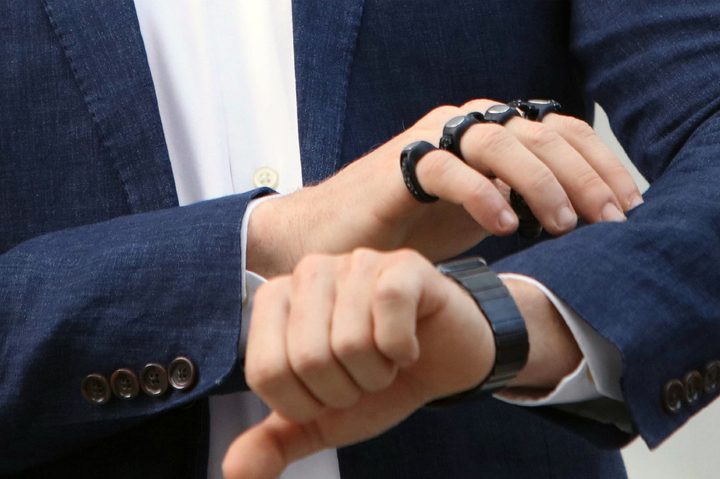
There are apparently 31 possible finger taps, and although an accuracy of 99 percent is promised, we expect a strong predictive text element to play a part of the Tap Strap’s typing skills. Most people struggle to remember more than a handful of gestures, let alone 31. Tap Systems sees the Tap Strap as an alternative to voice control, emphasizing the privacy aspect of using gestures to type messages as one of its major benefits.
Bluetooth connectivity
The Tap Strap connects using Bluetooth and therefore should operate with almost any mobile device, but the real advantage here could be for use with VR headsets. Anyone who has tried typing on the Gear VR — where you must look at each individual character on the screen — will know how laborious the process can be. Wear the Tap Strap, and you could tap out commands on your leg. It also negates the problem of how to type on a smartwatch’s small screen and is already compatible with smart TVs, Windows and Mac OS X, plus Android and iOS devices.

Its use goes beyond virtual keyboard control, and Tap Systems founder Ran Poliakine envisages it being used for playing music on digital devices and being incorporated into mixed reality hardware such as Microsoft’s HoloLens headset. To promote the Tap Strap’s multiple uses, a development kit and a reference design will be available to developers and hardware manufacturers.
If you’ve heard Poliakine’s name before, it’s because he also founded Powermat Technologies, one of the companies still battling for wireless charging supremacy.
Tap Strap is now shipping to those that pre-ordered it. Those that didn’t can get it for themselves for $150 at the Tap Strap website.
Updated February 21: The Tap Strap is now shipping to pre-orders and available for purchase.



