
  1. Home
  2. Social Media
  3. Legacy Archives

On the day of Google Reader’s death, Bloglovin adds new social features to fill out its RSS service

Add as a preferred source on Google
follow your friends bloglovin
Image used with permission by copyright holder

Today marks the death of Google Reader and the collective scramble to export data and find a replacement just highlights one of the Internet’s inherent problems: There’s too much to read and too little time to find it. Bloglovin launched in order to try and help solve that problem, bringing you the best blogs the Web has to offer. It’s an RSS reader that’s bookmarked by fashionistas, foodies, especially. And in the wake of Google Reader’s departure, Bloglovin is adding new social features to spice up its discovery platform.

Bloglovin is piecing together bits of Facebook and Tumblr seamlessly into one, minimalist network. With these new features, you can follow your Facebook friends and keep connected with the content they’re sharing. And of course since “following” friends is a social-centric feature, you can “like” things your friends have shared.
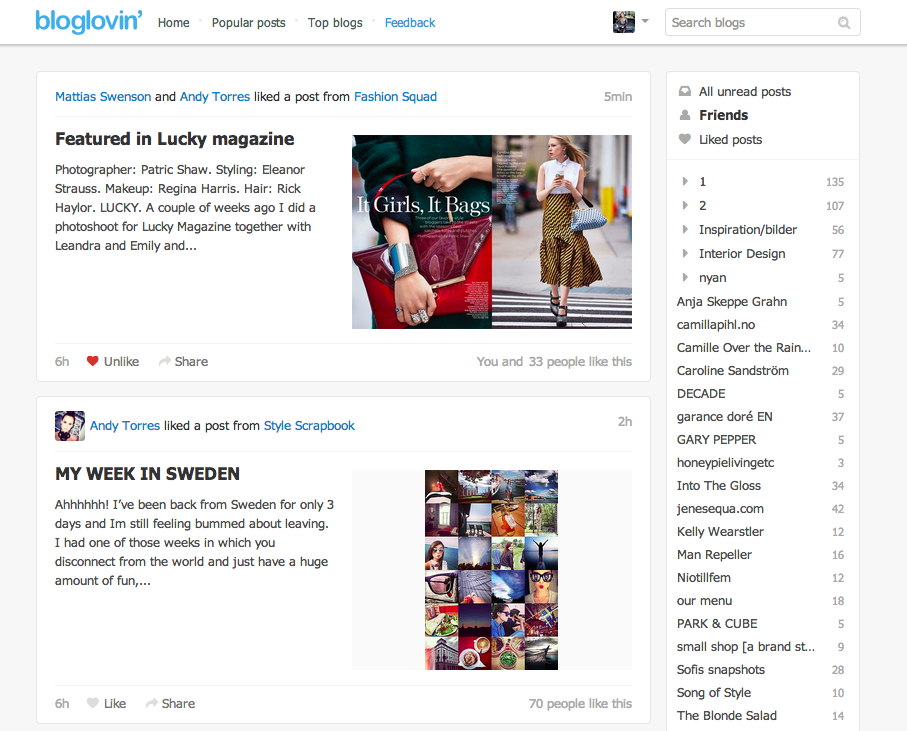
bloglovin FEED
Image used with permission by copyright holder

To find this brand new social dashboard, you’ll have to sign into your Bloglovin account and navigate to the “Friend activity” tab where you’ll land on a page titled “Follow your friends.”

Recommended Videos

To access this feature, you’re urged to sign in with Facebook – yes, something every site asks you to do. But there’s an added benefit to doing this with Blogloving: It sort of gives you an ad-free experience to Facebook. You’ll see all the links and stories you’re friends and reading and sharing, without meaningless sponsored or promoted status updates. 

Bloglovin also wants its users to actively use the site to discover new content. Bloglovin implemented a Facebook-esqe, Reddit-like Bloglovin button that Web developers can add onto their publication’s site. Click on “follow this blog” and you can add the site your Bloglovin RSS reader. Even with the overdone nature of a social button, it’s a great way for the platform to attract more content. More importantly, it gives Bloglovin users more to read, which if you’re using this network to begin with, is something you definitely want. 

Wisely, Bloglovin offers the ability to import your Google Reader subscriptions so you don’t have to lose all your previous RSS-building work; move fast though. It’s likely that pulling Google Reader data will only be available until the end of the day.  

Francis Bea
Former Digital Trends Contributor
Francis got his first taste of the tech industry in a failed attempt at a startup during his time as a student at the…
New X phishing scam uses fake login alerts to steal your account
Scammers have copied X's own security emails almost pixel for pixel, and people are falling for it.
X app store listing on iPhone

You open your inbox and see an alert claiming someone just logged into your X account from an unfamiliar device. Your first instinct is to click through and lock things down immediately. That instinct is exactly what a new phishing scam is counting on.

As reported by The Guardian, a wave of fake X security emails is currently doing the rounds. They claim a new device has logged into your account and urge you to click a link to reset your password or review app access. 

Read more
After YouTube, TikTok is testing its own AI likeness detection tool
TikTok's new tool lets creators flag AI deepfakes of themselves directly.
Home page of TikTok on Web.

AI deepfakes have become a headache for creators, and TikTok is finally stepping up to fight back. Social media consultant Matt Navarra spotted the platform quietly testing a new opt-in tool that hunts down AI-generated content mimicking a creator's face, giving them the power to flag it directly.

https://twitter.com/MattNavarra/status/2078129989128450064

Read more
You can now generate songs in your iMessage chats
iMessage users can now turn chats into short AI-generated songs
Text, Business Card, Paper

Suno has added an iMessage extension to its iOS app, letting users generate 30-second songs from voice recordings or typed prompts inside a Messages conversation.

The feature is available in the latest version of the Suno app and requires both people in the chat to have it installed. Users can access Suno from the plus menu in Messages, create a track, and share it without opening the standalone app.

Read more