
It’s hard to believe that Opera, in many ways a precursor to the modern internet browser, is nearing its 21st anniversary. The freeware program began in 1994 as a research program at Norwegian telecommunications company Telenor and branched out into a separate company soon after.
It wasn’t long before Opera Software was releasing versions of its web browser for Apple’s iOS devices, Google’s Android operating system, and even Nintendo’s DS and Wii consoles. Now, nearly two decades later, the company’s turning a page with Opera Neon, a new web browser for the modern age.
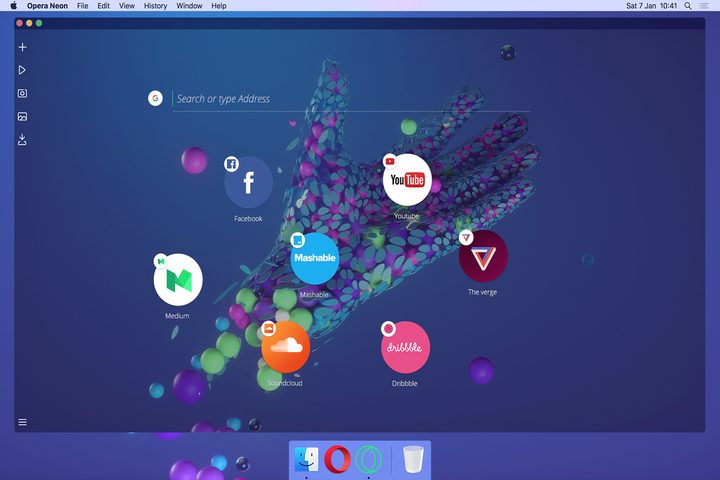
Opera calls Neon a “radical re-imagining of what a browser can be,” and it’s not hard to see why. The browser, which launches On January 12, looks nothing like Edge, Safari, or Chrome. In fact, what’s most noticeable about it is what isn’t immediately visible: a traditional task bar, bookmarks bar, and even options menu. Neon is about as minimalist as web browsers come.
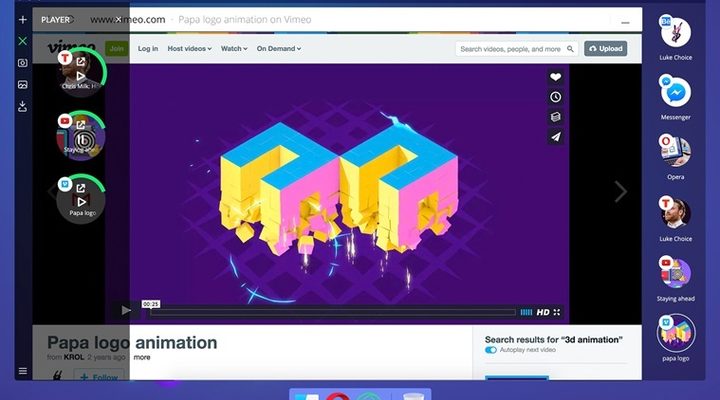
That’s to its arguable benefit. When you launch Neon, it expands to fill your desktop, blending into the background. Tabs take the form of oversized favicon bubbles that inhabit a right-side tab bar. A split-screen function, meanwhile, lets you view two webpages side-by-side in a manner that is very similar to the multi-window modes in Windows and on mobile devices.
But Neon’s ideas go deeper than skin level. There’s a media control panel that puts playback and volume sliders for background videos, audio files, and ads at your fingertips, and a “snap” feature that quickly captures screenshots of webpages.
And under-the-hood optimizations make it fast. Neon uses Opera’s Blink engine. Videos play in a pop-out window, saving the trouble of having to manage a separate window. And an “intelligent system” manages tabs, automatically pushing frequently visited webpages to the top and demoting less-used tabs to the bottom.
Neon’s limitations may dissuade all but the most casual of users from making it their daily driver — it lacks support for Chrome and Firefox extensions, most notably. That’s perhaps why Opera’s billing Neon as a “concept browser.” It won’t — and isn’t meant to — replace Opera’s existing browser. But it’ll receive updates and fixes alongside Opera for the foreseeable future.
Neon is Opera’s first big splash since it was sold to a consortium of Chinese companies last year. The acquisition, led by software company Qihoo 360, saw Opera’s browser, performance, privacy apps, and licensing sold for $600 million.
Opera’s never had the most popular internet browser on the market — it’s commanded less than 10 percent for nearly the past decade — but its innovative features have earned it a loyal fan base. It has introduced ad-blocking, data and video compression, and a built-in VPN. And it’s historically focused on performance.
Where Neon could succeed is in drumming up interest in ongoing development. “[Some] of [Neon’s] features are expected to be added to Opera this spring,” the company wrote in a blog post.


