1. Home
  2. Phones
  3. Android
  4. Computing
  5. Mobile
  6. News

Google’s Android Messages for web finally lets you text on your computer

The full roll out of Android Messages for web is complete

Add as a preferred source on Google

Google has finally brought Android Messages to the web. The move is a step towards revamping its messaging strategy, which is still a little confusing.

Google has launched a number of messaging apps over the past few years, and not many of them have met with the success that the company is undoubtedly looking for. With Android Messages, the default texting app on most Android smartphones, Google is looking to Rich Communication Services and its newly-announced Chat platform to compete with Apple’s iMessage, which has had an MacOS desktop client for some time.
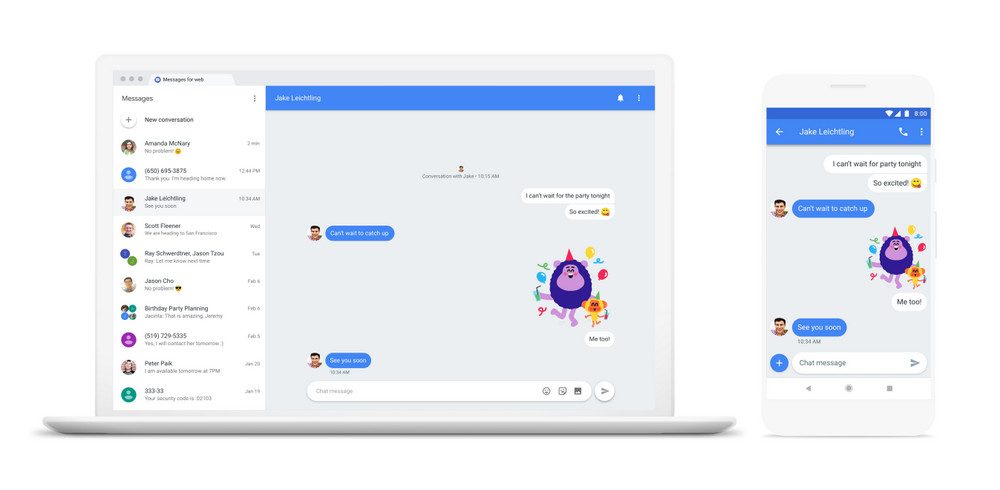
Image used with permission by copyright holder

Android Messages will be the company’s focus for the foreseeable future, and Google has been porting a lot of features from Allo over to the RCS-supported app. One such feature is a web client.

Recommended Videos

The full roll out for Android Messages for the web is complete. All you need to do is head to the Messages for web website, open up Android Messages on your phone (or download it on the Play Store), tap the triple dot menu on the top right, and hit the Messages for web option on your phone. Scan the QR code, and you should be good to go. The feature should work on any modern web browser.

Android Messages for Web is now fully deployed – make sure you have the latest Messages client, and then head over to https://t.co/diVFeAffVS to try it out!

— Justin Uberti (@juberti) June 26, 2018

There are a few extra features hidden in the Settings on the web version, such as a dark mode.

This isn’t the first time texting from an Android phone has been available on desktops. Third-party services like Pushbullet have been around for some time now, allowing you to access texts and other notifications on your computer. Still, a native way to do that is likely to gain a lot more traction — and hopefully be a whole lot easier to use.

Access to Messages for web isn’t the only new feature in Android Messages. Google has been adding new features to the app for some time now. For starters, when you tap the “+” icon, you’ll now be able to search for GIFs to add to your conversation. Google has also added Smart Reply to Messages, allowing you to reply to a message with the tap of a button without having to type it out. Messages will also now let you preview links before you open them up. And the app will now let you easily copy one-time passwords and security codes.

Android Messages is also set to better take on iMessage with support for Google Chat, or Google’s version of RCS. Google has been working with a slew of carriers and manufacturers to bring Chat to Android, and it’ll allow for long messages, read receipts, larger attachments, and so on. Overall, it should really bring texting into the 21st century.

Update: Added news that the full global roll out has completed.

Julian Chokkattu
Former Mobile and Wearables Editor
Julian is the mobile and wearables editor at Digital Trends, covering smartphones, fitness trackers, smartwatches, and more…
Back-to-school phone shopping on a tight budget? Here’s the one phone I’d recommend without hesitation
The budget phone market got messy this year, but one phone still makes sense.
Galaxy A17 in all colors on gradient background

Somewhere between the last day of school and the first day back, your phone conked out. Perhaps the screen shattered after a particularly nasty fall, or its battery regularly gives up by noon, or apps take so long to launch that by the time they do, you've forgotten why you opened them in the first place. You don't think it'll last another school year, but between all the school supplies and everything else, a budget phone is all your wallet can handle right now.

Fortunately for you, cheap phones have come a long way, offering better screens, bigger batteries, and more capable cameras than devices launched just a couple of years ago. Since you're already prepping to head back to school, this is as good a time as any to lay your old phone to rest and lock in an upgrade. But unfortunately, the timing isn't great for the smartphone industry in general, and that has had a real impact on entry-level phones.

Read more
5 mid-range phones I’d recommend you spend your Back-to-School budget on
From the Pixel 10a to the Moto G Power 2026, these five phones prove you don't need flagship money for a great back-to-school upgrade.
Electronics, Mobile Phone, Phone

Does your phone have a cracked screen? A battery that barely makes it past 3 PM? Or a camera that captures a blurry mess instead of great memories? You know it's high time for a new one, and right now, while you're shopping for the new school year, is probably the best time to make the switch.

The best part is that you don't need to spend flagship money to get a phone that'll last you the next few years. Mid-range phones have gotten seriously good of late, closing the gap with flagships where it matters the most, be it battery life, performance, or camera quality. Whether you're upgrading your own phone or picking one out for your kid before classes start, here are the best mid-range phones worth your money this back-to-school season.

Read more
After four generations of camera stagnation, the Galaxy S27 might finally get a new main sensor
Samsung could turn to Sony for the Galaxy S27’s long-overdue main camera upgrade
Samsung Galaxy S26

Samsung might finally be ready to stop recycling the same main camera hardware on its standard Galaxy S phones, which it introduced with the Galaxy S22. GalaxyClub reports that some Galaxy S27 and Galaxy S27+ prototypes are being tested with a new 50MP Sony sensor for the main camera.

Such a move would break Samsung’s long-running preference for its own ISOCELL hardware in the primary cameras of Galaxy S phones, even if the resolution remains unchanged.

Read more