

Hulu + Live TV might just be one of the best live TV streaming services out there, thanks to a combination of VOD, live streaming, and Hulu’s massive content library. Hulu + Live TV offers much of the features and content you’ve come to expect from your cable package without tying you down in long-term contracts.
Hulu has been one of the most popular streaming services for years now, thanks to a richly assembled library of licensed content, alongside original programming like The Bear and The Handmaid’s Tale. Since Hulu is owned by Disney, you can even bundle Hulu + Live TV with Disney Plus and ESPN+ for even more content.
There’s plenty to learn about Hulu + Live TV, and we have all the details you need. Let’s dig in.
Hulu + Live TV prices and plans
As of this writing, Hulu + Live TV’s 95-plus channel base plan costs $83 a month, and includes Hulu (with ads) + Live TV, and actually comes with a couple of pretty huge incentives — ESPN+ (with ads) and Disney+ (with ads).
Your Hulu + Live TV subscription also comes with unlimited recording. That matches what’s available on YouTube TV with 100 channels and which also costs $83 per month.
There are channel add-ons available, too, so you’re able to watch more from within the Hulu app itself. They include:
- Max (with ads) at $10 per month
- Max (no ads) at $17 per month
- Paramount+ with Showtime at $13 a month
- Cinemax at $10 a month
- Starz at $10 a month
There’s also a trio of “network add-ons” that add even more channels to your Hulu + Live TV experience. Here’s how they break down:
- Unlimited Screens ($10 a month): You are able to watch two screens at the same time on the base plan, but this upgrade allows you to watch on as many devices as you want on your home network and up to three at once while you’re on the road (with the exception of five devices at once at home for the four add-ons below).
- Sports Add-on ($10 a month): You’ll get NFL RedZone, MAV TV, Outdoor Channel, Sportsman Channel, FanDuel Racing, FanDuel TV, Strike Zone, and the Tennis Channel.
- Entertainment Add-on ($8 a month): American Heroes Channel, BET Her, Boomerang Channel, CNBC World, Cooking Chanel, Crime + Investigation, Destination America, Discovery Family, Discovery Life, Hallmark Drama, Nicktoons, Great American Country, Military History, Science, TennNick, MTV Classic, and MTV2.
- Español Add-on ($5 a month): CNN Español, Discovery en Español, Discovery Familia, ESPN Deportes, Fox Deportes, Hogar de HGTV, NBC Universo, The Weather Channel en Español, and History en Español.
Hulu + Live TV and the Disney Bundle
Currently, when you subscribe to Hulu + Live TV, you also get ESPN+ (with ads) and Disney+ (with ads) included with that $83-a-month fee. There’s currently an alternative package that offers less ads for a higher monthly cost. Here’s what that looks like:
- Hulu (no ads) + Live TV, Disney+ (no ads), and ESPN+ (with ads): $96 per month
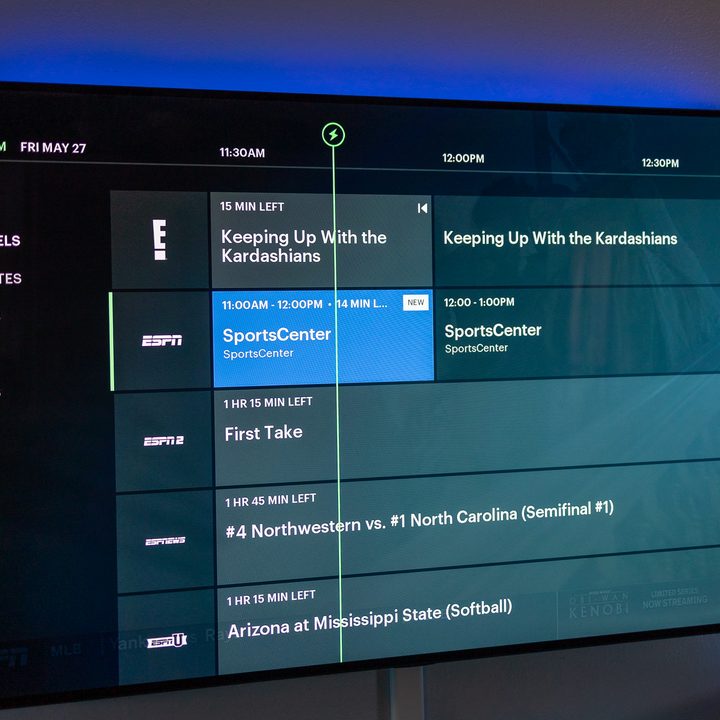
Disney also recently acquired Fubo TV, which means Hulu + Live TV will be getting more sports sometime in the near future. We’re not sure yet whether the programming will be a new bundle including Disney-owned networks such as ABC, ESPN, ESPN2, ESPNU, ESPNEWS, the SEC Network, ACC Network, & ESPN+ or whether it will be available directly through Hulu + Live TV, but it is exciting news for sports fans.
Hulu + Live TV channels
Hulu + Live TV has over 95 channels as of the autumn of 2024. That’s a decent amount, though not the biggest number you’ll find in the streaming world.
The following are the channels that are currently available on Hulu + Live TV. Note that it’s possible that some channels may be unavailable where you live — that’s a pretty standard caveat amongst all the providers. And while we’ll do our best to keep this list up to date, channels do come and go as contacts expire.
Major Networks:
ABC, CBS, FOX, NBC, PBS, The CW, PBS Kids, ABC Localish
News & Business:
FOX News, CNN, MSNBC, ABC News Live, CBS News, NBC News NOW, HLN, CNN International, NewsNation, Bloomberg Television, Cheddar, LiveNOW from FOX, FOX Weather, TheGrio-TV
Sports:
ESPN, ESPN2, ESPNEWS, ESPNU, FS1, FS2, NFL Network, SEC Network, Big Ten Network, ACC Network, MLB Network, Golf Channel, FanDuel TV, T2 Live Tennis, SNY
Entertainment & Drama:
FX, FXM, FXX, Bravo, BET, Paramount Network, SYFY, TNT, USA Network, E!, Freeform, Pop (Pop TV), Vice, Start TV, OWN, Oxygen, Lifetime, LMN, Justice Central, American Crimes
Lifestyle & Home:
HGTV, Food Network, Magnolia Network, TLC, FYI, Travel Channel, QVCⓇ, Dabl, Great American Family, Hallmark Channel, Hallmark Mystery, Hallmark Drama
Documentary & Learning:
National Geographic, Discovery, Investigation Discovery (ID), Animal Planet, The History Channel, National Geographic Wild, Smithsonian Channel
Kids & Family:
Disney Channel, Disney Junior, Disney XD, Nickelodeon, Nick Jr., Universal Kids
Comedy & Pop Culture:
Adult Swim, Comedy Central, Comedy.tv, MTV, VH1, Vice, TV Land, TheGrio-TV
Movies & Classics:
TCM, FXM, Hallmark Channel, Hallmark Mystery, Great American Family, Charge!, Comet, GET, Start TV, Cozi TV
Spanish-Language & Multicultural:
Telemundo
Shopping & Misc:
QVCⓇ, Cheddar, Bloomberg Television, Justice Central, T2 Live Tennis, Charge!, Comet, Dabl, Cozi TV
What devices can be used to watch Hulu + Live TV?
The short version is that you can watch Hulu + Live TV on any device that you also can use to watch Hulu proper, and that means basically any modern piece of hardware. (Hulu’s website has the full list, of course.)
That includes Android and iOS devices (for example, iPhones and iPads), plus Android TV, Apple TV, Google TV, Roku, Amazon Fire TV, and various smart TV platforms.
And you can always watch in a web browser if that’s your thing. In other words, Hulu + Live TV is available pretty much everywhere.


- 1. Live shows that also are available on-demand will give more info.
- 2. You’ve got a few options for shows on Hulu + Live TV.
- 3. A selection of Kids shows on Hulu + Live TV.
- 4. The Movies category on Hulu + Live TV.
- 5. The News section on Hulu + Live TV.
- 6. Sports on Hulu + Live TV.
What it’s like to watch Hulu + Live TV
At its simplest level, Hulu + Live TV is pretty much like every other internet-based live TV service. You’ve got access to all sorts of channels, and so long as it’s got the channels you actually want to watch, you’re good to go. It’s not as fast as some cable TV experiences, but it’s also not so slow to change channels that you’ll be overly frustrated.
The whole thing has the overall look and feel of the rest of the Hulu app, which is great — until it isn’t. While the user experience is great when it comes to on-demand material, there are some speed bumps when it comes to the live side.
The live guide itself is fine. It’s nicely designed and easy to read. It defaults to recently watched channels, which isn’t awful. The full list of available channels is just one click away in the menu. But that list of channels is in alphabetical order, and that can leave you clicking a whole lot to get to something farther down the alphabet. There is a “Favorites” list, but it’s pretty impossible to figure out on your own how to add a channel to that list. Nor is there any option to customize the full channels list. For comparison, YouTube TV allows you to reorder channels any way you want and even hide channels you never want to see.
The overall experience is mostly fine on platforms like Roku and Amazon Fire TV, which takes care of the two biggest in the world. Press the Down button on the directional pad, and it’ll take you back to the live guide. There’s no method of simply jumping from one channel to another.
Things get a good bit messier on Apple TV. At some point, you’ll see a little note on the screen instructing you to swipe up (not down) to get to the guide. However, more often than not, that doesn’t actually take you to the guide. Instead, what you need to do is press the Back button first so that the top-level navigation items show up in the menu options like Home, Live, TV, Movies, Sports, My Stuff, etc. Then, you can swipe up on the directional pad to get back to the live guide. It’s messy. And like many other times on Apple TV, it’s too easy to accidentally swipe the wrong way at the wrong time. Frankly, it’s a much worse experience than what you get on the other platforms, and that’s too bad.
Hulu Live video quality and 4K
Hulu + Live TV serves video at either 720p or 1080p resolution, at up to 60 frames per second. That’s standard, though actual resolution will depend on the video source itself, as well as what device you’re watching on. The list of hardware that supports Hulu Live in 1080p is fairly short. There’s Apple TV (4th-generation and up), Chromecast, Amazon Fire TV and Fire TV Stick, PlayStation 4 and 5, select models of Samsung TV, and the Xbox One and Series line.
Otherwise, 720p is what you’ll get.
Missing from that conversation altogether is any sort of 4K content. While there is some on-demand content available from Hulu 4K resolution, you’ll not find anything live in 4K. YouTube TV, meanwhile, has a 4K option available for more money.



