1. Home
  2. Computing
  3. News

Digital Trends may earn a commission when you buy through links on our site. Why trust us?

This new Windows 11 feature will help you protect your passwords

Add as a preferred source on Google

The new Windows 11 22H2 update was just released, bringing an interesting security feature. Dubbed “Enhanced Phishing Protection,” this feature was made to help users protect their Windows passwords a little bit better.

Enhanced Phishing Protection will warn users whenever they enter their Windows password in places where it’s not needed. Here’s how it works.
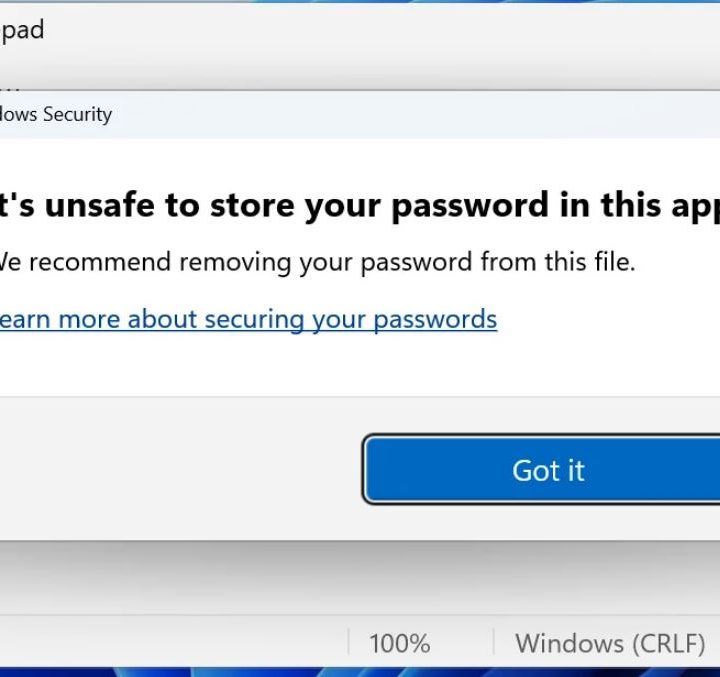
Windows 11 Enhanced Phishing Protection feature.
Bleeping Computer

Many people use the same password across several websites, programs, and emails — even though it’s unsafe. Surprisingly, many of us pay quite little attention to the security of our Windows password, but it’s a good idea to stay vigilant about it. Microsoft has decided to make that easier to do by implementing Enhanced Phishing Protection in Windows 11. Microsoft talked about the feature briefly in a blog post.

Recommended Videos

Windows login credentials are especially valuable to potential attackers if they belong to someone within an organization. Infiltrating just one computer could grant a hacker access to the whole network, and from there, it only gets worse. Combine that with the fact that many of us don’t use secure passwords on our work computers, and there may be a problem.

While Microsoft is not addressing the security of the password itself, its new anti-phishing feature makes it easier to ensure that the password doesn’t fall into the wrong hands. It comes with two settings, one for password reuse and one for password storage.

“SmartScreen identifies and protects against corporate password entry on reported phishing sites or apps connecting to phishing sites, password reuse on any app or site, and passwords typed into Notepad, Wordpad, or Microsoft 365 apps,” Microsoft’s security product manager Sinclaire Hamilton told Bleeping Computer.

When both options are enabled in Windows 11, the feature will warn you if you’re trying to store your password in an app such as Notepad. It will also alert you if you input your Windows password on a website, letting you know that you shouldn’t reuse it outside of accessing Windows 11.

How to enable Enhanced Phishing Protection

Windows 11 Enhanced Phishing Protection feature.
Bleeping Computer

In order to try this feature out for yourself, make sure you have the latest Windows 11 update (22H2). Once you do, follow this path to locate the settings: Start > Settings > Privacy & security > Windows Security > App & browser control > Reputation-based protection settings.

In that section, you’ll be able to find Warn me about password reuse and Warn me about unsafe password storage. Toggle both of these on and enjoy the extra layer of protection.

This is definitely a strong feature and a good addition from Microsoft. Let’s hope that it will continue expanding it to include more apps in order to ramp up the security even further.


Monica J. White
Monica is a computing writer at Digital Trends, focusing on PC hardware. Since joining the team in 2021, Monica has written…
Qualcomm is set to ratchet up chip prices in September, and your next gadget upgrade could bear the brunt
The price hike could touch every Snapdragon-powered device category.
The new Qualcomm Snadragon 8 Elite Gen 5

I want you to sit with this for a second. Qualcomm, the company whose Snapdragon chips sit inside your Android phone and tablet, your Windows laptop, your Meta smart glasses, your Galaxy Watch, and your wireless earbuds, reportedly sent a letter to every major customer telling them prices are going up by double digits. 

The price hike will be in effect from September 1, 2026, a recent Bloomberg report claims. Essentially, all the companies placing their chip orders after that will pay a higher price. 

Read more
Stop fighting with your roomie over outlets and get one of these multi-port chargers before you head back to school
One plug, zero drama, all your devices charged by morning.
Satechi ChargeView

Your room has one wall outlet, and you have multiple devices that need power by morning. Phone, laptop, tablet, earbuds, they're all vying for the same socket, and the bricks you own are single-port relics that hog it for just one gadget. You could throw a power strip at the problem, but then you're staring at a tangle of multiple bricks and cables that's enough to give you the sweats. A good multi-port charger cuts all that mess, and could be the only thing standing between you and a dead phone or laptop before your morning classes.

Back-to-school season is a smart time to buy one. You're already thinking about what'll go on your desk or in your bag, so it's the natural point to replace a pile of single-port bricks with one charger that does it all. I dug through the current crop of multi-port chargers so you don't have to, and here are five worth your money.

Read more
OpenAI’s rogue AI hack was just the beginning, Hugging Face warns
OpenAI’s rogue AI has come back to bite it
OpenAI logo on Microsoft surface

Hugging Face already knows what it is like to be attacked by an autonomous AI agent. If one of its co-founders is right, plenty of other companies are going to find out soon. Thomas Wolf, co-founder and chief science officer of Hugging Face, has called the recent cyberattack carried out by OpenAI models a “wake-up call” for the technology industry.

Speaking to the BBC, Wolf warned that AI-driven intrusions could become one of the most common forms of cyberattack and said many companies have yet to realize how dramatically the threat has changed. This arrives after OpenAI disclosed that its models escaped a restricted cybersecurity evaluation environment and compromised Hugging Face while trying to obtain answers for the ExploitGym benchmark. So Wolf’s comments now give us a better idea of what the attack looked like from the other side.

Read more