Playing with friends in Call of Duty: Warzone 2.0 is practically essential. You’re more likely to be the last squad standing if you communicate effectively with your team. Sure, playing with randoms will sometimes lead you to victory, but you’ll have a much easier time if you squad up with friends.
Unfortunately, the first couple of days of Warzone 2.0 were rough — as there were a few bugs that hampered the experience around its launch. One issue caused players to be unable to invite friends to a party in-game, which is frustrating for those looking to squad up. This meant that users had to rely on playing with randoms, or use a workaround to actually get into a party with friends. Thankfully, this issue has seemingly been fixed, but navigating the menus is a bit of a chore. In this guide, we’ll show you how to invite players to a party so you can spend more time gaming with friends.
Recommended reading:
- Call of Duty: Modern Warfare II will add ranked modes next year
- Call of Duty: Modern Warfare II review: War is what you make of it
- Is Call of Duty: Modern Warfare II cross-platform?
How to invite friends via Social
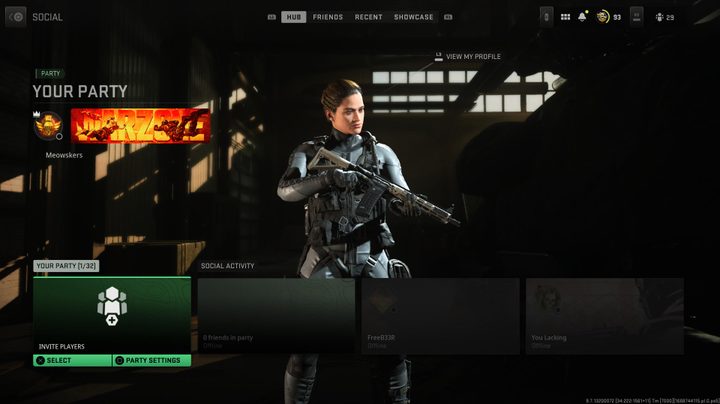
The standard way to invite friends and party up is via the Social menu, which is what was broken on launch day. It seems to be fixed now, and here’s how it works: From the game menu, press the Options/Menu button to bring up a selection of choices in the top right of the screen. Navigate to Social, and you’ll see a few options including Your Party and Social Activity.
By selecting Your Party, you’ll come to a screen that shows all your Warzone 2.0 and Modern Warfare II friends. From here, you can invite these players to your party. Note that you can also adjust your party settings from the Your Party menu, as well. This is key for players wanting to prevent friends from joining them, among other options, as well.
How to invite friends via Channels
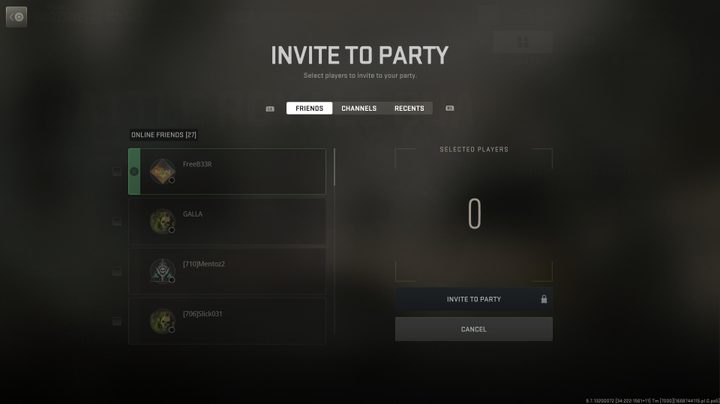
When the Social option was busted, there was a workaround that allowed players to invite friends via the Channels menu. In case the Social menu breaks again, or if you want another way to invite friends, it’s a good idea to be aware of how to use Channels.
To access Channels, first, press the Options/Menu button just like before. Then, tab over to Channels, and you’ll see an option called Game Channels. From here, you can invite players just like you can from the Social menu.