1. Home
  2. Tablets
  3. Mobile
  4. News

You can now use an external webcam with Microsoft Teams on your iPad. Here’s how

Add as a preferred source on Google
Home screen layout of the 2024 iPad mini.
Nadeem Sarwar / Digital Trends

For a lot of people, the iPad is the device they choose to work with, which may include taking video calls. Though the front-facing camera on iPads has gotten better over time, many still prefer external webcams because they’re often much better than the built-in webcam on your tablet or even laptop. And now, if you use Microsoft Teams on iPad, you’re finally able to use external cameras, as Microsoft has announced via a blog post.

When we say “finally,” it’s because Apple has included support for external USB-C cameras on the iPad since iPadOS 17. So technically, Microsoft is a little late to the party with this feature. But if you have to use Microsoft Teams for work and you tend to use the iPad most of the time, then this is certainly welcome news.

Recommended Videos

But again, why would someone want to use an external camera for video calls on their iPad? For one, the iPad selfie camera, even on an M4 iPad Pro, is just 12MP. Typically, external webcams have more megapixels, higher resolution, dynamic range, and the ability to adjust the viewing angle and even tweak lighting for various environments. There’s often a very clear difference between using the built-in camera versus an external one, and the latter is higher quality and even more professional-looking in video feeds.

External camera support on Microsoft Teams for iPad.
Microsoft

So, how do you get the external camera support to work in Microsoft Teams on iPad? It’s very easy! All you need to do is connect the external camera to the iPad via the USB-C port, then join your Microsoft Teams meeting — the camera can be connected before or during the meeting. When you want to switch back to the default iPad camera, just disconnect the external camera from the iPad.

Currently, there’s no native or Microsoft Teams control to switch between the built-in or external camera. Instead, whenever the external one is plugged in, Teams will default to it. Most USB-C cameras are supported, so chances are high that the one you’re currently using will work, so long as it’s USB-C.

Make sure to grab the update to Microsoft Teams on your iPad to gain external camera support today.

Christine Romero-Chan
Christine Romero-Chan has been writing about technology, specifically Apple, for over a decade. She graduated from California…
From lecture notes to design projects, I picked the right iPads that belong in your bag
Stop taking lecture notes on your phone and get one of these iPad and Pencil combos
Apple iPad Pro 2025 on a table

A semester’s worth of notebooks, printouts, and loose assignment sheets can turn your backpack into hefty luggage. This is where the iPad steps in, not by making your reading list shorter, but by making your academics less cluttered. Add an Apple Pencil, and the same tablet can handle handwritten lecture notes.

It's not all work and no play, as the iPad can double as a handheld gaming console or streaming device. But at the end of the day, the real question is, "Which one is right for you?" With the various models under its belt, Apple has an iPad for everyone. It currently sells four very different iPads and two relevant Pencil models, with compatibility changing depending on the tablet.

Read more
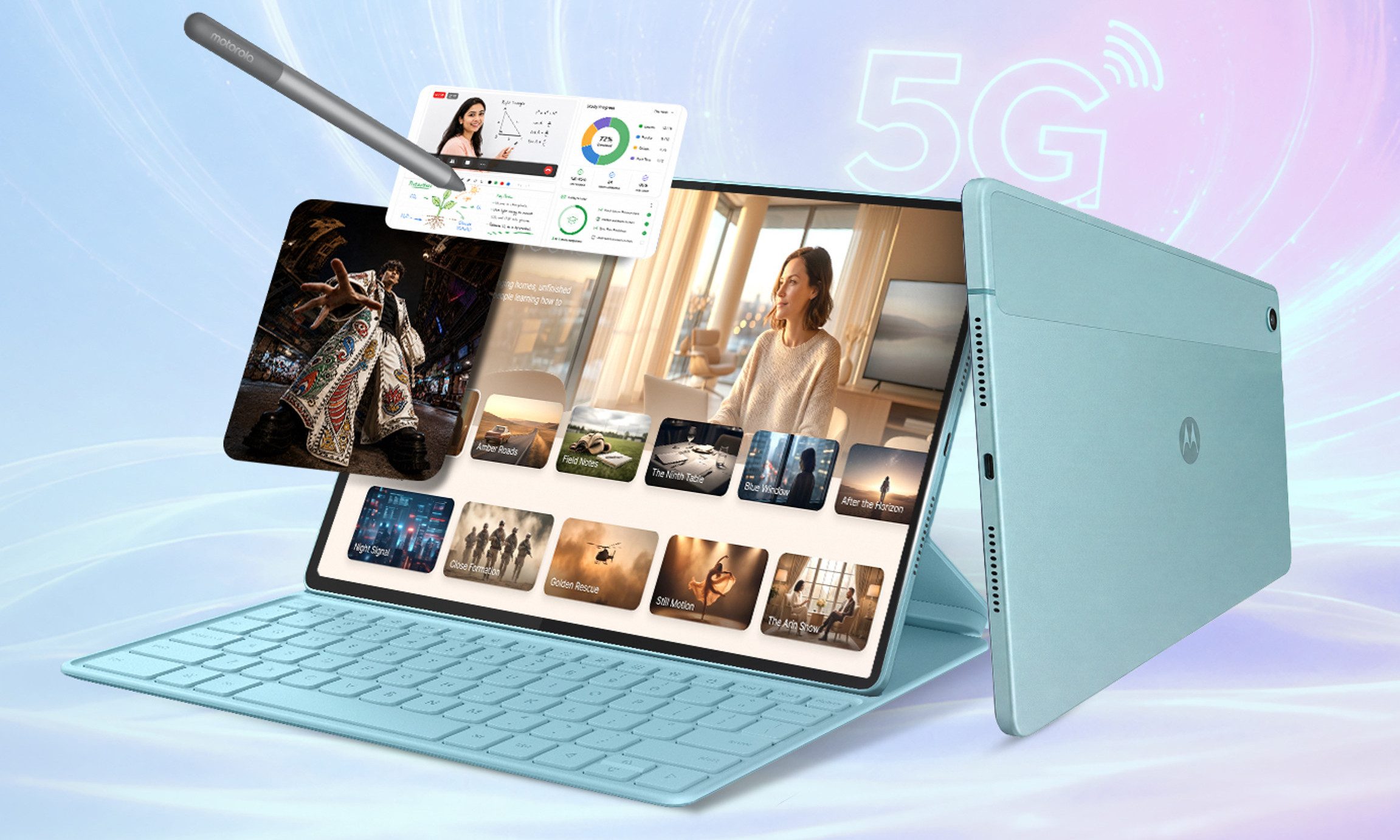
Motorola may have built the iPad alternative Android users have been waiting for
The Moto Pad 70 could be the affordable tablet that finally gets the basics right
Computer, Electronics, Laptop

Motorola has revealed the Moto Pad 70, a new mid-range Android tablet with a large display, stylus support, 5G connectivity, and a sizeable battery.

The tablet will launch in India on August 8 through Flipkart. Its 12.1-inch 2.5K display, included Moto Pen, 10,200mAh battery, and 68W charging give it several features that could appeal to people considering Apple’s base iPad. However, the mid-range Dimensity 6400 processor means it is unlikely to match the iPad in raw performance.

Read more
Qualcomm is set to ratchet up chip prices in September, and your next gadget upgrade could bear the brunt
The price hike could touch every Snapdragon-powered device category.
The new Qualcomm Snadragon 8 Elite Gen 5

I want you to sit with this for a second. Qualcomm, the company whose Snapdragon chips sit inside your Android phone and tablet, your Windows laptop, your Meta smart glasses, your Galaxy Watch, and your wireless earbuds, reportedly sent a letter to every major customer telling them prices are going up by double digits. 

The price hike will be in effect from September 1, 2026, a recent Bloomberg report claims. Essentially, all the companies placing their chip orders after that will pay a higher price. 

Read more