
At Google I/O 2014 today, Google announced some forthcoming updates to its popular Chromecast streaming dongle for televisions. In addition to a new app discovery engine that will work across iOS, Android and Chrome devices, Google is cutting the Wi-Fi ties that require users to be on the same network as the Chromecast they wish to ‘cast’ to, adding a baked-in screen mirroring options, and offering a new ‘Backdrop’ feature for display customization.
Casting goes social
Presently, if you want to cast content to a Chromecast dongle, your device must be on the same Wi-Fi network the Chromecast is on. But that’s about to change, as Google announced that, soon, users will be able to cast to any Chromecast or Android TV within close proximity, no Wi-Fi connection needed.
Google said it would use ‘various technologies’ to verify that someone is, indeed, in the same room as the television they wish to cast to, but as a fallback measure, a PIN will be displayed on-screen through the Chromecast which will allow users to authenticate themselves and get casting, free of Wi-Fi bonds.
Baked-in screen mirroring for Android devices
Until now, Android device users have had to employ the use of a third-party app to mirror anything from an Android phone on a big-screen TV through the Chromecast. That app cost money, and worse, the “mirroring” it offered suffered from occasional latency and was restricted to photos, music and stored video. In other words, it wasn’t true screen mirroring.
Now, thanks to an update for Android devices expected later this year, true, real-time screen mirroring will be a reality. In a demonstration at the I/O developer conference, Google showed an Android phone’s screen mirrored in real time, stutter free. Even when the demonstrator opened up the camera app, the video feed was shown instantaneously and without hiccup. From the live demonstration, this appears to be huge coups for Google, as screen mirroring from mobile devices has, thus far, been an involved, often expensive process.
The screen mirroring feature will be introduced first to the following list of devices, with support for more Android devices coming soon.
- HTC One M7
- LG G2
- LG G2 Pro
- Nexus 4
- Nexus 5
- Nexus 7 (2013)
- Nexus 10
- Samsung Galaxy Note3
- Samsung Galaxy S4
- Samsung Galaxy S5
Your TV, as a picture frame
One of the chief complaints uttered by Chromecast users since the device’s introduction is that there was no easy way to control what the dongle displayed when TV wasn’t being watched. Now, with the addition of what Google is calling “Backdrop,” users will be able to stream artwork or personal photos to the television, essentially turning the television into a giant picture frame.
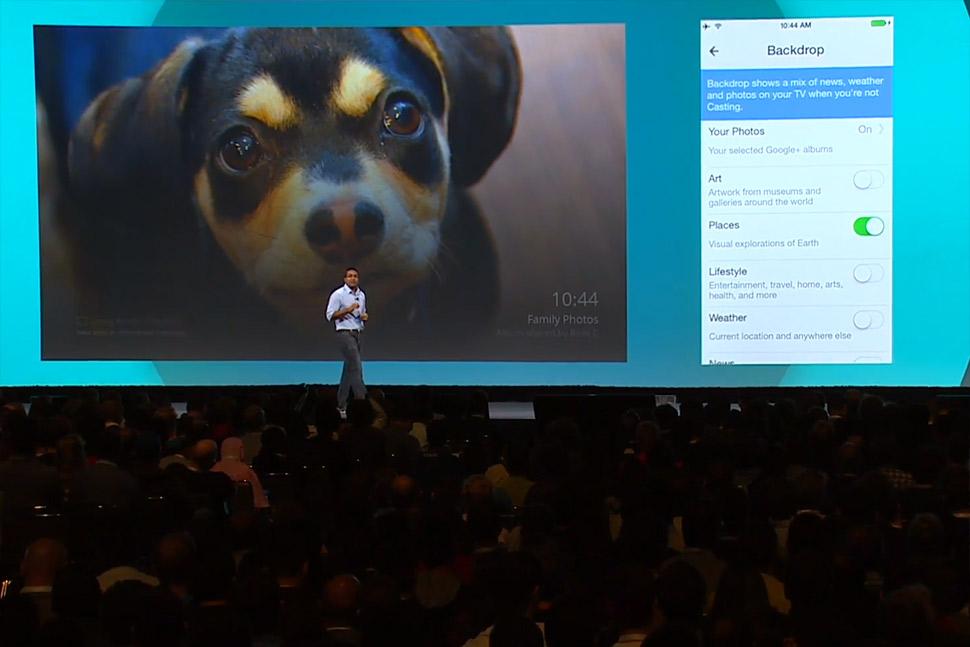
For personal photos to be displayed, the images will have to be stored in a Google + account. Other images, such as well-known works of art, will be available directly from Google, and categorized under different headings, such as Art, Places, Lifestyle, Weather, and News. Google has also tweaked mobile device integration so that users can use voice search to find out more about the art that is being displayed on the screen.
A better way to find Chromecast apps
Presently, finding Chromecast-compatible apps is a real chore. But Google aims to change that with a new discovery system that will work across Android, iOS, and Chrome devices. The update is highlighted by a new Chromecast app store within Google Play, where all available Chromecast apps will be searchable by category and/or through the use of filters. Google stated the new discovery engine will be available “later this year.”
Are more Chromecast apps on the way?
Google spent plenty of time discussing the Chromecast’s successes and milestones, and highlighted its increasing useage. The company also reminded developers that its Chromecast SDK (software developer kit) is completely open, prodding developers to get on board. Though Chromecast app development has been a little slow to start, perhaps seeing how widely used the device has become will be the encouragement necessary to bring some more original apps to the table. Only time will tell, but at this point it is clear that the Chromecast is no stepping-stone technology, but a device Google has clear plans on leveraging heavily going forward.



