

“While the P2314T offers convenient touch and elegant design, its image quality fails to impress.”
- Attractive design
- Stand can recline display for easier touch use
- Good post-calibration color accuracy
- Lack of ergonomic adjustments
- Low contrast ratio
- Unattractive out-of-the-box picture
- Too expensive
“Why you can trust Digital Trends – We have a 20-year history of testing, reviewing, and rating products, services and apps to help you make a sound buying decision. Find out more about how we test and score products.“
While touchscreen all-in-ones have become a popular market, stand-alone monitors remain shockingly few, with only a handful of models from the usual suspects; Acer, Dell, HP, Samsung. In some cases, the monitor is essentially a version of a respective company’s all-in-one with the innards stripped out. That translates to bulky and unconvincing design.
Dell’s P2314T sacrifices too much at the altar of touch.
Enter the Dell P2314T, a sibling to the larger P2714T. This 23-inch monitor was built as a stand-alone touchscreen from the beginning and, as a result, provides a slimmer and more versatile alternative to many competitors. Highlights include a reclining stand for more convenient touch use, IPS display panel and a wide range of connectivity.
There’s just one catch; price. At $449, this 23-incher is expensive for a monitor of its size, though most touchscreen competitors beat this Dell by only a few dollars. Does its image quality really live up to the price?
Sleek, but not functional
The P2314T isn’t the slimmest option on the market, but its curved black back helps reduce the perception of size and provides an elegant, modern look to the display. This, combined with glossy edge-to-edge glass across the front, creates a luxurious attitude that makes this Dell fit in even in the most posh of confines.


While the sleek silver metallic stand contributes to the monitor’s premium tone, it’s far more stylish than it is function. The ability to recline the screen for easier touch use is its only feature. Height, tilt, swivel and rotate are unavailable, though a VESA mount is available for users who have their own, separate display stand.
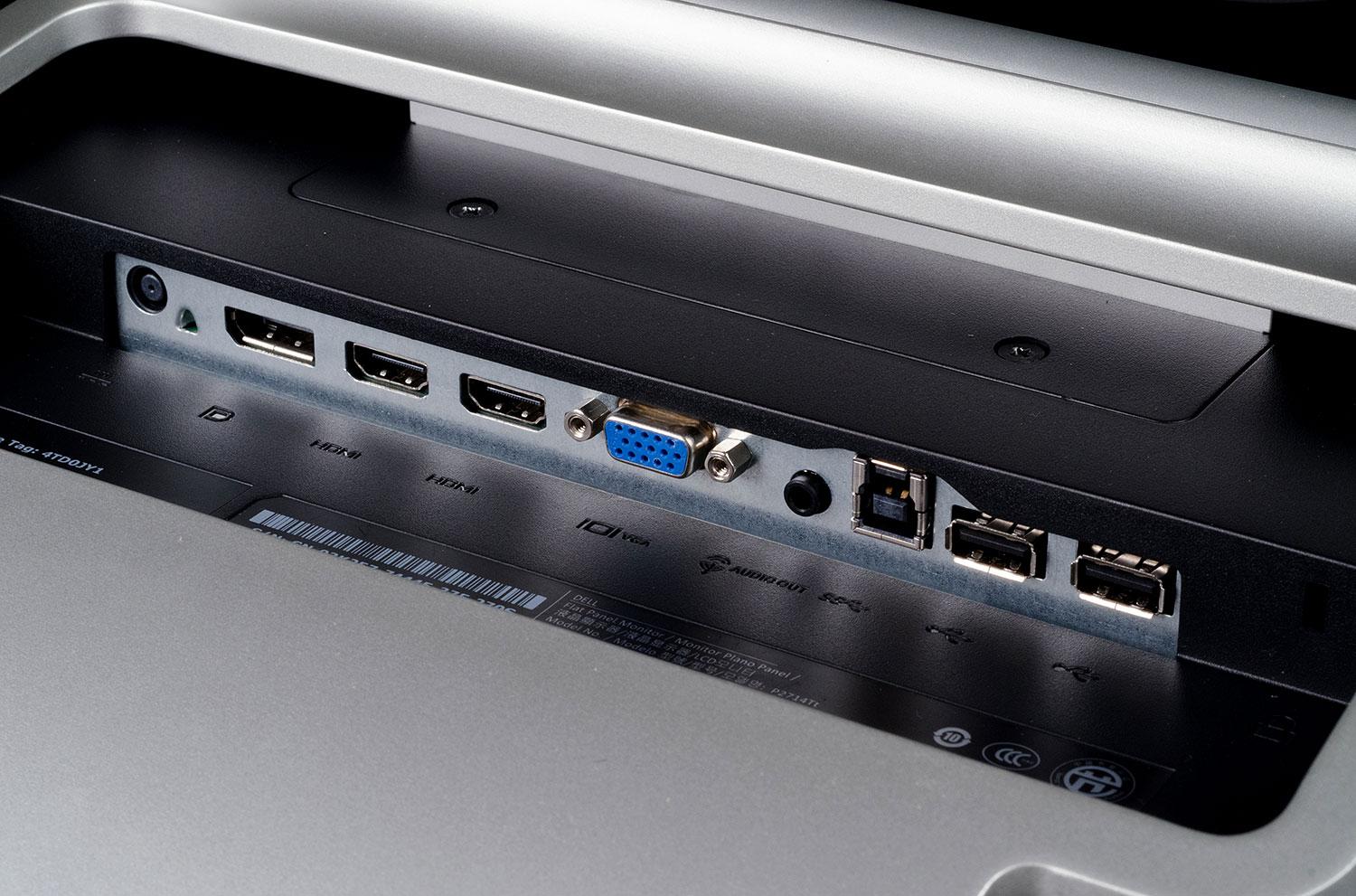
Connectivity both simultaneously is and isn’t one of the P2314T’s strengths. There are certainly many ports available, including two HDMI, DisplayPort, VGA, and USB, along with an audio-out jack that can be used to route sound to the display via HDMI to external speakers (as the monitor has none). However, the reclining stand protrudes from the bottom of the monitor and creates an obstacle that makes attaching cables more difficult. There are no USB ports along the left or right flank, either; they’re all inconveniently located on the back, which partially defeats the point.
A few easy controls
Dell’s usual on-screen display controls, which consist of four buttons along the right side of the monitor, are available here. The buttons, when activated, bring up a display menu that offers context-based controls such as brightness, contrast and image preset mode. Dell has always had an edge in this area, and the P2314T is no exception. Learning the menus is a cinch and options can be toggled or adjusted in seconds.
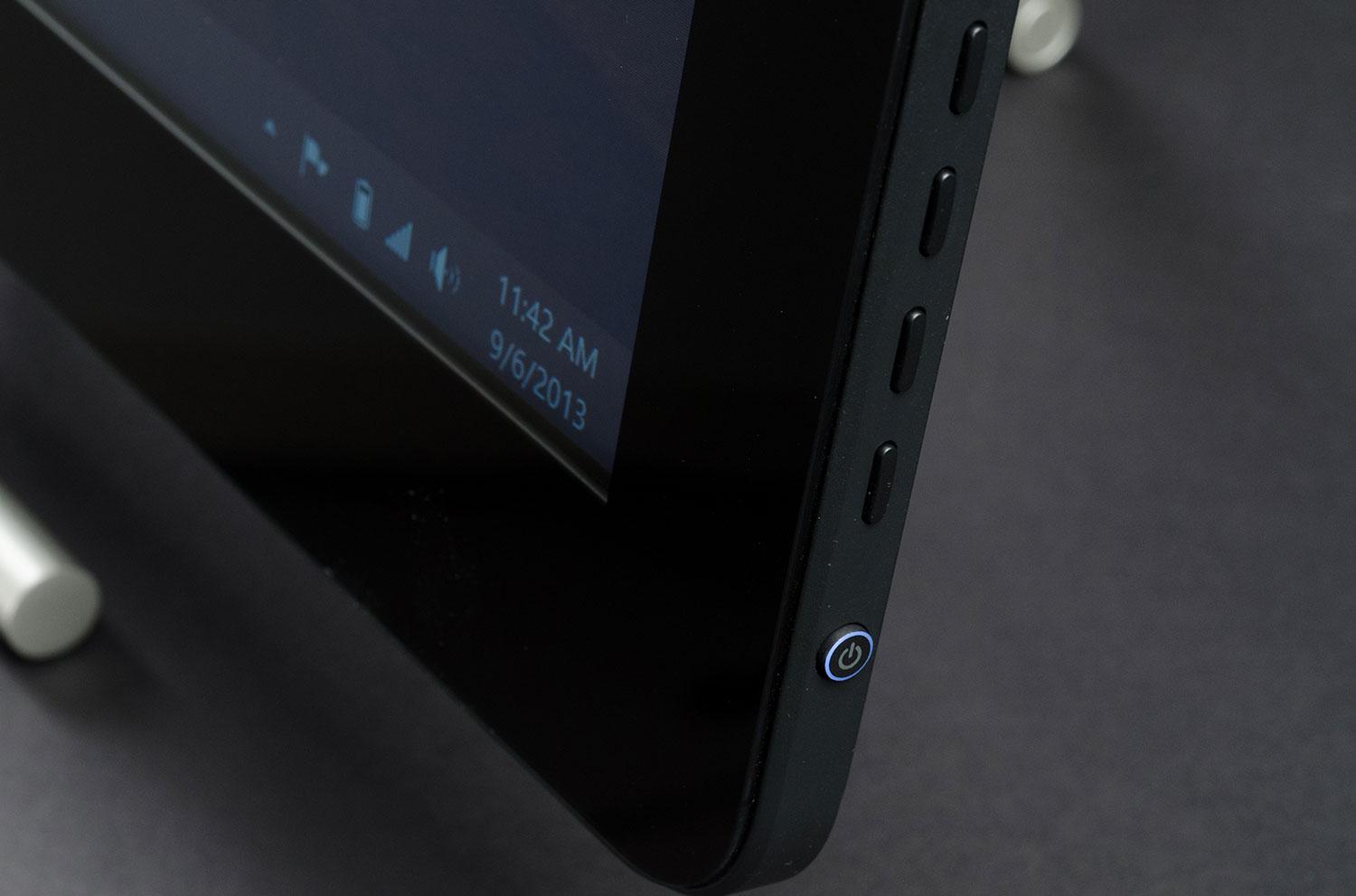
With that said, however, there are not many adjustments to make. Brightness and contrast are available, of course, along with basic red/blue/green color controls. There’s no control of gamma or color temperature, features that are common among non-touch monitors in this price range.
Ugly out of the box
We immediately noticed an off-putting grayish hue to the P2314T’s picture when we attached it to our test desktop. This showed up in benchmarks through very high black levels – among the highest we’ve seen in the last year. The display simply can’t render a deep shade of black at default settings, a problem which reduced measured contrast to a lackluster 190:1.
There were other problems, too, the most noticeable being color accuracy. The delta error of cyan came in at 6.91, a rather poor result, and all shades of gray showed a deltaE of 3 or greater. Gamma registered at 2.0, a bit off the target of 2.2, and our sensor recorded a color temperature of 6700k, which is also slightly off our preferred target of 6500k. While these are not the worst figures we’ve ever seen, we expect better performance from a $450 monitor.


We were not at all impressed by this monitor’s performance in benchmarks or subjective use. Besides the grayish hue already noted, the monitor imbued whites with a bluish tone and failed to provide enough contrast to give colorful scenes punch. Movies like 2012’s The Hobbit, which contains wonderfully vivid landscapes and costumes, look flat and lifeless when viewed on the P2314T.
Calibration helps, but some flaws remain
After using the Spyder4Elite calibration utility to adjust the monitor, we ran it through another series of tests. These showed some improvement, particularly in color, where the average deltaE dropped from 2.4 to 1.2. Cyan, though still the most inaccurate color, was reigned in to a tolerable deltaE of 4.5, and all gray tones saw their error reduced to just below 1. That’s excellent, as an error below one is generally imperceptible to the human eye.
While color improved, most other areas did not. Black levels, though slightly better, remained high, and were only made possible by dimming the display’s brightness – which means measured contrast stayed put at 190:1. Gamma did not budge from 2.0 and color temperature was stuck at 6700k.
Subjectively, the post-calibration picture was an undeniable improvement, but remained less than impressive. Movies still lacked punch and dark scenes were still a gray haze rather than inky black. There are many monitors, including the Dell Ultrasharp line and ASUS ArtPro series, which provide a substantially better picture at the same price.
Conclusion
The Dell P2314T suffers from the same problem as the larger P2714T – a price that’s just too high relative to its image quality. Indeed, the value of the 23-inch model is arguably worse, because even Dell ships Ultrasharp monitors with better picture quality for less. The Ultrasharp 2312HM, for example, is currently $299.
That’s not an apples-to-apples comparison, of course, because that Ultrasharp, like most monitors, does not offer touch. The question then becomes – is touch worth a premium of $150, on top of a reduction in image quality? There may be a few consumers who say “Yes!” but most, we think, will scream “No!” without hesitation. Touch is occasionally convenient on a desktop, but that’s all; in terms of necessity, we’d rank it alongside a third HDMI port or built-in speakers.
This is not to say that the P2314T is a terrible monitor. Despite some poor results in certain benchmarks, the post-calibration picture is about average. That says something about the quality of the typical monitor (and it isn’t good), but ultimately our criticism has as much to do with price than with results. A monitor like this, if sold for $250, could be viable for consumers curious about touch. At $449, however, it’s a non-starter.
Highs
- Attractive design
- Stand can recline display for easier touch use
- Good post-calibration color accuracy
Lows
- Lack of ergonomic adjustments
- Low contrast ratio
- Unattractive out-of-the-box picture
- Too expensive


