
After many months of testing, Microsoft has posted a release candidate version of Internet Explorer 9, its flagship browser for the Windows platform. Although there may be a few tweaks and fixes between the RC release and a final version of IE9, for most purpose the release candidate represents Microsoft’s final vision of what IE8 should be: a leaner, cleaner design that complies with far more Web technology standards than its predecessors. Microsoft started letting users have a sneak peak at IE9 back in September, and the user community’s response has generally been one of guarded enthusiasm: IE9 is cleaner, faster, and less idiosyncratic than its predecessors; however, unfortunately for loyalists still using Windows XP, IE9 requires Windows Vista or Windows 7.
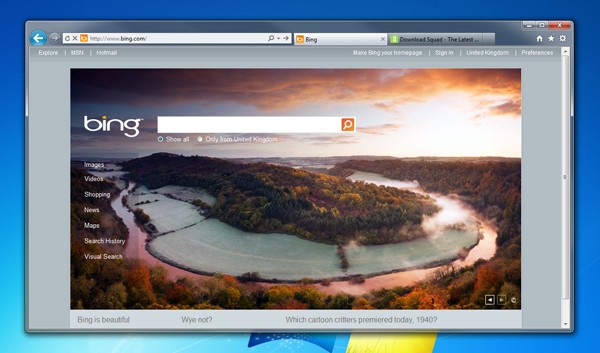
The primary features of Internet Explorer 9 include a streamlined, de-cluttered interface that Microsoft describes as “focused on your Web sites:” the idea is to make sites themselves the center of your attention, not all the bells and whistles and controls of your browser. IE9 features a “one box” address bar that functions as both an address bar and search field, and Microsoft has worked hard to improve Internet Explorer’s traditionally lagging performance—and by most accounts made significant strides—as well as improved its compatibility with (and support for) Web standards: that means that proper HTML and CSS markup that renders one way in, say, Firefox or Chrome or Safari should render the same way in IE9. The result is a boon to Web developers, who have traditionally had to code around oddities and deficiencies in Internet Explorer in order to accommodate the browser. (If you want to see a Web developer’s eyelids start to twitch uncontrollably, ask them about supporting IE6.)
Internet Explorer 9 also offers features that integrate it tightly with Windows 7, including pinned sites, jump lists, and (for sites that support it) thumbnail preview controls. Microsoft has also added a heap of security features designed to make browsing with Internet Explorer more secure and trustworthy. Internet Explorer 9 also has support for Add-ons, in an effort to keep up with extensions and plug-ins available for other browsers. For the most part, the add-on community for IE9 add-ons has yet to blossom, and the process of configuring add-ons (as well as IE9 itself) can be burdensome.
Overall, Microsoft wants Internet Explorer 9 to become the default choice for HTML5 browsing—and while there’s no doubt the company has come a long way since Internet Explorer 8, there’s also no doubt Microsoft is facing fierce competition from the likes of FireFox and Chrome.
Microsoft hasn’t said when it believes it will ship a final version of Internet Explorer 9.


