  1. Home
  2. Computing
  3. Mobile
  4. Legacy Archives

With the Transformer Book, Tablet 600 and Tablet 810, Asus has all the Windows 8 bases covered

Add as a preferred source on Google

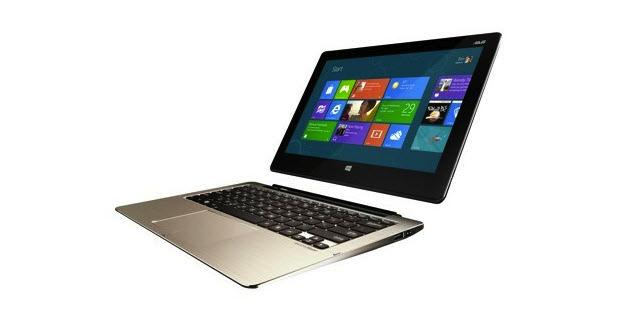
Asus Transformer BookWhile the Asus Taichi and AiO may attract the most attention today, thanks to the unusual form factor and dual-boot OS respectively, they weren’t Asus’ only new products introduced just before the opening of Computex 2012 to feature Windows 8.

The Transformer Book is similar to the company’s existing Transformer Prime range, but instead of Google Android, it runs Windows 8. Three different models make up the new Book range, differentiated by their HD 11.6-inch, 13-inch and 14-inch screen sizes.

Recommended Videos

There will also be a choice of Intel Core i3, i5 or i7 Ivy Bridge chips, all with Nvidia GeForce graphics, plus either hard disk or solid state storage options. Other features include 4GB of RAM, a 5-megapixel camera on the rear and an HD video-call lens around the front, plus USB 3.0 ports.

Like other Asus Transformers, the screen and keyboard can be separated, allowing the Book to be used purely as a Windows 8 tablet.

In addition to the Book, Asus revealed the Tablet 600 and the Tablet 810. The 810 is similar to the Book, as it’s Intel-based — this time with an Atom chip — has 2GB of RAM, and an 11.6-inch screen with a 1366 x 768 pixel resolution. It also boasts an 8-megapixel camera, NFC, Wi-Fi and Bluetooth 4.0.

The Tablet 600 however, is an ARM-based tablet, which will run Windows RT and be powered by Nvidia’s Tegra 3 processor. The 10.1-inch screen also has a 1366 x 768 pixel resolution, and like the Tablet 810 has 2GB of RAM too. It also shares the same 8-megapixel camera. Nvidia has recorded a short introduction video to the Tablet 600 and Windows RT, and you can see it below.

Asus will package the Tablet 600 and Tablet 810 with a keyboard dock, which as well as providing more connectivity through extra USB ports, also has a built-in battery for extended use.

Frustratingly, like the rest of Asus’ new products, price and availability were not discussed, although a post-October release is probable.

Andy Boxall
Andy has written about mobile technology for almost a decade. From 2G to 5G and smartphone to smartwatch, Andy knows tech.
Topics
This website is a goldmine if you love Mac menu bar apps
Discover hundreds of menu bar apps, from tiny utilities to powerful productivity tools, all in one place.
MacMenuBar website open on Mac

The menu bar is the most underrated part of macOS. It sits quietly at the top of your screen, and most people never do anything with it other than checking the time and battery percentage. But if you find the right apps, that thin strip becomes the fastest way to get things done on your Mac.

The problem is finding those apps. The Mac App Store is not great at surfacing them, and hunting through random blog lists is a chore. And while I have shared my favorite Mac utilities that include menu bar apps like Supercharge and CleanShot X, there’s an even better place to find the best apps for your Mac’s menu bar.

Read more
How to install macOS 27 Golden Gate public beta on your Mac?
From a smarter Siri to a more reliable Spotlight, here's your full walkthrough for installing macOS 27 Golden Gate's public beta today.
macOS 27 Golden Gate

Along with iOS 27’s public beta, Apple has also released macOS 27 Golden Gate’s public beta build, so that early adopters can get their hands on the new features, including Siri AI, and provide timely feedback to help ensure a stable iOS launch in September. 

If you’re sold on all the new features but don’t want to put your faithful MacBook through developer beta duty, a public beta offers a much more refined experience. To install macOS 27’s public beta, follow the steps given below. 

Read more
Microsoft is finally fixing the worst thing about Windows Search, but you can’t try it just yet
Windows Insiders in the Experimental channel are getting a Search experience that finally feels less of a billboard and more of what users actually need.
Page, Text, Person

Windows Search has been a mess for years, and I do not use that word lightly. Open it to find a file, and you get trending Bing topics, Microsoft Store promotions, and an AI tools tile that just opens a browser. 

That is changing, but not immediately for all users. Microsoft is rolling out a batch of Windows Search improvements to Insiders in the Experimental channel, and for once, this isn't just a fresh coat of paint.

Read more
