
“Small, simple, and quick, the Ideacentre Y900 is a great mid-range gaming rig.”
- Attractive, if simple, design
- Easy to upgrade
- Clever chassis enhancements
- Great gaming performance
- Quiet, even at full load
- Perhaps too simple
- Small solid state drive
- Included peripherals are too basic
“Why you can trust Digital Trends – We have a 20-year history of testing, reviewing, and rating products, services and apps to help you make a sound buying decision. Find out more about how we test and score products.“
Lenovo still isn’t a brand known for its contributions to PC gaming, but in recent years the company has stepped up its efforts with consistent debuts of systems with cutting-edge hardware.
The Lenovo Ideacentre Y900 is the latest example. Although base models still offer the Nvidia GTX 980, the GTX 1080 is now an option as well. It’s paired with a Core i7-6700K processor (which isn’t overclocked from the factory), 16GB of RAM, a 128GB solid state drive, and a 1TB hard drive.
While the GTX 1080 is a few months old, it’s still hard to find, particularly in low-cost systems from major brand names. At $2,099, the Y900 isn’t affordable enough to be considered cheap, but it’s certainly inexpensive for a GTX 1080-equipped rig. It would seem Lenovo built its latest Y900 around Nvidia’s new GPU.
Is that a winning formula? Or are other components ignored?
Playing it safe
Like most of Lenovo’s gaming PCs, the Ideacentre Y900 is not gigantic. It measures about 19 inches tall, equally long, and about eight inches wide. While far from the smallest rig around, this is solidly mid-tower territory. The Y900 is going to fit anywhere you’d normally expect a desktop to fit. And at 33 pounds, it’s easy to move around when the time comes.
The Y900 has some clever tricks that prove it was engineered with serious thought.
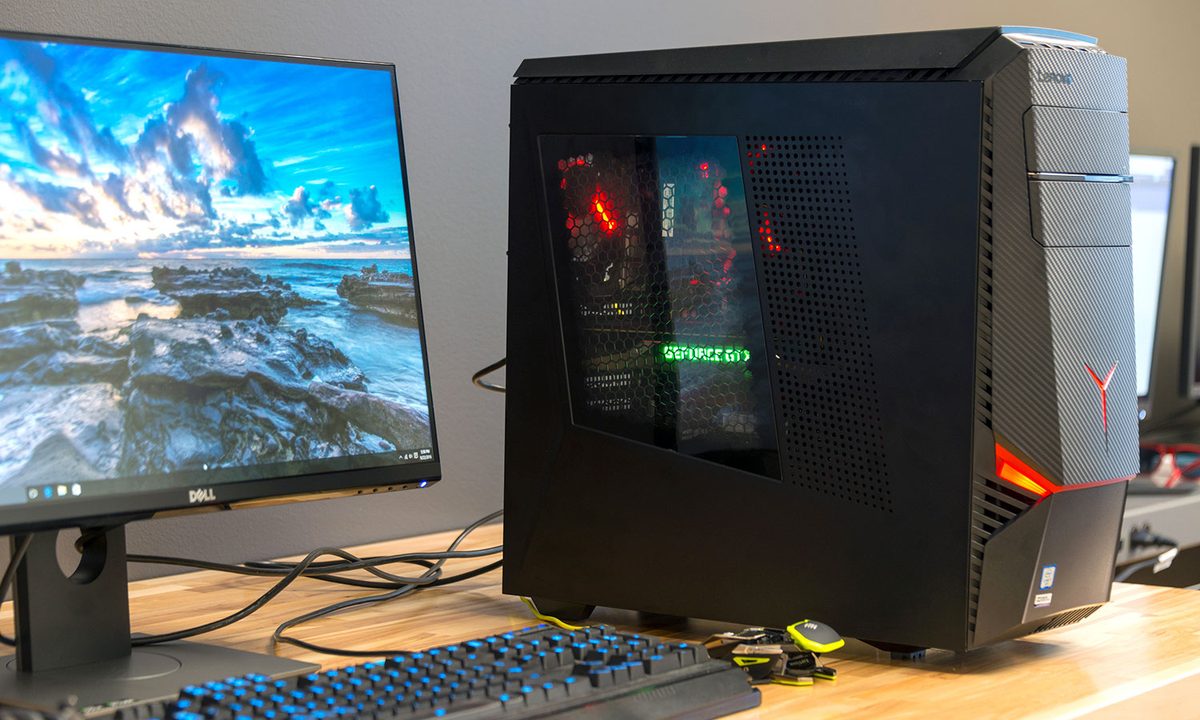
The Y900 wears its gaming intent on its sleeve. The design, which is now about a year old, is flashy but not overbearing. The front plastic, adorned with the red LED-lit, three-pointed star that serves as Lenovo’s gaming brand logo, attracts attention. But it’s not so bright that it’s annoying in a dark room. We also like the faux carbon-fiber weave, so much so that we’re disappointed it doesn’t extend to the main case. This touch usually looks cheesy, but the particular gloss and texture Lenovo uses on the Y900 is nice. A case window further bolsters the PC’s gaming aesthetic.
We think the Y900 looks handsome. Still, there’s no denying its Ideacentre heritage. The profile of the case, and the simple, matte black metal used for most of it, doesn’t stand out. Competitors like the iBuyPower Revolt 2 Pro take design to a new level without drastically inflating the price tag. Even Acer’s Predator line-up is more distinctive. Lenovo is playing it safe here – and that’ll turn off gamers looking for something special.
In terms of function, the system offers four front-facing USB ports, two of them USB 3.0. There’s also an SDcard reader and the typical headphone and microphone jacks. This is a solid selection for a mid-tower. Some competitors match it, but some only have two front-facing USB ports.
Just a little spice
Opening the Ideacentre Y900 is tricky, until it’s not. The side panels pops off by moving a lock mechanism on the rear and then pressing a hidden button on the rear-top of the case. How it works isn’t immediately obvious, but it works well once you’ve figured it out.


Inside, the system’s conventional roots lead to a typical layout. The power supply is on the bottom, at the rear. A hard drive cage, with room for up for three drives, sits up front. Above that you’ll find room for two 5.25-inch optical drives, or added card readers. The motherboard is oriented as normal, with the I/O ports towards the rear.
In short, everywhere is where it’s expected. While that sounds dull, there’s nothing wrong with it. The usual desktop layout works very well in mid-tower systems like this one. Because it’s conventional, you won’t have problems finding components. Cables are neatly routed and the power supply, which proudly wears and 80+ Bronze efficiency certification (rare, for a big-brand PC), offers some spare PCI Express and SATA power connections for future upgrades.
Though it’s simple, the Y900 has some clever tricks that prove it was engineered with serious thought. The CPU cooler, for example, is a nicely built tower air cooler with red LEDs. It looks slick, isn’t too large, and doesn’t require a bulky radiator. Case fans are secured using rubber grommets, which prevent vibration, and an unusual attachment between the 5.25-inch and 3.5-inch drive bays provides extra support for large, heavy video cards like the GTX 1080.
CPU Performance
As mentioned, the Lenovo Ideacentre Y900 we reviewed had a Core i7-6700K processor, paired with 16GB of memory. Though the processor is unlocked, Lenovo didn’t take advantage of that by overclocking it from the factory. That was reflected in the performance.
These figures look worse for the Y900 then they are, as most of the other systems we’ve recently reviewed were overclocked from the factory. And then there’s the Origin Millennium, which we reviewed with a ten-core Core i7-6950X. Obviously, the Y900 isn’t going to beat that. It’s also a lot less expensive.


The Core i7-6700K is not a new processor. We’ve tested it many times before. It performs in the Y900 like it does in most any other desktop. Our benchmarks show it beating the Predator G1, which we tested in a configuration that had a Core-i7 6700, priced similarly to the Y900. For most people, the level of performance provided by the Y900 will prove not just adequate, but excellent, and the Core i7-6700K is certainly fast enough for modern games.
Hard drive performance
Our review unit arrived with two hard drives. The primary system drive was a 128GB solid state drive from Samsung – specifically, the PM951. Immediately, this struck us as a potential issue. A 128GB drive is only large enough to handle a Windows install and a couple modern games. It runs out of space quickly. At least it performed well.


Like past Samsung PM951 drives we’ve seen, this one has a particular performance quirk. It reads a lot more quickly than it writes. That means you’ll see great performance when loading data, but relatively slow results when adding new data to the drive. For a gaming machine, the PM951 is a decent compromise, though it’s clearly not best-in-class.
Our review unit also came with a 1TB, 7200RPM hard drive from Western Digital. It performed well for a mechanical drive, reading data at about 185 megabytes per second. That’s good, because most of your games will end up installed on that drive. There’s just not enough room on the SSD.
Gaming Performance
The star of the Y900 is the Nvidia GTX 1080. It’s received rave reviews, but is also expensive, retailing for between $650 and $750 at most stores. That makes it all the more impressive to see in a $2,099 computer. But does its performance hold up?


There’s not a lot to complain about here. The GTX 1080 performs well, offering huge results even at 1440p resolution. In Battlefield 4, the Y900 hits an average of 138 frames per second even with resolution set to 1440p and detail levels at the maximum possible setting. Fallout 4 also looks great, hitting 112 FPS at 1440p resolution and Ultra detail.
Crysis 3 the only game that makes the Y900 work – but even there, the game hits an average of 44 FPS at 1440p resolution and maximum quality. And we do mean maximum. Our test even sets Multi-sampling anti-aliasing (MSAA) at 8X, which is usually more than enough to bring a video card to its knees.
Put simply, the Y900 is more than powerful enough to handle any game at 1440p resolution. You’re going to like what you see.
Keyboard and mouse included, but why bother?
Most gaming PCs don’t come with peripherals. While that may seem cheap, it’s for good reason. Gamers tend to be picky about their weapons of choice. Bundled devices are often tossed aside.

Despite that, Lenovo included a keyboard and mouse with the Y900. They appear to be the same as what you’d receive with any other Ideacentre system. They work, but serious gamers will want to replace them immediately. The mouse, in particular, feels slow and awkward.
Noise
Remember the rubber-secured fans mentioned earlier? They do their job. In our testing, the Lenovo Ideacentre Y900 produced only 38.9 decibels at idle, and a mere 42.7 decibels at full load. That’s in line with the Acer Predator G6 and the Dell XPS 8900, and quieter than larger and more powerful rigs like the Digital Storm Aventum 3 or Falcon Northwest Mach V. You may notice the Y900’s fan, but it’s unlikely to bother you while playing.
Warranty
Lenovo ships the Ideacentre Y900 with a one-year warranty. This is standard for the industry, but a bit behind the curve among companies that build gaming computers. Even Acer now provides its customers with a special service hotline and a two-year warranty on most Predator computers.
Conclusion
One word sums up the Lenovo Y900: competent. It is a solid, mid-sized, mid-priced gaming system that does many things right. It’s handsome, it’s easy to upgrade, it’s quick, and it’s not too expensive.
Compared to a system from a specialist PC builder, like Digital Storm, Falcon Northwest, or Origin, the Y900 seems mundane. Look closer, though, and the attention to detail is obvious. It’s easy to open. It has a halfway decent power supply. It uses rubber mountings to reduce fan noise. And the cable management isn’t terrible.
Those extras aren’t normally found in competitors. Acer’s Predator G6 and G1, for example, are more striking on the outside. But they’re mundane on the inside, and make questionable decisions about power supply choice and cable routing. Dell’s XPS 8900 Special Edition is another strong pick, but more slanted towards budget gaming. Its power supply and case design don’t hold up as more expensive options are ticked off.
Paying attention to detail helps the Y900 nudge ahead of most competitors. It’s only unconquered foe is the Digital Storm Vanquish. We’ve not reviewed that system in a while, but we liked it when last we did – and it’s only become more competitive on price since then. Right now, the Vanquish V is available from Digital Storm with extremely similar hardware for $200 less than the Y900.
Still, prices vary from week to week in this arena, and the two seem neck-and-neck. Even if it’s not the clear champion, Lenovo’s Ideacentre Y900 is worth the attention of any gamer shopping for a mid-range rig that doesn’t give anything up in performance.