1. Home
  2. Mobile
  3. Legacy Archives

Wrap your phone in Andy Warhol prints with latest Incase collection

Add as a preferred source on Google
Image used with permission by copyright holder


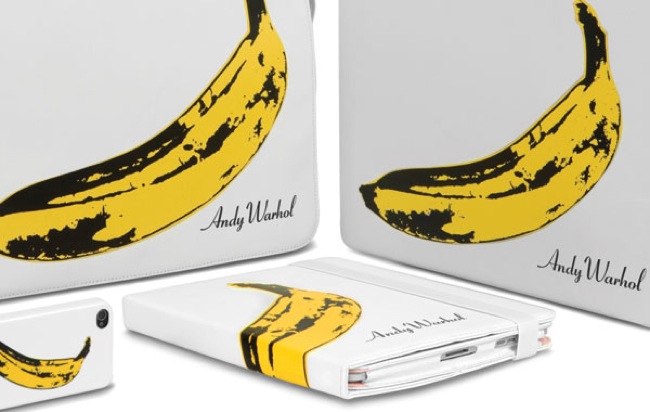
On Tuesday, Incase revealed its collaboration with The Andy Warhol Foundation for the Visual Arts, which has resulted in colorful Warhol prints covering various cases and bags for the iPhone 4, iPad, and MacBook. Warhol’s famous Camouflage and Banana prints from the 60s cover the company’s snap-on iPhone 4 case, iPad 2 book jacket, iPad 2-friendly shoulder bag, and protective MacBook sleeves. Various prints, including a bright cow portrait, are featured on some of the other products. The full range of designs from the Incase for Andy Warhol collection can be seen in the line of cases for the iPhone 4 (above, $50 each). None of the prints are for the faint of heart, but diehard Warhol fans and color enthusiasts will be excited to wrap their Apple products in such a bright and fun collection.

Recommended Videos

On Wednesday April 6, The Andy Warhol Foundation for the Visual Arts will host an event in New York to celebrate the new collection. The event will include showcases of the collection as well as interactive art pieces that focus on the connection between art and technology. The entire event will be filmed on an iPhone 4 to be viewed live at goincase.com.

Select products from the new collection are available for purchase as of today, while others will be coming soon or are available for pre-order. The products will also be available through the Apple store and its retail locations.

Kelly Montgomery
Former Digital Trends Contributor
Kelly Montgomery is a magazine journalism graduate from the University of Oregon's School of Journalism and Communications…
The best iPhone apps in 2026
These are the iPhone apps worth installing in 2026, from better browsers and productivity tools to travel, photography, fitness, podcasts, and games.
ChatGPT Live on an iPhone

If you've just bought an iPhone, ChatGPT, Bitwarden, and Google Maps are three of the first apps we'd consider installing. After that, the right choices depend much more on what you actually use your phone for.

The 17 apps below made the cut because each solves a specific problem well enough to deserve space on your home screen. Some improve tools Apple already gives you. Others add something the iPhone doesn't really do on its own.

Read more
How to reset an iPad: soft restart, force restart, and factory reset
From a quick reboot to a full wipe, here's every reset trick your iPad actually needs.
iPad Pro on table

Even the best hardware from Apple isn't immune to glitches. iPhones, iPads, and MacBooks are known to run for years without issues, but every so often, your iPad needs a reset to get back on track.

The good news is that resetting an iPad is one of the easiest things you can do on any Apple device. It takes just a few minutes and doesn't require any tech expertise. That said, there are three very different types of resets, and mixing them up can cause more problems than it solves. You don't want to wipe your entire iPad when all you needed was a quick restart.

Read more
The best funny and useful Siri commands for iOS and macOS
Siri Ai on iPhone

There was a time when Siri was the best voice assistant. Then it lost its crown to the likes of Google Assistant and Alexa. Now, with the rise of AI assistants like Google Gemini and ChatGPT Voice, the competition has become even more fierce. 

Thankfully, after letting Siri stagnate for years, Apple has finally given it the attention it deserved. And while there's still a long way to go, I cannot deny that I am enjoying using this new Siri, and it has become more useful in my daily life than ever before. 

Read more