 What do you do when you’re not at work, or busy running errands, or overly preoccupied by your gazillion social media accounts? You sit and wonder what else is there to do that doesn’t involve sitting, staring at a screen or getting through a tedious to-do list. Like for most things these days, there’s an app for that! Gravy, an event discovery platform, recently released a mobile app and a brand-new Web experience that makes it way easy for you to fill up your calendar with productive, non-work-related things-to-do.
How it works
After installing the app, you are required to sign up via Facebook or email. In order to get it to work appropriately, you need to grant the app Facebook permissions and allow it to use your current location to improve the app’s recommendation accuracy. Gravy will ask you for your home and/or work zip code, which you can choose to skip or change at any time.
You are directed to a page asking you what you are in the mood for, and Gravy provides five different choices:
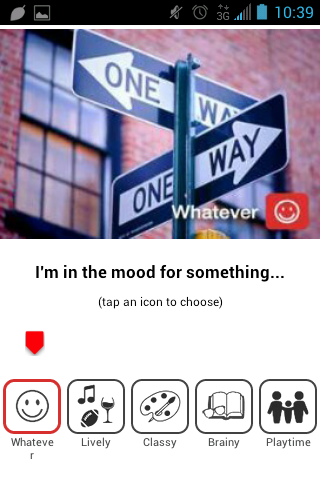
- Whatever – lists any sort of event happening near your current location, your home, or your work
- Lively – shows any sporting or music event as well as social gatherings that involve food and drink
- Classy – displays activities in museums, concert halls, and other elegant environments
- Brainy – focuses on events that engage the mind, like documentary film showings and conferences
- Playtime – prioritizes activities that engage the body and prioritize hobbies, like dance classes and blockbuster movies
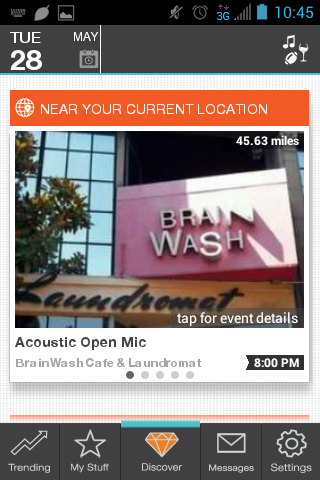
After choosing one, you will be directed to a list of events that fit your selected mood. Every mood lists down activities near three location types: your current location, your home, and your work. You can peruse through various recommendations by swiping left per location type. At first glance, you will see the event’s title, its location, its distance, and the time it begins. Every suggestion encourages you to tap for more details.

Much like the event summary, the event page is headed by the title, date and time of the event, and is followed by a banner image. It offers a short description of the event (which will expand in pop-up form when you click on the arrow) as well as a map that includes directions and route view. You can easily find out the average drive time and enable a When2Leave alert that uses real time. You can make a quick phone call to the location within the app, as well as buy tickets to certain events that offer it.


You can edit your location from within the mood’s list of events by clicking on the location type if you would like to improve filtered results. You can also improve each event listing by sending an email.
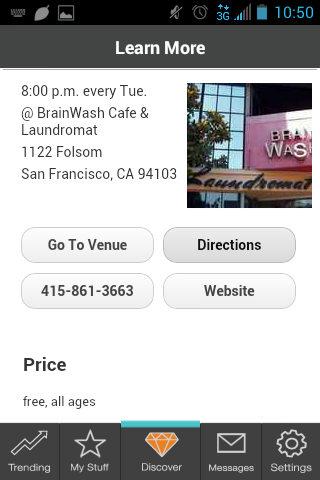
Clicking on “Learn More” will allow you to access the event’s source without having to leave the app.

Clicking on the image within the event page will show you the event’s “Social Vibe”, which lists updates posted on various social media outlets related to the event.
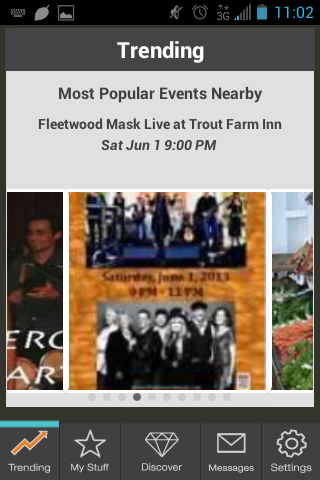
If you’re in the mood to be a follower, the Trending page will show you a scroll of the most popular events nearby (both current and upcoming), including dates and times, in case you want to go to one that’ll certainly have a wide audience.

My Stuff is where you can instantly access events you have saved or events listed under niche channels, including “Live Music,” “Foodie,” “Happy Hours,” and “Get & Stay Fit.” It also features branded channels that have forged partnerships with Gravy, such as LivingSocial.
Other pages include Settings (where you can edit your profile, app options, and social networks) and the inbox, where you can receive exclusive invitations and special messages from Gravy’s partners.
What’s good
It’s refreshing (and relieving) to have an app that’s not only free to use and download, but also is available in Web format on most devices. I like the idea of being able to access Gravy’s curation of events, whether it’s on my desktop, my Android phone, my husband’s iPad, on either the app or its website.
There seems to be more than one way to access a list of events; for me, it’s a lot easier to check out recommendations through the available niche channels versus the mood lists, but having the option to switch back and forth provides good flexibility.
One of the featured branded channels is LivingSocial, a smart partnership to have because not only will users be able to browse through various activities, they also get to preview specials and offers that are related to events specifically happening in their city.
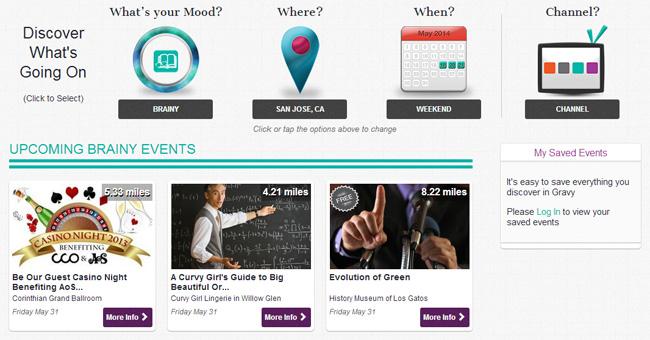
The website version of the Gravy app is also pretty decent – like the app, it allows users to browse events upon first glance as well as by mood, location, date, and channel. It’s a great alternative to Internet purists who would rather do their search for things to do on the desktop rather than their phones. On the new website, users can also set up venue-specific channels for places they frequently go to.
What needs more work
Right now, there are only five available moods, which is certainly not enough to describe the intricacies of the human psyche (especially on a lazy Tuesday). It would be great if the app would be improved to include user-defined moods and have them match event tags. Likewise, more channel options is also always a good add-on.
Bottom line
Anyone is welcome to submit a local event for curation. “Since Gravy’s launch in 2012, our platform has processed over 100 million events and recommended over 300 million event discoveries to our users, nationwide. We expect that number to grow exponentially with the launch of the new Web experience,” says Jeff White, Founder of Gravy. “We have indexed the local event and experience Web for our users. Our platform fueled by our event distillery, is uniting a highly fragmented space and solving a problem for millions of people.”
With all bases covered through multi-platform mobile apps as well as a brand new mobile-optimized website, Gravy ensures that the millions of events the service amasses are appropriately served to each and every user based on their current location, home, or work. At the end of the day, all Gravy wants to do is help you answer one simple question that usually takes hours to decide: What are you in the mood for? It does precisely that. While you might find prettier sites, or faster ones, getting back this many results will be something that’s difficult to do. Hopefully, the new features will help expand your “What should I do?” searches, but even at the moment it’s a pretty impressive catalog. We’re one step closer to turning social media into an actual social life, everyone.
Editors' Recommendations
- You’re probably seeing more social media propaganda, but don’t blame the bots
- Help wanted: British royal family seeks social media wiz to run its accounts