Twitter is a great source of breaking news – you can pretty much ditch your newspaper subscription and still be in-the-know, provided that you follow the right people. However, much like in any social networking site, it’s very easy to drown in a barrage of random information, and in order to isolate specific topics, you need to use hashtags and keywords.
Searching on Twitter has always been an available option, but quite recently the micro-blogging platform has made improvements on the function, which they aptly announced via tweet:
Search update on http://t.co/eNvqKTup1d: See photos & accounts in results + recent searches & social context as you type your query.
— Twitter (@twitter) August 1, 2013
Breaking down Twitter Search interface improvements
As far as we can see, there are at least three significant modifications to the layout and organization of Twitter’s search results dashboard.
Besides being able to check out all search results pertaining to user-typed keywords in one stream, post types can be segregated according to People and Photos.

Aside from showcasing tweets containing the searched word or phrase (which can be revealed entirely by clicking on “new results”), there’s now a separate boxed area for related Twitter account handles labeled People.

If you’re more interested in media content, Photos are now also included in search results, within its own boxed area that appears after Top tweets associated with your search.

Below the Photos box, the stream goes back to showcasing more Top tweets.

A more intelligent search bar
Twitter now has better predictive powers when it comes to dishing search results – after entering at least one character, you are immediately given a list of results that include possible phrases as well as any Twitter account handle that matches your search as well as your current relationship with them.
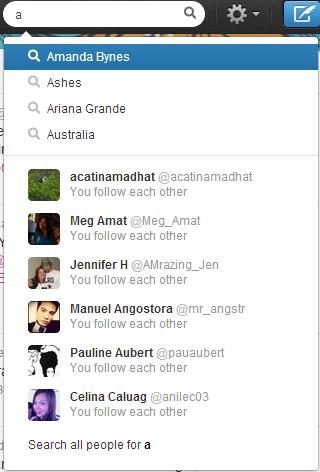
If you’re not following any of the returned handles, only their usernames appear.

Clicking on an empty search bar now offers users both their Recent Searches and any Saved Searches.
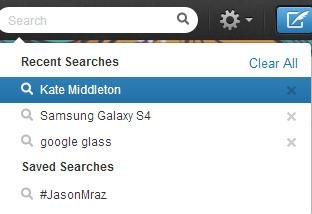
While Recent Searches is a new feature, being able to save searches has been an available option for quite sometime – it’s just that not a lot of people know about it. To save a search, just click on the gear icon atop your search results stream.
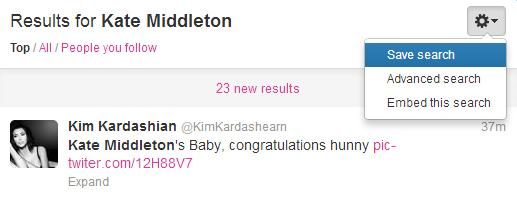
Any improvement on providing better and more finely tuned results is of course a welcome one. Right now only a few users are seeing these updates on the Web – I tested Twitter on iPad, and out of all the upgrades, it only seems to have Recent Searches – but everyone should start having access to optimized searching in the next few weeks.