  1. Home
  2. Gaming
  3. Evergreens

Digital Trends may earn a commission when you buy through links on our site. Why trust us?

Stay safe with two-factor authentication for your Nintendo Account

Add as a preferred source on Google

Using two-factor authentication is an easy way to keep your various online accounts safe from would-be intruders, one that forces you to provide a second code with your password whenever you sign in. Up until now, Nintendo was the only one of the three major console manufacturers to not offer it, but this recently changed. Here’s how to set up two-factor authentication for your Nintendo Account.

Downloading Google Authenticator

Sony’s two-factor authentication uses your mobile phone number, but for Microsoft and Nintendo, you’ll be making use of a separate app to sign in — Google Authenticator, at least in the case of Nintendo. Before you do anything else, download the app for either Android or iOS, which will make the rest of the process much easier.

Recommended Videos

Enabling two-factor authentication

Next, go to Nintendo’s website and sign into your Nintendo Account before heading to the account settings page. On the left, you’ll see “sign-in and security settings.” Select this and scroll to the bottom for “2-step verification settings.”

Select this, and you’ll have a few different options for enabling two-factor verification. The first is to scan a QR code using the aforementioned app, but if you’re doing this on your phone already, this doesn’t make much sense. You can also enter the long code listed on the screen, along with the email address associated with your Nintendo Account.
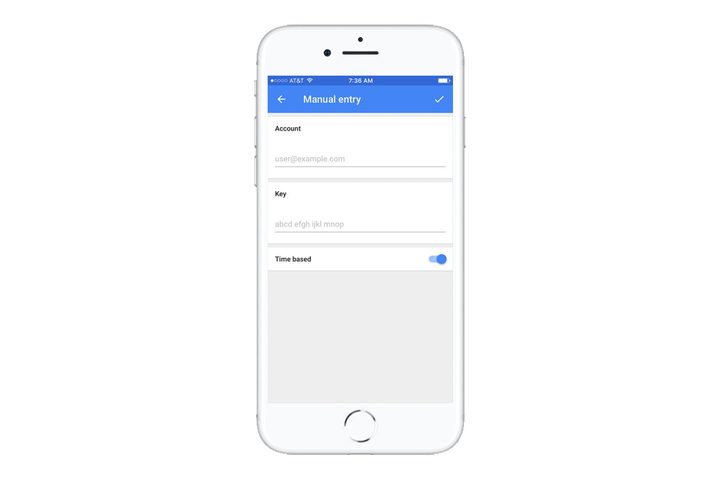
Image used with permission by copyright holder

However, you can also select the code on your phone and open it directly with Google Authenticator. From here, you just need to enter the email address associated with the account, and you’ll be all set to use two-factor authentication. Nintendo will also give you a list of temporary codes that you can use, should you ever be locked out of your phone.

Using two-factor authentication

From now on, whenever you sign into your Nintendo Account from a web browser, you’ll be asked for a six-digit code after entering your account name and password. Just head back to Google Authenticator and it will list the code, which you can then enter for access to your Nintendo Account. We noticed that we actually weren’t signed out of our Nintendo Switch after enabling it, for better or worse.

It’s as simple as that! Now get back to defeating Ganon, saving the Mushroom Kingdom, and winning SplatFests!

Not sure which games to pick up your newfangled Switch? Lucky for you, we’ve rounded up the best Nintendo Switch games available.

Gabe Gurwin
Gabe Gurwin has been playing games since 1997, beginning with the N64 and the Super Nintendo. He began his journalism career…
The hottest indie game on Steam just had a malware scare
A Meccha Chameleon Workshop map was found attempting to write and execute code outside the game.
MECCHA CHAMELEON Gameplay screenshot

One of Steam's biggest success stories of 2026 has suddenly found itself at the center of a security scare. A security researcher has discovered that a community-made Meccha Chameleon Workshop map contained code designed to write files outside the game and launch a hidden PowerShell process that attempted to download an additional payload from an external server.

How did a custom map become malware?

Read more
You can play Xbox games for free if you don’t mind watching ads
You can watch some ads and play for an hour!
Xbox logo

If you've been curious about Xbox Cloud Gaming but didn't want another monthly subscription, Microsoft may have a new option for you. The company is testing a free, ad-supported version of Xbox Cloud Gaming for Xbox Insiders, allowing eligible players to stream select games they already own without a Game Pass membership.

However, you'll have to watch a short advertisement before your session begins. Microsoft says the ads will never interrupt gameplay, making this an early test of whether a simple tradeoff can bring cloud gaming to more players.

Read more
Lenovo’s latest LOQ is more comfortable running newer AAA games
Lenovo's LOQ 17 gets a new RTX 5070 12GB graphics option
LOQ 17 gaming laptop

Lenovo has expanded its LOQ gaming laptop lineup with a new graphics option. The company has introduced a refreshed version of the LOQ 17IRX10, pairing Intel's Core i7-14700HX processor with Nvidia's newly announced GeForce RTX 5070 12GB laptop GPU. The update gives buyers another configuration to choose from without changing the overall design or feature set of the laptop.

The new variant joins Lenovo's existing LOQ 17IRX10 lineup, which was previously available with GeForce RTX 5050, RTX 5060, and RTX 5070 8GB graphics options. While the chassis remains unchanged, the addition of a 12GB RTX 5070 brings more VRAM to the series, a specification that has become increasingly important as modern AAA games demand larger texture caches and higher memory capacity.

Read more