  1. Home
  2. Computing
  3. News

The Windows 11 June update makes your Start menu and Search feel much more snappier

Low Latency Profile is the first targeted fix Microsoft has shipped for shell responsiveness, and the June update brings it to every eligible PC rather than just Insider preview testers.

Add as a preferred source on Google
Windows 11 Laptop
Microsoft

If you’ve ever clicked on the Start button and watched the menu appear after a second or two, you already understand the problem Microsoft is trying to solve with its June 2026 Windows 11 update. 

The update (KB5094126) rolled out on June 9, 2026, for WIndows 11 24H2 and 25H2, and targets the shell responsiveness issues that have quietly frustrated users since its launch in 2021. The headline change is the broad rollout of the Low Latency Profile.

What is Low Latency Profile and why does it matter?

It’s something that Microsoft first tested in the May 26 preview build (with limited availability) before promoting it to the stable channel (with broader availability) this month. 

Recommended Videos

The way it works is that the Low Latency Profile briefly spikes the CPU frequency to its maximum for one to three seconds, providing an additional burst of performance whenever you interact with the core system features, including the Start menu, Search, Action Center, and taskbar flyouts. 

The burst is short enough that it doesn’t meaningfully impact battery life or thermals, but substantial enough that the shell responds immediately rather than after half a second, making those core system features feel more responsive.

With the Low Latency Profile, system flyouts can open up to 70% faster, and core apps can launch up to 40% quicker compared to the same hardware running the previous build. The performance gains are most visible on older or lower-spec machines that barely cleared Windows 11’s hardware requirements and have felt sluggish ever since.

What else is new in the June update?

Shared Audio now lets two people listen to audio from a single Windows 11 PC simultaneously via Bluetooth LE Audio. The Windows Task Manager gets new NPU usage columns, making it easier to see how your neural processing unit is being used during on-device AI tasks.

Multiple apps can now access the same camera stream simultaneously. In addition, Windows Search now finds local files with as few as two characters, which, as far as I understand, is a quality-of-life improvement for daily users. 

Windows Setup now lets you choose a custom user folder name during initial installation. Windows Hello has also been refined to consistently fall back to face or fingerprint-based sign-in after alternative methods have been used. 

You shouldn’t hold off on installing the update, as it includes the June 2026 Patch Tuesday fixes for more than 200 security vulnerabilities.

Shikhar Mehrotra
For more than five years, Shikhar has consistently simplified developments in the field of consumer tech and presented them…
Lenovo’s next ThinkCenter desktop is ready to hit the shelves, but the price will make you blink twice
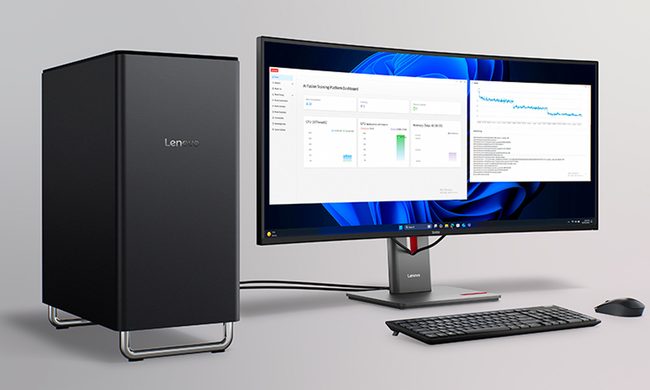
The ThinkCentre X is finally heading to the US with up to 256GB RAM, dual RTX 5060 Ti GPUs, and a price tag that rivals a used car.
Lenovo ThinkCentre X workstation with monitor

If the phrase "future-proof desktop" means never worrying about running out of RAM again, Lenovo may have just built the ultimate machine. The company is preparing to launch its new ThinkCentre X workstation desktop in the US after making it available in several international markets. Built for AI workloads, professional content creation, and demanding enterprise applications, the desktop can be configured with up to 256GB of DDR5 memory, Intel's latest Core Ultra 9 processor, and support for dual GeForce RTX 5060 Ti 16GB GPUs.

A workstation built for serious workloads

Read more
A metallic Hall effect keyboard and a 59g mouse are Lenovo’s latest upgrades for snazzy gaming setups
The Legion R7 RT75 keyboard and Y7MG mouse bring 8K polling to both sides of your gaming setup
Computer, Computer Hardware, Computer Keyboard

Magnetic gaming keyboards and lightweight mice are hardly unusual anymore, but Lenovo is trying to push both ideas a little further with its latest Legion peripherals. The new lineup includes the Legion R7 RT75 keyboard and Legion Y7MG mouse, and both support an 8,000Hz polling rate for players who want every input delivered to their PC as quickly as possible.

Of course, Lenovo has styled these peripherals to be as bold and eye-catching as possible without getting in the way of practicality. The keyboard has a hefty metallic design with translucent keycaps and RGB lighting. Compared to that, the mouse is more tame and traditional in design, but it also has an RGB strip that appears to belong on an alien spaceship. (via NotebookCheck)

Read more
Shopping for back-to-school? These are the budget laptops I’d actually recommend
From a $359 Chromebook to the cheapest way into macOS, these are the budget picks worth your money.
Computer, Electronics, Laptop

The back-to-school season often turns into a laptop, especially the budget ones that aren't too heavy on your wallet. Due to the ongoing memory crisis, most manufacturers have already bumped up their laptop prices, including Apple. However, that doesn't mean that I won't help you get a new machine. So, for this one, I spent time digging through spec sheets, customer ratings, and price tags, finding devices that don't just look cheap in an Amazon listing, but actually hold up. 

From a flexible touchscreen Chromebook to the least expensive way into macOS, these six laptops balance price and performance well. I'd hand any one of them to a student heading back to campus this fall, depending on what they need and what their priorities are. 

Read more

