With the release of the Nintendo Switch 2, I was initially focused on playing all the new Switch 2 launch games. Mario Kart World dominated my first day with the device, but I already had a list of original Switch games I wanted to return to on the newer hardware to see how they benefited from the improved hardware. Aside from the games with bespoke Switch 2 Editions, I was curious to see how big a difference the experience would be for these older games with improved stability and maybe a bit of a visual bump.
As impressed as I was with how much better nearly all my old titles ran on the Switch 2, it is an accessibility option absent from the Switch that turned out to be the biggest game changer.
Accessibility on demand
One of the driving criticisms of the Switch was its power. As the generation went on, the issues only became more prominent, with games like Pokémon Scarlet and Violet being prime examples of games that buckled to the point of breaking on the underpowered device. Third-party ports were especially downgraded compared to their PS5, Xbox Series, and PC siblings, and even Nintendo’s best first-party offerings were starting to show cracks. The Switch 2’s power is more than enough to brute force its way past almost all of those issues, even for games without dedicated upgrades or patches, but it doesn’t solve the big issue I had with so many Switch games: the controls.
I love the Joy-cons, and the Pro Controller is arguably my favorite modern gamepad, but those can’t alleviate the lack of accessibility options in Nintendo games. There’s a larger argument to be made for how far behind Nintendo is compared to the likes of PlayStation and Xbox for players with greater accessibility needs, but what always baffled me was how even the most basic options had been ignored. Specifically, I’m talking about remapping controls.
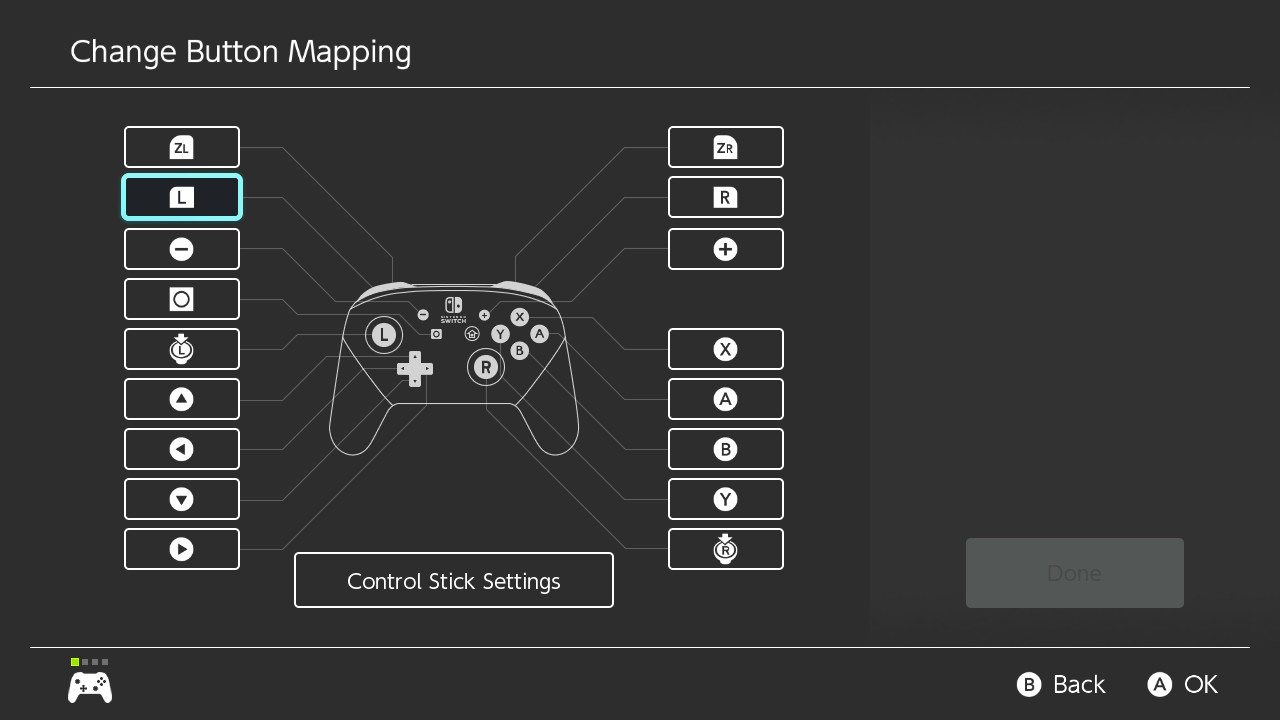
There are tons of examples to pull from, but my personal biggest gripe was with Tears of the Kingdom. By default, the game maps the jump button to X and dash to B, which are the north and south buttons, respectively. That makes the act of dashing into a jump a particularly uncomfortable and unintuitive action, despite how frequently the player is likely to do it. The only alternative control scheme the game offers is to swap jump and dash, which in no way solves that problem. That leaves players to either remap their buttons on the system-level in the Switch options — assuming you know that is even available — or hope you eventually get accustomed to it.
Playing these older games on the Switch 2 doesn’t magically add fully rebindable buttons to old games, but it does make it much more convenient to work around it. Button remapping on the Switch 2 works nearly identically to the Switch, but with one key difference — the Quick Settings shortcut. By holding the Home button, you can bring up a few settings to tweak without having to exit your game and dig through the system menu to find them. By default, button remapping isn’t included in that list, but if you take a moment to add it then you can give yourself a quick and easy workaround. On the original Switch, you would need to dig into the system’s settings menu each time you wanted to swap controls since it wasn’t an option to add to the Quick Settings shortcut, and that was assuming you even knew the feature was available.
Combined with the ability to save specific control schemes as profiles, jumping into a game like Tears of the Kingdom, swapping controls, and then going back to the default on the fly is about as good of a solution as I could hope for. It can’t be understated just how much my experience with certain games was improved over my original playthrough once I wasn’t fighting the controls. Compared to that, better frame rates and resolution are just icing on the cake.
This isn’t an excuse for future Switch 2 games to neglect this feature. For as much as Nintendo prides itself on creating experiences that are fun for everyone, its lack of accessibility options has always felt like a glaring omission. We’re just at the start of the Switch 2 generation and have to see if this changes, but I hope this workaround isn’t treated as a solution for what should be an expected feature in future Nintendo games.