

Facebook Home is, without a doubt, Facebook’s most ambitious and inventive play for our mobile attention. Since filing its S-1 papers last year, the social network’s need to capture this market has been much-discussed; if the platform can’t make the jump from being thought of as a desktop app to a mobile one, its days are essentially numbered – not to be dramatic about it.
In addition to some fairly expansive updates to the Facebook app and other mobile-facing efforts like Poke, Camera, and Messenger, the platform has been working on Home. So after four days of making the switch, does the “apperating system” make a compelling argument for taking over your phone?
Trading design for function
Shortly after installing Home and admiring cover feed and its never-ending stream of your Facebook friends’ updates and photos, the first thing you might realize about the app is how truly limiting it is and how very trapped you are.
Before that moment though, there’s a lot about Home that’s very eye-catching and hypnotizing. Is the edge-to-edge display, your friends’ photos somehow look better, nice, more interesting. There’s a certain “live” quality to seeing them roll by in a much more visual fashion than we’re used to with the plain old News Feed. Updates, set against the backdrop of someone’s cover photo, just seems more worth reading. You will end up paying attention to updates – which is just what Facebook wants.
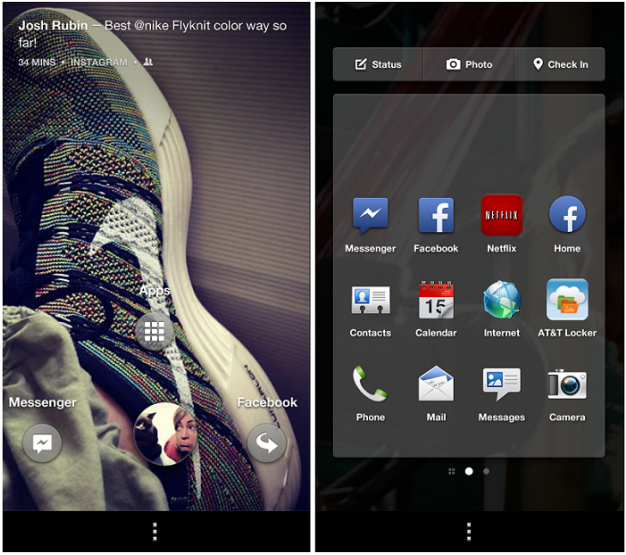 The interface means it takes more taps to get to apps you often want – calling, the Play Store, settings, Maps, search. Facebook’s concern is that you use Facebook … who cares about everything else?
Well, you do. Probably. I’m not saying we don’t spend an inordinate amount of time using our smartphones to access Facebook – we definitely do – but we also use it for a variety of other things. And Home offers far fewer ways to customize app accessibility. For god’s sake, your clock disappears within a brief moment of waking your phone up. What’s up with that?
The way you interact with your phone when using Home is interesting, though. Sliding your profile icon to Apps, Messages, or Last app opened is fun and user-friendly; it’s a method you catch onto quickly and start to enjoy.
Still, overall, you’re making some compromises when it comes to time and usability. And while the cover feed is inarguably beautiful and eye-catching, it actually hurts discoverability. Check out how the old-fashioned Facebook News Feed packages these image-focused stories versus how Home displays them:

Or, stories with multiple photos end up taking up multiple pages of cover feed:

The accidental ‘like’ and other harms of the no-lock screen
As we already discussed, Facebook Home prevents you from using a lock screen on your smartphone. Now if you dive into Home’s settings, which is a standalone app downloaded when you install Home, there’s an option to toggling Home off unless you choose to open it; essentially, this means Home becomes like any other app and is just an option for how to access Facebook. It doesn’t serve as the layer on top of your smartphone … sort of undoing its entire purpose.
But if you leave it on for the full Home experience, so that when you turn on or wake up your smartphone, Home immediately starts running, you sacrifice your lock screen. And this means if anyone happens to grab your phone, they have immediate access to your account and the ability to start liking updates and commenting. And it also means they can dive right in to anything else on your phone: text messages, email, photos, etc. You’re just asking for an awkward situation. Begging, really.
There’s also the opportunity for accidental liking. Two taps, and you’ve thumbs-upped that update; I cannot tell you how many times you’ll unintentionally do this … it’s a lot.
Silver linings playFacebook
 In addition to just being downright good looking, there are a handful of features of Facebook Home that are a joy to use. Chat heads is inarguably the best part of Home and a feature I profoundly hope will make its way independently to app stores (including iOS, please and thanks). The ability to keep on doing whatever it is you’re doing and have SMS and Facebook Messages roll in simultaneously is a welcome change; the UI of this function is also fantastic: Being able to open one message that overlays whatever app you were previously using without diving straight into your messaging app is a godsend.
At launch, it was a little confusing what would happen when you recieved an SMS versus a Facebook message; the answer is that they both function the same. Sort of. When you get a Facebook message, the user’s picture shows up … also known as his or her chat head. When you get a non-Facebook message, a circular icon that reads SMS pops up in the same fashion. Everything else works the same, including how you open and dismiss these chats.
Chat heads are exceptionally fun and easy to use and allow you to keep doing whatever it is you’re doing without being interrupted.
Dismissing chats by dragging them to the “X out” area is also a nice touch. Chat heads could use some tightening up: Some of my contacts didn’t merge with my address book, so when I jumped into the phone’s native texting inbox, I would see names, but inside Home’s message portal, just numbers. But this is probably nothing that can’t either be easily patched or requires some effort digging inside of Home’s settings.
 Notifications are also great. They are big and bold and overlap the cover feed. Two taps open them up, and a simple slide to the right dismisses it. Of course, this is only when they worked: I never once received a notification for a missed call or voicemail or email, though there is an option within Home settings to have the standard Android notification status bar pinned to the top of your display, which is something of a workaround.
Facebook also deserves props for creating something truly unique here. Home is the first original thing Facebook has done when it comes to mobile innovation. Poke, Friends Nearby, Camera, and even Messenger took heavy cues from niche apps that were becoming viral hits – naturally, organically experiencing widespread adoption and growth. Facebook, on the other hands, has been content to manufacture clones that attempt to pocket a bit of their competitors magic. The results have been mixed.
So to Facebook’s credit, Home is certainly an original take on how to leverage a social platform over mobile. I wouldn’t be surprised to see other platforms experimenting with the “apperating system” model.
Lipstick on pig
The problem with Facebook Home is the same as the problem with Facebook: Content. It’s no secret that Facebook has recently been struggling with engagement, and this isn’t only proven with statistics and measurements, but in personal anecdotes. How many of us are guilty of saying “Facebook is boring” or doing the daily perusal of the News Feed, sweeping for birthdays, event invites, or tagged pictures, and then Xing out? It’s part of your daily Internet fix, a requisite stop, but not one that yields much investigation or interaction.
There are a lot of reasons for this, and you can make the argument it’s generational; those of us who were Facebook’s original clientele are older (and wiser?) and maybe growing up and out of how intensely we used to interact with Facebook. And younger users grew up with a very different relationship with the connected Web than we did, and are playing with it in different, more ephemeral, personal ways.
But there’s also the issues with content. The News Feed is broken; you only see a third of what your Facebook friends’ post every day, ads have increasing real estate within the stream, as do other kinds of sponsored content. It’s not a true source of news; there’s a lot of manipulation going on there, and for all its realizations that there’s power in real time, Facebook simply isn’t equipped to handle that type of structure.
Home doesn’t fix this, it just packages it all differently. It’s a better package, sure, but what inside isn’t inherently more interesting to me. Home means you see each update one at a time, instead of a list of them presented in vertical fashion. And yes, they have nice background images and easy commenting, but I still don’t find myself very motivated to engage with this content. The fact that this cover feed will see ads too means that it’s only a temporary reprieve from the sponsored posts that might be inundating your News Feed.
Facebook Home is many things: It’s beautifully designed, ambitious, and an interesting option for experiencing Facebook. If you’re sick of logging on via desktop, then Home is worth a try – it definitely keeps you from spending time checkout out your account. But there are also many things it’s not: An Android replacement. An operating system. And it’s absolutely not an antidote to Facebook Fatigue.
This isn’t a home – it’s more like that vacation resort you’re ready to leave: Everything was great, and the scenery fantastic … but you’re ready to go back to the place you actually call home.



