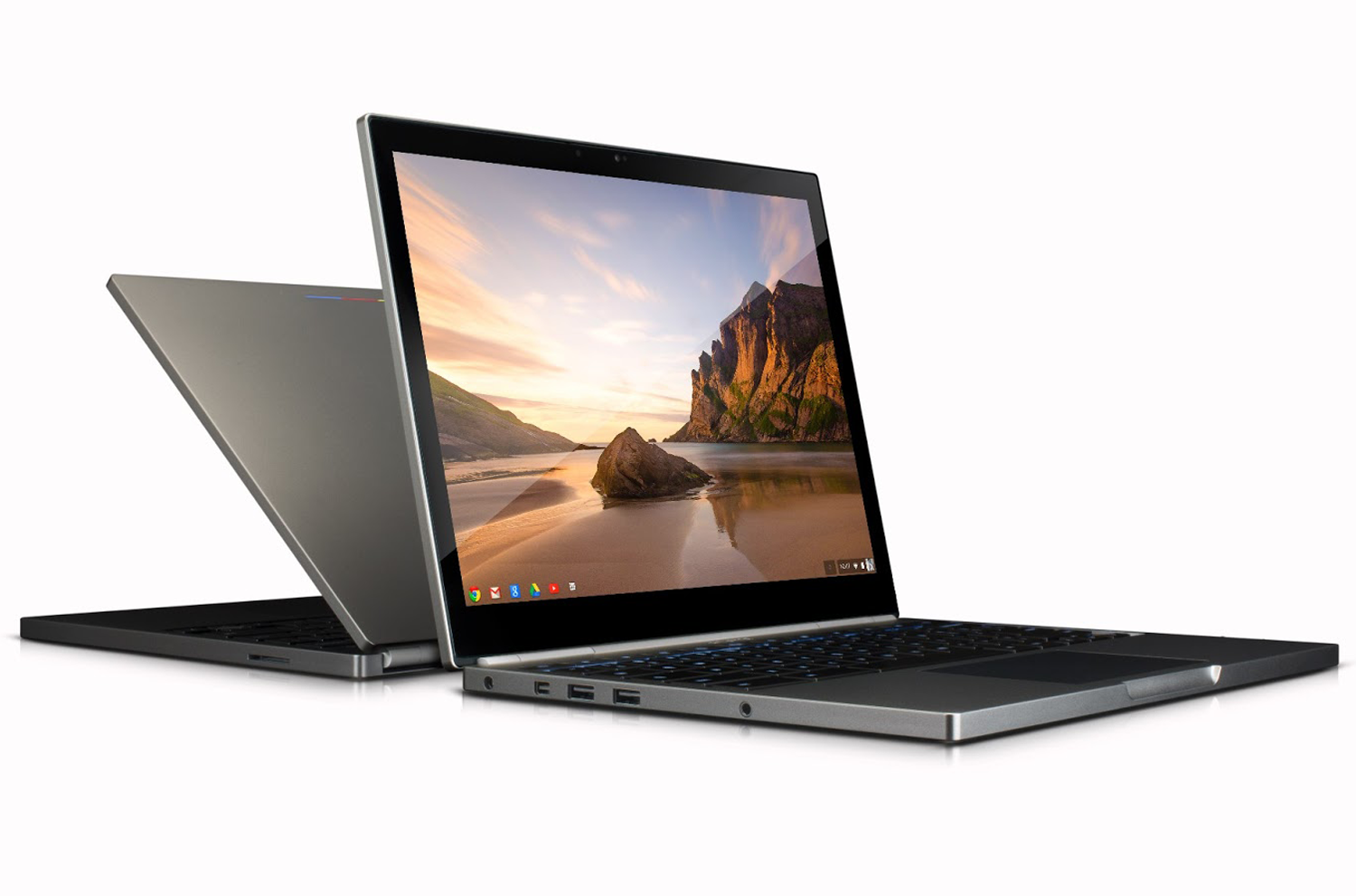
The release of Google’s Chromebook Pixel yesterday took quite a few people by surprise. Not only was the announcement a shock, but so was the price. Considering that previous Chromebooks have all been relatively inexpensive machines that offered more than a netbook, but less than a full-fledged system, the Pixel’s $1,299 price tag is a big deal. Google is entering notebook territory that’s been home to portables with premium design cues, such as the HP Envy Spectre, the Acer Aspire S7, and Apple’s MacBook Pro. Google’s Chrome OS previously ran with the $400-and-under crowd, so will consumers want the same stripped down operating system in a luxury package?
The Pixel sits somewhere between the Samsung Series 3 Chromebook and the MacBook Pro with Retina display. But what do you get for your money with each system? We break it down below.
|
Chromebook Pixel
|
Retina MacBook Pro
|
Samsung Series 3
|
|
| Dimensions | 11.72″ x 8.84″ x 0.64″ | 12.35″ x 8.62″ x 0.75″ | 11.40″ x 8.09″ x 0.69″ |
| Weight | 3.35 pounds | 3.57 pounds | 2.1 pounds |
| Processor | 1.8 GHz Intel Core i5 dual-core | 2.5 GHz Core i5 dual-core | 1.7 GHz Exynos 5200 |
| RAM | 4GB | 8GB | 2GB |
| Screen Size | 12.85″ | 13.3″ | 11.6″ |
| Resolution | 2560 x 1700 | 2560 x 1600 | 1366 x 768 |
| Storage | 32GB SSD | 128GB SSD | 16GB SSD |
| Networking | Wi-Fi, Bluetooth, optional LTE modem |
Wi-Fi, Bluetooth | Wi-Fi, Bluetooth |
| Ports | Mini display port, 2 USB, SD card reader |
HDMI, 2 Thunderbolt, 2 USB, SD card reader |
HDMI, 2 USB, SD card reader |
| Webcam | 720p HD | 720p HD | 0.3 megapixels |
| Operating System | Chrome OS | Mac OS X 10.8 | Chrome OS |
| Battery Life | 5 hours | 7 hours | 6.3 hours |
| Price | $1,299 | $1,499 | $249 |
While you certainly get a lot of pixels for the price, and extreme portability, it’s hard to ignore the fact that for $200 more, the MacBook Pro offers a complete operating system with an easily accessible file system, a more powerful processor and RAM configuration, and two more hours of battery life.
That’s not a complete diss on Chrome OS, though. It’s still a very young OS and definitely has advantages if you primarily use your computer for e-mail, Web browsing, and video streaming. If your life is deeply embedded in the Google ecosystem and you’re okay with that, go Chrome. However, we still think $1,299 is a lot of dough for a limited OS and would favor the less expensive Samsung Series 3.


This comparison omitted the Pixel touchscreen, the 1 TB of free storage on Google Drive which cost $1600 alone, and QuickOffice integrated. The whole package make it much cheaper than a MacBook Pro Retina 13″. This said, it is the best and cheapest device for power users using Google Apps and Cloud storage. You can create 10 folders and transfer ownership to 10 different accounts, it will cost you $0 instead of $3000 ( Box pricing $100 /year for 100 GB). Not to mention that Google Drive was much better than iCloud or Skydrive for collaboration and sharing documents. It is now even better witch QuickOffice integrated. If you buy a Pixel for your enterprise and apply the process I described above, you will have a lot of Pixel for free.
That’s something that I haven’t thought of.. this would be great especially for a business standpoint, but on the other hand, someone buying this for themselves is STILL a hard pill to swallow especially since you can get a full blown Windows system roughly about the same price…
This the best opportunity for businesses using Google Apps to reduce even their operating cost. Let me try to explain you how.
Zero maintenance is an aspect that highly interest enterprise. However Chromebook still missed features that could replace Windows laptop for most enterprises using Google Apps. Right now, 5 million business are using Google Apps. How many are actually using Chromebook?
Let me try to explain why I believe Pixel does make sense for Google.
A basic Google Apps business user has 5GB of Google Drive storage. Additional business storage is not free, 1TB cost $1068 / year or $3184 for 3 years. When you buy a pixel, you get 1TB free for 3 years. Enterprises using Google Apps that purchase Pixels can share their Google drives to several accounts. The Google Apps admin can create folders and transfer ownership to other basic accounts.
Most of Enterprises using Google Apps still keep MS office for their office power users. Pixel comes with integrated QuickOffice with Google Drive. QO should be better than MS office standalone since users can share and collaborate in real time on compatible Office documents.
Google estimates that 5% of Google Apps still need MS office. For every purchased Pixel for the power users, every free 1TB can be shared between 20 users as I described above. Each user will have additional 50GB for free during 3 years instead having to pay $7,5 /user/month for the same capacity. For every purchased Pixel, an enterprise using Google Apps will save $2016, not to mention MS office license fees. After 3 years, you will pay $600/year instead of $1086. This is a perfect 5 years plan to reduce a lot of cost.
There are 5 millions businesses using Google Apps. If I believe a rumor, Google has ordered 20 million units. It is an expensive bet therefore I believe they know what they are doing. They know better their business users than you and I. It is the beginning, it should be noted there are more and more native Client applications coming including Gimp and powerful Games. Enterprises can manage their private applications store for Chromebook. Right now, this is only possible with Chromebook and not with any Chrome browser running on top of Windows or OSx.
I believe Google plan for 2013 is following:
-Samsung, Acer and HP Chromebook for schools.
-HP, Sansung, and Lenovo Chromebook for enterprise users
-Pixel for enterprise power users
They will sell to Chromebook fans and others as well. If the others don´t like ChromeOS, they can replace it by Linux or Windows 8( they have to pay additional $200 for Windows 8). If you consider the whole package, you have a decent hardware for cheaper than any competitors. Comparative hardware with OSx or Windows 8 are more expensive if you have to add anti virus, MS office, etc..
All in all, I believe Pixel will sell more than most analysts can say.
Especially if they can get that free cloud space, that alone with the math you just have, would make sense even for the long term. I can see where you going with this, as the whole idea is simply to save money, and if enterprises can get past the fees Microsoft has with compatibility then this would be a very nice plan for business to sink their teeth into, and enterprises always find ways to save when the means present itself. Appreciate you explaining that further sir..
Thank you. It is amazing the read comments or recommendations made by people who have never used a Chromebook or tried to understand at least the concept. Regarding this digital trend ¨in- dept comparison¨, the blogger did not even check her source. The MacBook Pro battery is given for 7 hours but it actually lasts less than 5 hours which is in fact comparable to the Pixel. Regarding the limited OS consideration, just boot it in developer mode and you get a Linux Chromebook. I can do it then every body can do it. Just to say that this ranking is biased since it totally bypassed the essentials that makes the Pixel very attractive for any users that embrace the cloud beyond the Google Ecosystem.
Welcome sir.. When a program or hardware moves beyond its capabilities then it becomes useful, and I think that Google is ahead of the competition in regards to this..
Actually, this is considered a free computer because of the free 1TB of storage and the 2 years of LTE and the 15 free GoGo Internet sessions… you’re basically being paid to get this computer, and the 100MB per month of LTE is being changed to 5GB per month this fall, and everyone will be upgraded to the new plan….