

There are now several models to choose from when deciding where you want to play the best Switch games. There’s the standard model, the Nintendo Switch OLED, and then the Switch Lite which each have their pros and cons. You don’t have to worry about buying any new games or controllers for any of them, but the Switch Lite doesn’t come with a dock like the others. We already know how to connect the regular switch to a TV, but can you play the Nintendo Switch Lite on a TV too? And is it possible to play Switch Lite on a TV using an HDMI cable or other workaround? Here’s everything you need to know about the device.
Can you play the Nintendo Switch Lite on a TV?
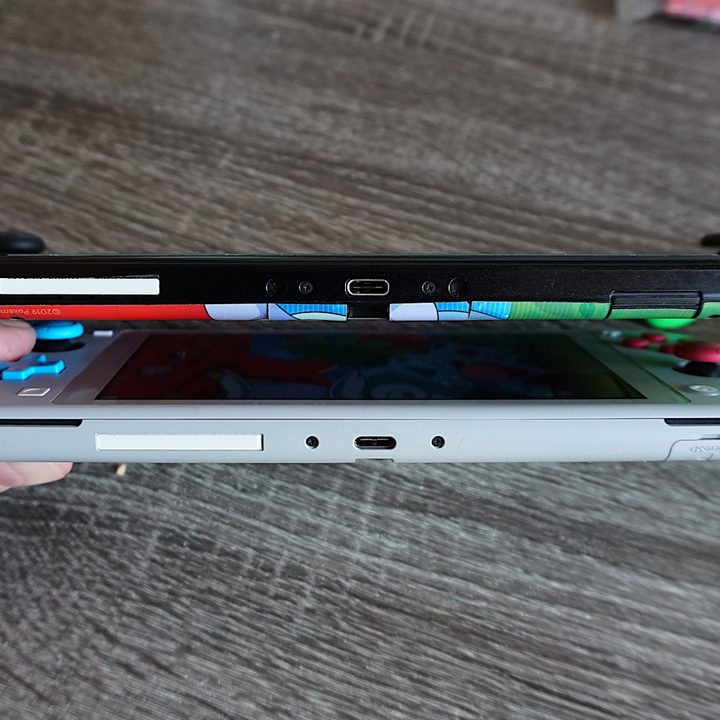
When you first examine the handheld Nintendo Switch Lite, you’ll notice that it has the same USB-C port as the traditional Nintendo Switch. Looking good so far, right?
A big misconception is that USB-C supports everything under the sun, including video output. However, it’s just an interface, and the only guaranteed technology is USB 3.2. There’s enough power delivery to use a mouse or some other peripheral, but everything else, from recharging a battery to video output, depends on the device manufacturer.
So, the simple answer is that the Switch Lite cannot output video to an external device. The USB-C port only supports USB 3.2 and power delivery.
For those wanting a more technical answer, though, here it is: The Switch Lite simply doesn’t have the hardware.
Nvidia’s custom Tegra chip inside the traditional Nintendo Switch is an all-in-one solution, combining CPU and GPU cores. As with any other computing device with a built-in screen, this chip uses the DisplayPort protocol to deliver uncompressed video to the console’s integrated display.
However, there’s also a chip on the motherboard — a bi-directional matrix switch — that routes USB 3.2, DisplayPort, and audio output through the USB-C port. According to the specifications, this chip can route a USB 3.2 signal only; two DisplayPort channels and a USB 3.2 lane; or four DisplayPort channels.
When you connect the Nintendo Switch to the dock, a chip within the latter receives the DisplayPort and audio feed and converts it all to HDMI using the older Mobility DisplayPort standard. This data is then sent to the dock’s HDMI out port.
Long story short, the bi-directional matrix switch installed in the traditional Nintendo Switch simply isn’t present in the Lite version. The lack of video output has nothing to do with software.
Can the Nintendo Switch Lite be docked?
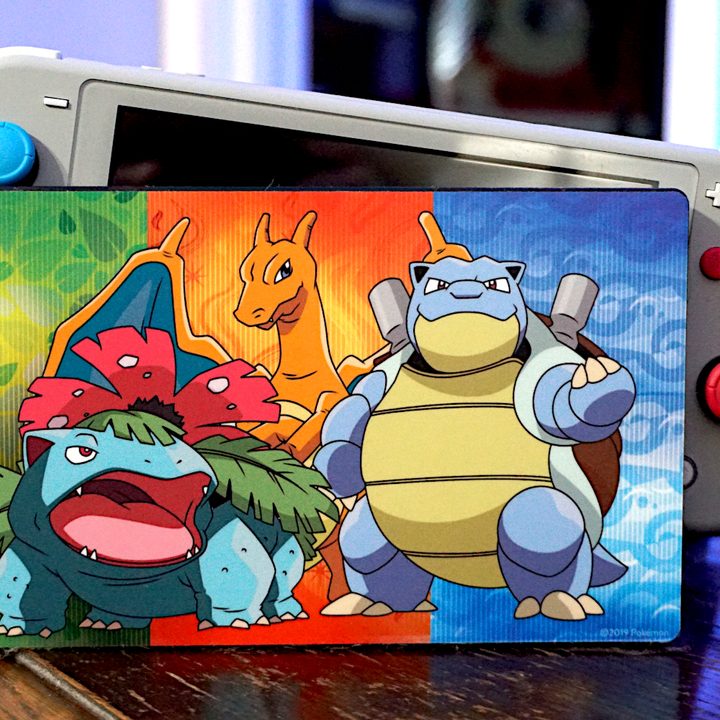
Yes, but not using the dock supplied with the traditional Nintendo Switch. Again, you must purchase third-party solutions designed to accommodate the Switch Lite’s smaller frame, if you want to take advantage of the many Nintendo Switch games that are more enjoyable to play when docked.
The photo shown above should visually explain why, but here are the dimensions of each (in inches):
| Width | Height | Depth | Actual Depth | |
| Traditional Switch | 9.4 | 4 | 0.55 | 1.12 |
| Switch Lite | 8.2 | 3.6 | 0.55 | 1.12 |
| Switch dock | 6.75 | 3.25 | 0.75 | n/a |
The problem here is width. Measure the distance from the inside of the Lite’s left thumbstick to the inside of the right thumbstick, and the result is 6.125 inches — far shorter than the width of Nintendo’s dock.
Because there is no removable Nintendo Switch controller, this model will never fit within the original Nintendo Switch dock without some serious hardware modifications to the latter, namely ripping 0.3125 inches of plastic off each side of the dock’s cradle. That just isn’t practical — not to mention ugly.
The only thing you can use is the standard Switch AC adapter.
For third-party docks designed specifically for the Switch Lite, the Dual USB Playstand By HORI is a great solution. Note that this dock also includes two extra USB-A ports so you can connect wired controllers, like Nintendo’s Pro Controller. This wired connection eliminates the latency associated with wireless controllers while gaming.
Even if you don’t want a dedicated dock, the USB-C port allows the console to connect to a USB hub with multiple ports. You can then pull out the console’s kickstand, connect a few wired controllers, pair a few additional Joy-Cons, and play in tabletop mode. Talk about a party!
Can you stream your Switch Lite to your TV?
No, there currently isn’t a way to wirelessly stream your Switch Lite to a TV. That means you’ll be stuck using the built-in display on your handheld. It’s best to think of Switch Lite as a traditional Nintendo handheld, instead of a hybrid console. The Switch Lite does not support any method that lets you easily get its screen replicated on an external display — whether you’re using wires or trying to stream it wirelessly. And despite the rise of cloud gaming and remote play, it doesn’t look like Nintendo has plans to offer the feature on Switch Lite. So, once again, you’re left playing on the Lite’s 5.5-inch display.
Can you play a Switch game on one and resume on the other?
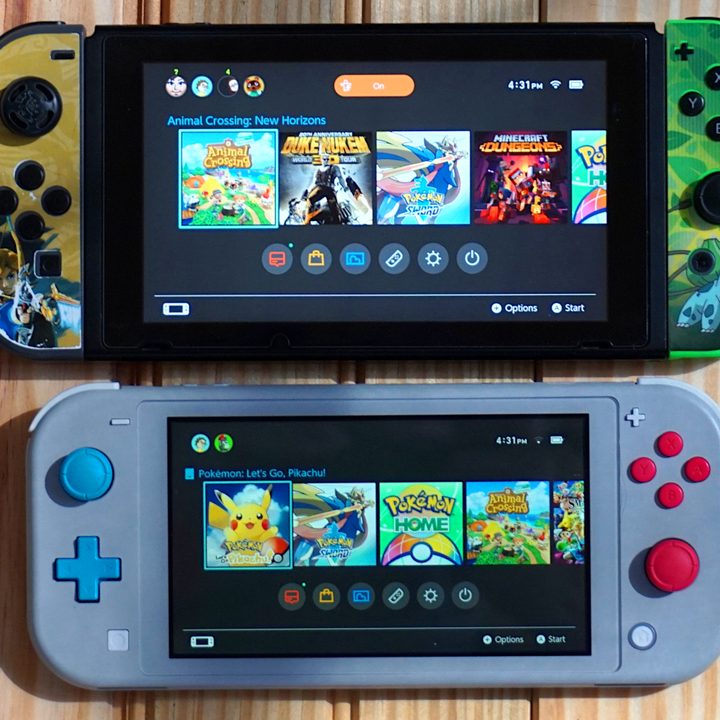
Though you can’t play the Nintendo Switch Lite on your television, you can still play your games on the thinner version and then pick up where you left off on the larger docked model. All you need is an internet connection and a subscription to Nintendo’s paid membership service. This allows you to freely switch back and forth between any model registered to your Nintendo Account.
First, make sure you have a Nintendo Switch Online subscription — it’s really cheap compared to Xbox Game Pass and PlayStation Plus.
Next, ensure that automatic backups are enabled on your primary console. This sends your saved game data to the cloud. For instance, if you typically play on the Switch Lite, you want that saved data to synchronize with a docked Nintendo Switch.
To do so, follow this path: System Settings > Data Management > Save Data Cloud > (Select a User) > Backup Settings.
Make sure Automatic Save-Data Backup is toggled On.
The last step is ensuring that the user information on your Nintendo Switch Account matches your Switch Lite Account. Then backtrack to System Settings and toggle the Automatic Save-Data Backup option to On.
Your progress from the regular Switch will be synchronized and ready to go on the Switch Lite when you pick it up to play.
Unfortunately, cloud save doesn’t work on all Nintendo Switch games, so you can only use the service to back up certain ones. The list of incompatible titles might include some of your favorites, like Dark Souls Remastered, Fortnite, Pokemon Let’s Go Eevee / Pikachu, Pokemon Sword / Shield, and Splatoon 2. Check out Nintendo’s support page for the complete list of incompatible titles.
On the plus side, there are a ton of popular games, like Animal Crossing: New Horizons, Mario Kart 8 Deluxe, and Luigi’s Mansion 3, that do support cloud save. Other compatible favorites are BioShock Remastered, Borderlands: Game of the Year Edition, Minecraft Dungeons, The Outer Worlds, The Witcher 3: Wild Hunt, and Xenoblade Chronicles: Definitive Edition. You can drop in and out of your games without worrying about losing your progress with these or any other cloud-save compatible titles.


