1. Home
  2. Computing
  3. Legacy Archives

Dell announces flexible new touchscreen monitors

Add as a preferred source on Google

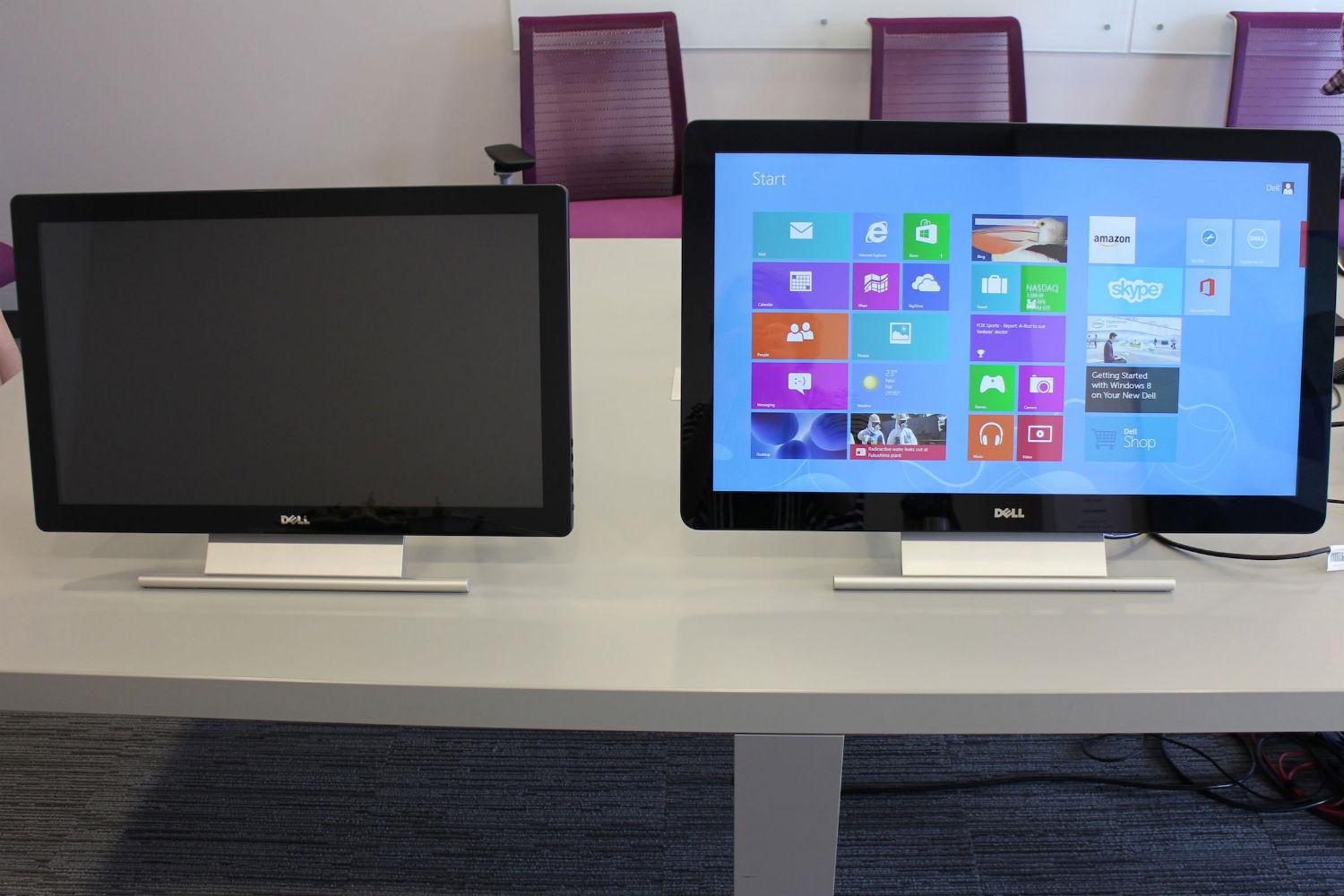
In addition to unveiling new Latitude Ultrabooks earlier this week, Dell also announced three new touchscreen monitors designed for Windows 8. The touch HD monitors boast multitouch capabilities that won’t break the bank. 

Dell’s three monitors include a 20-, 23-, and 27-inch model. The 23-inch (the P2314T) and the 27-inch versions (the P2714T) have full HD 1920 x 1080 touchscreen displays with 8 million:1 dynamic contrast ratio. That’s great and all, but the coolest part about these monitors is the stand, which lets you easily adjust the angle. Both monitors are capable of 60-degree angles, which means they can lie pretty flat – but not completely flat – making it easier to slide the monitor closer to you and type right on the display.

The 20-inch monitor (E2014T) isn’t as robust as its bigger brothers. Though it has a touchscreen, its resolution is only 1600 x 900. Its hinge also doesn’t have the same flexibility as the larger versions as it’s only capable of tilting five degrees forward or backward. It has a 2ms response time, and a high dynamic contrast ratio of 8 million:1. 

Recommended Videos

Port-wise, with all three monitors you’re getting MHL (Mobile High-Definition Link), DisplayPort, HDMI, VGA, and USB, making it possible to connect your smartphone or tablet to the monitor. 
Dell-23-Touch-Monitor-vs-27
Image used with permission by copyright holder

For those of you who are intrigued by the touch capabilities of Windows 8, but aren’t about to go out and buy a touchscreen laptop just  so you can swipe around on your display, Dell’s new monitors are a good compromise. Instead of buying a new $1,000 or more laptop, these touch monitors are an affordable option, starting at $250 for the 20-inch model. Of course, those prices increase for the larger sizes, with the 23-inch model going for $450 and the 27-inch version for $700. All three monitors are available now in the U.S., Canada, and Latin America regions, and will be available in Asia and Europe in September. 

Jennifer Bergen
Former Computing Editor
Jennifer Bergen is the Computing Section Editor at Digital Trends and is in charge of all things laptops, desktops, and their…
Topics
Asus’ powerful new gaming laptop with a 240Hz Mini LED display makes its global debut
The 2026 ROG Strix G18 pairs up to RTX 5080 graphics with an Intel Core Ultra 9 290HX Plus CPU
ROG Strix G18 (2026) laptop

Asus has started rolling out the 2026 ROG Strix G18 globally, and the easiest way to describe it is as a slightly toned-down version of the ridiculous ROG Strix Scar 18. It keeps the same 24-core Intel Core Ultra 9 290HX Plus processor but tops out at an Nvidia GeForce RTX 5080 Laptop GPU instead of the Scar’s RTX 5090. (via Notebookcheck)

The Mini LED model gets the best balance

Read more
Every app on my phone has decided I need AI, and none of them bothered to ask
AI assistants are invading everything from photo libraries to messaging apps, and dismissing them only seems to guarantee they’ll return later.
Electronics, Phone, Mobile Phone

My wife doesn’t use AI very much. She isn’t philosophically opposed to it, nor is she waiting for the machines to overthrow civilization. She simply opens Google Photos because she wants to look at her photos.

Lately, however, the app keeps greeting her with invitations to try its AI tools. Google would very much like her to search her library conversationally, generate something new, or ask Gemini to edit a photo. She dismisses the prompt, gets on with her life, and eventually meets it again.

Read more
Shopping for Back-to-school? These are the gaming laptops I’d recommend
Powerful enough for AAA games, practical enough for everyday lectures, assignments, and everything in between.
oled gaming laptop

Every gamer knows the pain of trying to do too much with the wrong hardware. Back-to-School is the perfect excuse to fix that. A good gaming laptop shouldn’t just hit high frame rates -- it should also survive endless browser tabs, assignments, coding sessions, video edits, and everything else college throws at it. These five machines strike that balance better than most, which is exactly why they’d be my picks this semester.

Alienware 16 Aurora

Read more