
Version 67 of Google’s Chrome browser for Windows, Mac, Linux, and Chrome OS now includes a new security feature called Site Isolation. This new component protects web surfers against Spectre-based attacks on the internet but for a price: 10 to 13 percent more system memory consumption.
Spectre — along with Meltdown — is a design flaw in modern processors that enable hackers to gain access to data stored in memory. This data is supposedly off limits, but the method processors use to predict the outcome of their current task leaves that data exposed. Hardware and software manufacturers have scrambled to fix these flaws since their initial reveal in January.
While the typical scenario sees a hacker physically accessing a computer and running custom code to read sensitive data stored in memory, an attack can happen across the internet as well. According to Google, browsers run potentially malicious JavaScript code in the background from multiple websites and in many cases within the same process. That means a website could steal data stored in memory stemming from other websites.
Although all major web browsers include “some mitigations” to prevent Spectre-based attacks, Google believes Site Isolation is the best approach. Prior to version 67, Chrome relied on a multi-process architecture that allowed each tab to have its own web page rendering process. The problem is that many websites use frames (aka iframes) to compile different web-based components together into a single page: Components that are used across multiple sites. The page may even display cross-site pop-ups too.
That said, all of this rendering resides within a single process. But if one of those components or pop-ups include malicious JavaScript that exploits the Spectre flaw, they could read data residing in the system memory that is stored by the other components of the page. Data may include passwords, cookies, credit card numbers, and so on.
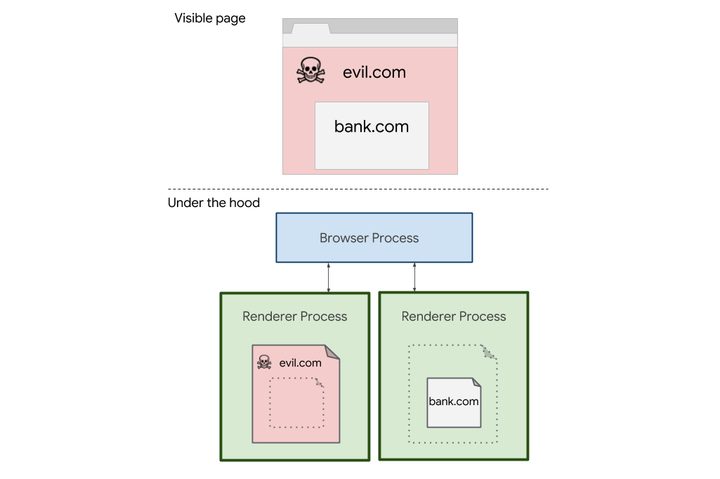
With Site Isolation, pages aren’t rendered in a single process. Instead, the website’s mainframe has its own render process while all other cross-site components have their own individual “out of process” rendering. This is why the browser’s memory consumption increased up to 13 percent.
According to Google, splitting a single page across multiple processes is a major change to how Chrome displays a single page.
“The Chrome Security team has been pursuing this for several years, independently of Spectre,” states Google’s Charlie Reis. “Site Isolation is a significant change to Chrome’s behavior under the hood, but it generally shouldn’t cause visible changes for most users or web developers.”
Although Site Isolation is baked into Chrome 67 for Windows, Mac, Linux and Chrome OS, only 99 percent of those installs will actually have the feature running in the background. The remaining one percent will stay inactive as Google monitors and improves performance.
Does that mean the team will trim off Chrome’s 10 to 13 percent added memory consumption? Time will tell, and given that Chrome already gobbles memory like a kid on Halloween, the extra Spectre-based consumption could be an unwanted setback for machines with low amounts of system memory.