
  1. Home
  2. Computing
  3. Gaming
  4. Legacy Archives

MSI shows off GS70 Stealth gaming laptop with touchpad display

Add as a preferred source on Google
msi-gs70-stealth_dt
Image used with permission by copyright holder

Go, go gadget touchpad! At Computex in Taipai, Taiwan, MSI showed off a concept gaming notebook with a touchpad that functions as a separate touchscreen display. The 17.3-inch display on the MSI GS70 Stealth concept gaming rig is not a touchscreen; instead, it’s a touchscreen display takes the place of a traditional trackpad. 
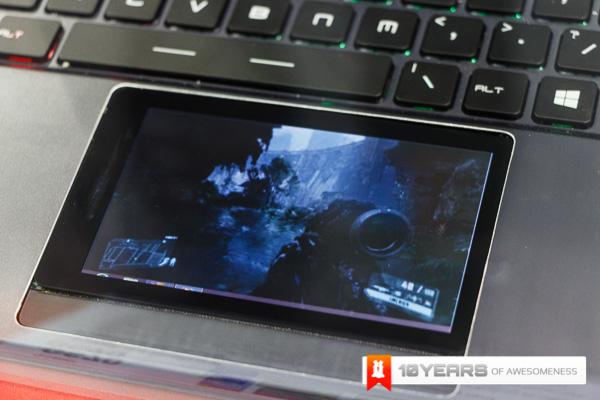
msi-gs70-stealth-3Engadget got a hands-on look at the GS70 Stealth concept laptop, but, unfortunately, the mini-touchscreen wasn’t fully operational, though it was displaying a video sequence. Windows 8 is often easier to navigate with a touchscreen and the GS70 prototype gives gamers the best of both worlds by maintaining a full HD gaming display plus an extra display for when a quick swipe of a finger works better than a mouse. We imagine the extra display could be useful for chatting with buddies while playing, adjusting game controls on the fly, or even surfing the Web for Halo tips and tricks while still staying immersed in the game.

Recommended Videos

Though the GS70 Stealth is currently just a concept machine, MSI is releasing a version of the GS70 with a traditional touchpad in August. Like the prototype, this 17.3-inch machine is completely clad in aluminum instead of plastic, and features MSI’s Steel Series full color backlit keyboard. The full 1920 x 1080 HD display will be anti-glare and the whole package will weigh 8.6 pounds. Of course, the GS70 will be powered by Intel’s Haswell processors, the fourth generation of the company’s Core series of chips. The MSI GS70 will be available in August, and, while a price hasn’t officially been announced yet, current speculation puts it around $,1600.

[Image via Engadget, GadgetZone]

Meghan McDonough
Former Contributor
Meghan J. McDonough is a Chicago-based purveyor of consumer technology and music. She previously wrote for LAPTOP Magazine…
The best screenshot app for Mac just became a screen recording powerhouse
CleanShot X already made screenshots easy. Now it wants to make screen recording and editing just as painless.
CleanShot-X-version-5-running-on-Mac

CleanShot X is the best screenshot app for Mac. It's one of my favorite Mac apps, and I've already covered all its features in a previous article. The app just received its 5.0 update, and it's such a massive release that I had to write about it.

CleanShot X already had a built-in screen recording feature, but it was pretty bare-bones. With this update, the app has grown into a proper screen recording studio. You can now record your Mac's screen, edit that recording, add zooms and backgrounds, and do a whole lot more without ever leaving the app.

Read more
Apple has some big changes planned for the Apple Store experience
Apple Fifth Avenue store

Apple spent much of the last decade trying to make its retail stores feel like more than places to buy an iPhone or get a Mac repaired. Now, some of those ideas are being reworked as the company prepares another major update to the Apple Store experience.

According to Bloomberg’s Mark Gurman, Apple plans to accelerate renovations across its retail network over the next several years. New and upgraded stores will reorganize online pickups and Today at Apple sessions, bring back dedicated Genius Bars, and phase out the giant video walls found at many locations.

Read more
The best password managers for 2026
have i been pwned owner uncovers 13 million plaintext passwords leaked from free webhost is a safe password even possible we

Passwords are still a fact of digital life, even as passkeys slowly start to change how we sign in to our accounts. Apple, Google, and other platforms have also made their built-in password managers much more capable, giving people more options than ever for keeping track of their credentials. A dedicated password manager still has an important advantage, though: it can bring passwords, passkeys, two-factor authentication, secure notes, and shared credentials together across the different devices and platforms you use.

The best password managers also make good security habits easier to maintain. They can generate unique passwords instead of leaving you to come up with another variation of the same one, flag compromised credentials, and make it easier to share access without passing passwords around in messages. For families and people who regularly move between operating systems, they can be particularly useful, while privacy-focused services offer another reason to look beyond the tools built into your phone or browser.

Read more