


“Old-school photographers will embrace the Nikon D3100’s sharp stills and classic design, but noisy video keeps it out of the big leagues with competing models.”
- Terrific 14.2MP stills
- Noise well under control at high ISOs
- Good ergonomics, menu system
- Mic picks up lens noise when shooting videos
- Jelly effect when panning
- No USB cable supplied
“Why you can trust Digital Trends – We have a 20-year history of testing, reviewing, and rating products, services and apps to help you make a sound buying decision. Find out more about how we test and score products.“
Introduction
Ho-hum–another new DSLR that shoots HD video. That was our reaction at the announcement of this new Nikon geared for first-timers to interchangeable lens ranks. And yet there’s something unique about this camera we’ll share with you in a click or two…
Features and Design
No need to spend too much time dissecting the industrial design of this baby since it looks like every other DSLR on the market. It does have a nice textured grip and is blessedly clean of icons and decals. Let’s get to the good stuff. DigitalTrends.com readers know we’re not big fans of DSLR video. Until the Sony SLT-A55V came along we dismissed it because focusing was a real pain. Not to get too techie but DSLRs use contrast phase detection when capturing movies compared to a camcorder’s more accurate phase detection. The new Sony –A55 (and A33) cameras are breakthroughs because they use phase detection. The result? Those DSLRs take the best video of any camera we’ve tested (and it’s the AVCHD format, just like better high-def camcorders). Although the D3100 uses contrast detection, it’s the first with full-time auto focus (AF) in movie and Live View modes. In theory, this means you can concentrate on your subject as the camera does the focusing chores. More on this in the Performance section…
Like all DSLRS, the front of the D3100 is dominated by the mount and lens; it accepts over 40 Nikkor AF-S mount lenses. The $699 kit comes with an 18-55mm 3x zoom with an equivalent focal length of 27-82.5mm. Needless to say you can spend a small fortune adding to your glass collection but this one is a good start if you’re a newbie. Also here is an AF Assist/self-timer lamp, mono (not stereo) mic and lens release button.
On the top you’ll find the auto pop-up flash, hot shoe, mode dial and release mode lever. This lets you quickly change between single shot and burst mode (3 fps) as well as the self-timer and quiet shutter. On the pistol grip are the shutter button surrounded by the on/off switch, access to exposure compensation and Info. The mode dial has the usual DSLR options including Auto, PASM, no flash and six common Scene modes (portrait, landscape, child, sports, close-up and night portrait). The setting that’s unusual here is Guide which is basically an on-camera tutorial. Designed for newbies and those who want to explore what the camera can do, it shows a number of situations and then makes the appropriate settings. For example, in Easy Operation you can choose things like Auto, No flash, Distant Subjects, Sleeping faces and so. You hit the OK button and the D3100 will adjust settings to that specific subject. If you’re an experienced photographer, this means nothing—and you wouldn’t buy this camera in the first place. For those stepping up from a point-and-shoot, it’s a real plus.
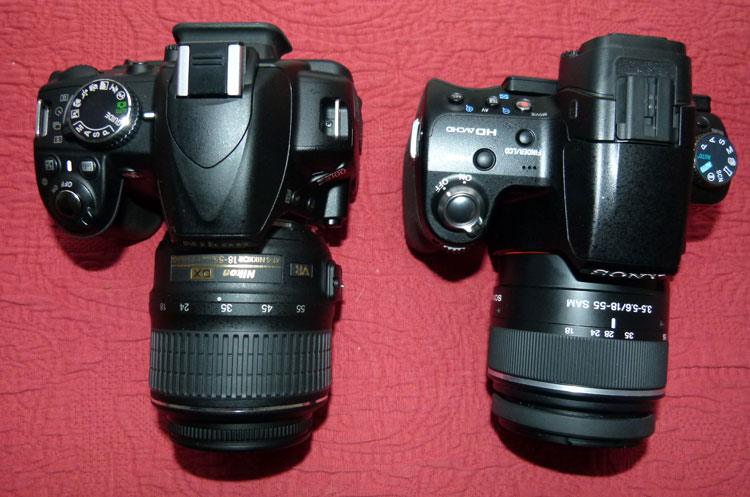
Nikon’s D3100 next to Sony’s Alpha SLT-A55V
The rear of the D3100 has a viewfinder with diopter control. The viewfinder has 95% coverage, the going spec for entry-level DSLRs (more expensive models are closer to 100%). It’s fairly bright and has legible readouts of key parameters. Beneath it is a 3-inch fixed position LCD screen rated 230K pixels. The screen holds up well in Live View but more pixels would be better (of course you have to pay for this privilege by stepping up to the $899 D90 or $1,199 D7000).
To the left of the monitor are five basic keys. The lower “I” Information button give access to the camera’s main parameters which vary by mode. Making adjustments is very simple. On the top right is the AE/AF Lock key and a jog wheel for moving through various options. This is nicely positioned and there’s a textured thumb rest below it. You’ll also find a 4-way controller with center OK button, delete key and a small speaker. Also here is the obligatory red dot button for shooting videos except unlike a digicam which just takes a single press, you have to flip the surrounding Live View lever then hit the red dot to record. This isn’t a big deal, just different.
A word about DSLR video given the brouhaha a short time ago. Cameras are not camcorders and the D3100 can only for record 10 minutes maximum at a time. Nikon warns the camera may overheat if conditions are bad (such as high ambient temperatures, too much Live View use) and will automatically shut down. Remember: DSLRs are good for short clips (several minutes) and if you need longer times, buy a camcorder. Read our coverage on the truth about overheating DSLRs.
The right side has a SD card slot (it accepts SDXC and Eye-Fi cards). The left has four inputs/outputs (accessory terminal, USB, mini HDMI, A/V connector) and near the lens opening are flash up and Function keys. The bottom of the Made In Thailand camera has a metal tripod mount and battery compartment.
What’s In The Box
The D3100 body, kit lens, rechargeable battery rated a solid 550 shots using the CIPA standard, plug-in charger, lens/body caps, neck strap and two CD-ROMs. One has ViewNX 2 to handle files while the second has a full 224-page Reference Manual. Surprisingly, the camera does not come with a USB cable. This seems like a chintzy move—or does Nikon assume everyone has a card reader? We can understand passing on an analog A/V cable (definitely use the optional mini HDMI connection) but this seems low rent. Whatever. You’ll also find a Quick Start Guide and a 70-page User’s Manual that covers most of the bases.
After charging the battery, we popped in a 32GB SanDisk Extreme Class 10 card; a minimum of Class 6 is recommended.
Performance
The Nikon D3100 was initially set to best resolution JPEG (4608 x 3702) and tops for video (1920 x 1080 at 24 fps). From there we moved through the mode dial and used JPEG+RAW where appropriate.
It’s Fall in the Northeast so there’s little difficulty getting shots with strong colors. And how do you think a $699 Nikon with a 14.2-megapixel APS-C sensor handled them? Outstanding. Our 8×10 prints were right on target with very natural-looking colors which included macro close-ups and sweeping landscapes.
The D3100 has a great feel and it’s a pleasure to use. The 11-point auto focus system easily took care of even difficult focusing situations. The camera has a burst speed of 3 fps which is typical for affordable DSLRs. That said we didn’t feel like we missed much since we weren’t shooting horse races or car chases. Would we have like more? Sure, but the relatively similar Canon Rebel T1i is just a shade better at 3.4 fps.
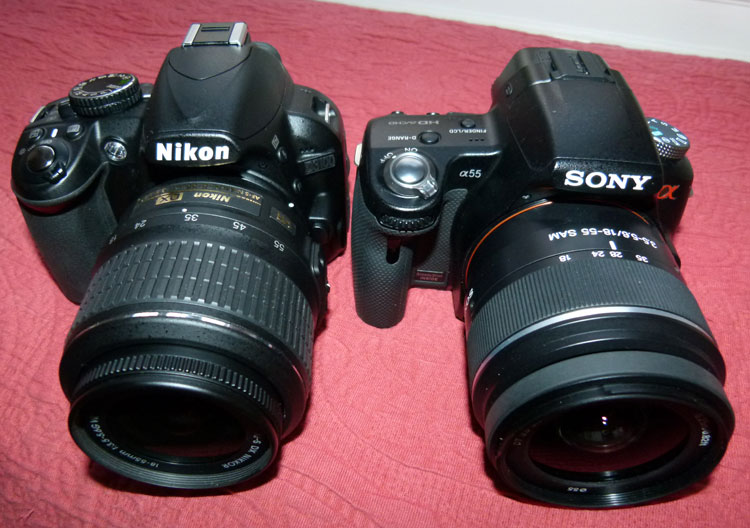
Nikon’s D3100 next to Sony’s Alpha SLT-A55V
The camera really excelled handling high ISOs. The basic range is 100-3200 but it reaches 6400 in Hi1, 12,800 in Hi2. As you’d imagine, 12,800 is pretty bad but amazingly 6400 was reasonable, and 3200 was excellent. You’ll have few problems shooting in low light with this DSLR.
We wish we could say the same for shooting video—no matter what the ambient light. We put the D3100 into Full-time servo AF mode so the camera focused continuously during movie recording. We pressed the red button after flipping the Live View lever, recording video clips, zooming in some instances, other times not. We then played them back via HDMI on a 50-inch plasma and the results were disappointing. Although it focused relatively quickly, there were some jelly effects when panning. That’s a drag but what was worse the mic picked up the noise of the lens motor, adding an unwelcome soundtrack. Ouch. Camcorders simply do not do this. The Sony SLT-A55V remains supreme in this category.
Conclusion
As a pure camera, the D3100 is an excellent choice. Unfortunately DSLRs are now rated on their ability to capture high-def videos—for better or worse. In this case, it’s worse. If you just want a solid 14.2-megapixel DSLR and aren’t concerned with video clips, by all means choose this camera. Fortunately, your options are much greater now if movie quality is important. Now there are models like the 14.2MP Sony NEX-5 ($699) that shoot 1920 x 1080 60i AVCHD videos and stills at 7 fps. Granted you don’t have the same number of lens options, the form factor is very different and not as beefy as a true DSLR. It’s a tough choice you’ll have to make (handle them both) but entry-level DSLR buyers can’t go wrong with the D3100 for taking photographs. People who want quality videos should look elsewhere.
Highs:
- Terrific 14.2MP stills
- Noise well under control at high ISOs
- Good ergonomics, menu system
Lows:
- Mic picks up lens noise when shooting videos
- Jelly effect when panning
- No USB cable supplied


