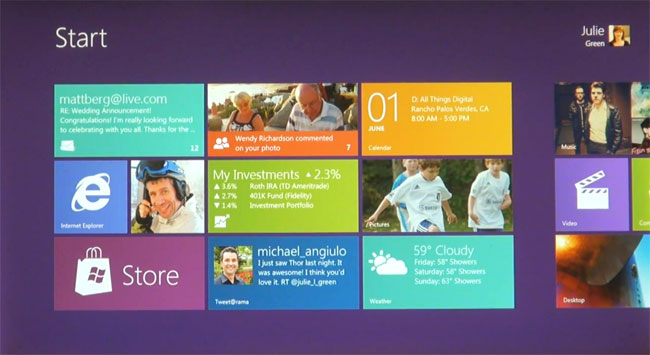
Microsoft has officially unveiled some key new features of its forthcoming operating system. The next-generation OS, which may or may not be called “Windows 8” (its “internal code-name”), delivers a completely re-imagined user interface, with a heavy emphasis on touch-based functionality that takes a hefty helping of inspiration from the Windows Phone UI.
One of the first major design changes from previous Windows versions is the completely overhauled Windows Start menu, which has been replaced with a colorful tiled design that evokes the Exposé screen of Firefox, or other similar quick-screen-navigation features found in most new web browsers. Rather than web pages, however, the new Start screen shows both static program icons and widgets, called “live tiles,” which provide constant notifications and updates. Windows 8 also allows users to access all the files on their computer in the same visualized way that programs are accessed, which helps make the OS easy to navigate with touch alone.
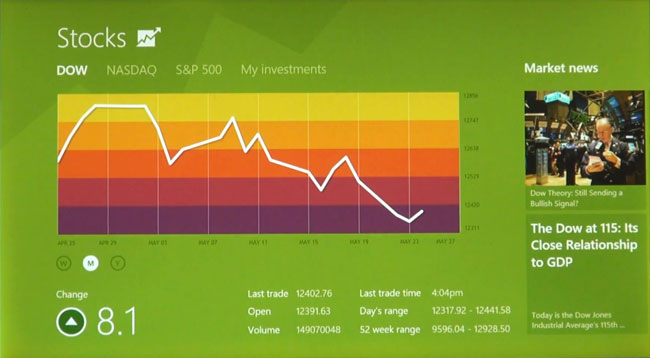
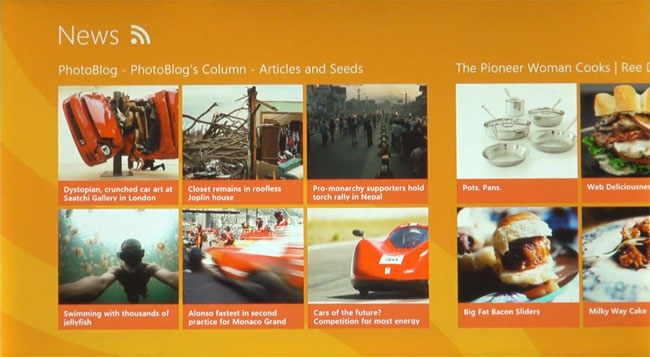
Since Windows 8 is obviously designed with tablets in mind (but can be used with a standard mouse and keyboard), users switch from application to application by swiping left and right in a similar fashion to mobile phone OSs, like Apple’s iOS or Google’s Android. Apps included with the OS, like a weather app, a stock ticker app, and a built-in news app, all take advantage of the entire screen. Fortunately, Windows 8 still allows for multitasking, and multiple apps can be viewed simultaneously on the same screen simply by dragging and dropping the app window onto the main screen.
Windows 8 also takes advantage of current web standards, like HTML 5 and JavaScript, and is optimized to work with Microsoft’s upcoming web browser, Internet Explorer 10.
Overall, Windows 8 looks like a step in the right direction for Microsoft, as it tries to compete with the touchscreen powerhouse of Apple’s iPad line and its iOS software. Windows 8 is still far from complete, however, and it is not yet clear when the software will be publicly available, though some guess a fall 2012 time frame. Check back with Digital Trends soon for the latest Windows 8 news.
Editors' Recommendations
- Windows 11 might nag you about AI requirements soon
- You’re going to hate the latest change to Windows 11
- How to disable VBS in Windows 11 to improve gaming
- The most common Windows 11 problems and how to fix them
- How to factory reset Windows 10 or Windows 11