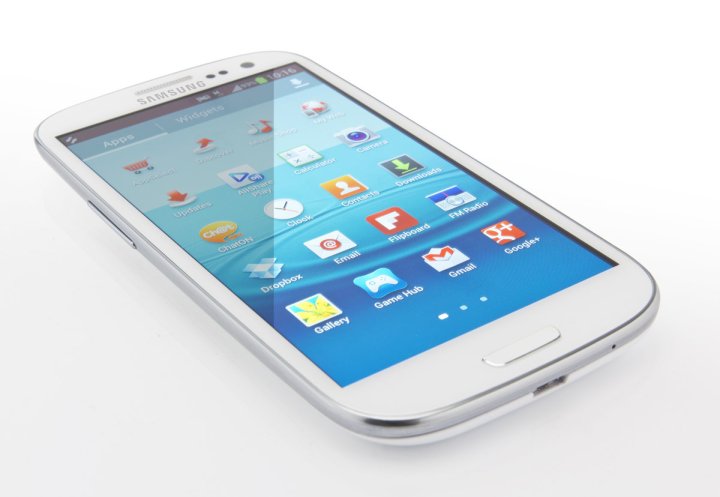
Some people felt it was too big, but the Samsung Galaxy S3 has been selling steadily since it first hit the market back in May. Samsung sold 20 million Galaxy S3 handsets in its first 100 days and it has become the poster child for Google’s Android operating system. Several months down the line, the Galaxy S3 continues to surpass expectations in terms of sales, but no device is flawless.
Let’s take a closer look at some of the biggest Galaxy S3 problems. These are the most commonly seen complaints from people around the world, and in each case we’ll try to offer up a useful workaround or solution.
Update 3-12-2013: We’ve added a couple new problems that have sprung up.
Problem: Random freezes
The Galaxy S3 keeps freezing randomly. A small number of users reported this problem last year, but it has been cropping up far more frequently in 2013. If you experience this problem with a brand new S3, you should be returning it to get a replacement. The bulk of issues being reported now relate to phones that people have had no problems with for months suddenly developing a random freezing habit. This seems likely to be a software problem and could be related to an Android update, possibly 4.1.2.
Workarounds: You can hold down the Power button and Restart or Power off and turn it on again. That seems to work for most people, but it won’t stop the problem from coming back. You can also pull the battery, but we don’t recommend that. You could also just wait, many people report that the issue fixes itself, but it may take 15 minutes or more and it can return at any time. Some people have reported a reduced frequency by turning off Wi-Fi or the mobile data connection, but that’s not convenient. You could try rolling back the software. Some people report success with this, but others say they have only reduced the frequency of freezing.
Solutions: There are only two solutions that people are reporting consistently. One is returning the device to Samsung for repair. In a number of cases a faulty motherboard is deemed to be the cause and replacing it results in perfect operation. If you’re under warranty this might be your best bet. That obviously points to a hardware problem, and yet other people have reported the problem just resolving itself when they ignored it, which would suggest a software problem. We’ll keep following this and post an update if another solution pops up.
Problem: Sudden Death Syndrome
This only affects some 16GB Galaxy S3 handsets and it’s related to your flash memory (eMMC) chip. If you encounter the problem then you’ll find that your S3 doesn’t switch on at all no matter what you do. If you’re worried about your device being affected, you can check if it is at risk with the eMMC Brickbug Check app.
Solution: If your phone is dead, go to Samsung Support and you should be able to get a replacement or get it fixed. Samsung has released a fix for this so as long as your phone has the latest firmware update then you shouldn’t need to worry.
Problem: Battery drain
Disappointing battery life is the Achilles heel of all smartphones, but some people have encountered a surprising battery drain on the Galaxy S3, even when the phone is not in use.
The international version of the Galaxy S3 has a flaw. The battery drain on standby issue is complicated by a miscalculation in the power profile which shows Cell standby eating a lot more power than it actually is. This doesn’t account for the drain it just means that the stats are wrong.
Some people with the U.S. and international versions have also reported an actual excessive battery drain on the Galaxy S3 when in standby. Having apps running in the background and features such as Wi-Fi, mobile data, Bluetooth, and push email turned on is obviously going to have an impact. If your Galaxy S3 is draining fast when not in use, then it can be tricky to find the culprit. It could be down your carrier or that you get poor service in your home; it could be Chrome; it could be email or LTE. Luckily there are some solutions you can try.
Solutions: If you have Chrome installed, fire it up and choose Settings > Developer tools and then uncheck Enable Tilt Scrolling.
Some people have reported huge battery savings by turning off LTE in Settings > More settings > Mobile networks > Network mode. There’s a theory that if you don’t have LTE in your area, the battery drains faster because the phone keeps searching for it. Having Wi-Fi turned on all the time can actually help because it uses a lot less power than connecting to a mobile network, but you have to be in range of a Wi-Fi network or the search for a connection will have a similar draining effect.
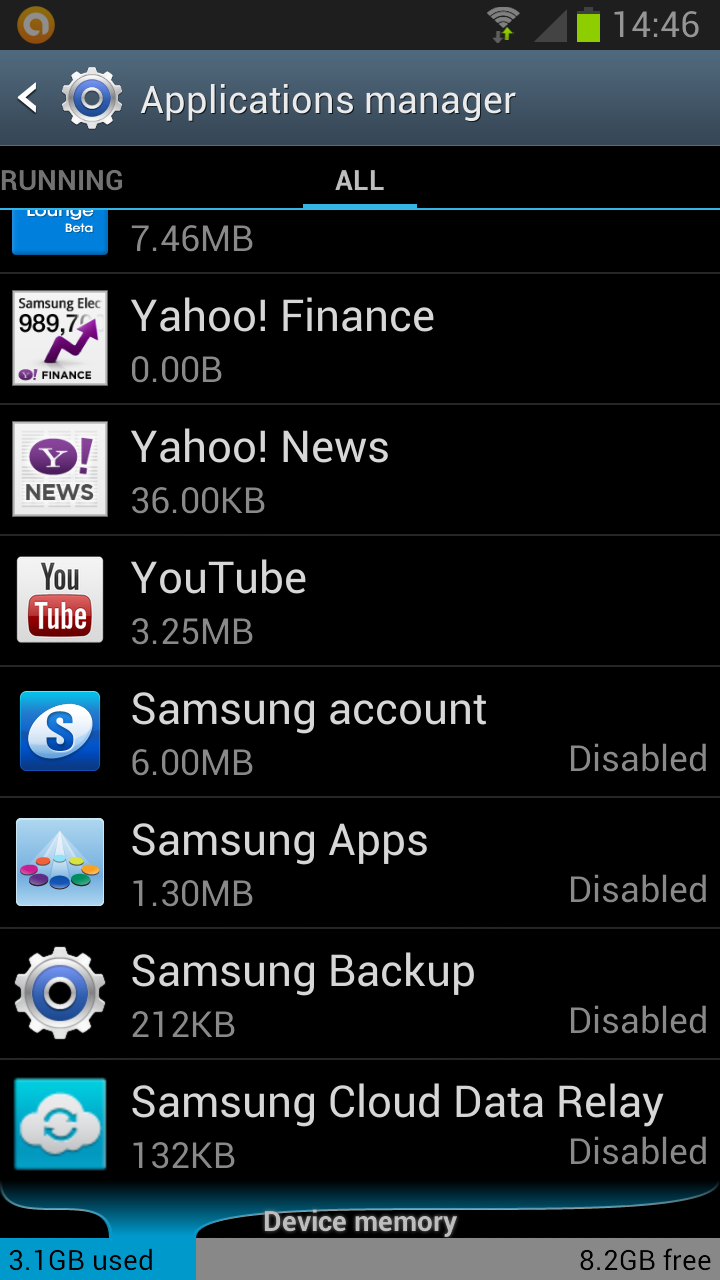
Some people believe that Samsung’s preinstalled apps could eat a lot of battery life even if you’re not using them. Some users reported success after disabling their Samsung account and various Samsung apps. Go to Settings > Applications manager and choose the All tab then disable Samsung Account, Samsung Backup, Samsung Apps, Samsung Cloud Data Relay along with anything else on the list you don’t use. The disabled apps drop to the bottom of the All list so you can always enable them again if you encounter any problems.
Problem: Audio and microphone issues
It’s difficult to have a phone conversation when the other person can’t hear you clearly or you can’t hear them. Some early adopters reported issues with the Galaxy S3 microphone and found that signal strength was dropping immediately after calls. The speakerphone function hasn’t worked smoothly for some and a complete loss of audio has been reported in extreme cases. A firmware update was rolled out to fix this, so you shouldn’t be experiencing these issues anymore. If you are, then it may be down to a blockage, a setting, or even the noise reduction feature.
Solutions: Restarting the phone should temporarily resolve the issue, but that’s obviously not ideal so let’s try and find a permanent fix. Go to Settings > Accessibility and make sure Turn off all sounds is not checked to begin with. Now go to Settings > Sound and make sure your volume levels are correct and sound is turned on.
Hit Phone > Menu > Call settings > Additional settings and then uncheck Noise reduction. Some people have reported less echo and clearer calls with this turned off.
Take a look at the microphone hole on the bottom edge of your Galaxy S3. If it looks like there’s something stuck in there then that could be your issue. Be very careful when cleaning this. Try compressed air to blow it out first.
Problem: Overheating
Many users have reported problems with their Galaxy S3 overheating and sometimes even freezing or crashing as a result. The S3 is very thin with a big screen, a big battery, and a powerful set of internal components, so the more you use it, the hotter it will get. This generally only rears its head as an issue after prolonged gaming or if you do something else that’s graphically intensive. If your Galaxy S3 is getting very hot and crashing without intensive use, then you might have a hardware problem.
Solution: The obvious solution is to take a break for a few minutes and let the phone cool down. If you’ve been running something for hours, then it will inevitably heat up. If it is heating up on standby or with low levels of usage, then you should contact the seller or carrier and check if the hardware is faulty. You should be able to get a replacement handset if they confirm the problem.
Problem: Wi-Fi dropping or not detecting
Are you having trouble connecting to Wi-Fi networks? Maybe your S3 is connecting fine, but then dropping the connection later? There have been plenty of reports of troublesome Wi-Fi and for some people this is a wider Android issue, while for others it could be related to the router. Fear not, there are some things you can try on your S3.
Solution: Turn your phone off and then back on. The mantra of the IT professional does work, but it’s obviously not a permanent fix. You should also go to Settings > Wi-Fi and hit the menu button again to choose Advanced and make sure that Keep Wi-Fi on during sleep is set to Always. Most people with this issue are reporting that an over-the-air update fixed it, so if you are still having problems it is likely to do with your router. You could try an app like Wifi Analyzer and see if you can identify the problem.
Problem: Lag
When you buy a powerhouse like the Galaxy S3, you don’t expect any lag when you are navigating around. If you’re experiencing a slight delay when you hit the Home button or when you exit an app then it might be down to your settings. You should avoid using task killer apps and reboot your phone fairly regularly to clear memory.
Solution: Drag down the notifications bar at the top and switch off Power saving. It’s a useful feature for saving power, but it does introduce some slight lag. If your problem is related to the Home button, then S-Voice might be the culprit. Samsung has it set up so that a double tap on the Home button launches S-Voice, which can cause lag when you press the Home button. To get rid of it simply double tap the Home button to launch S-Voice and hit menu to access Settings and then uncheck Open via the home key.
The animations slow things down so you can always go into Settings > Developer options and change Window animation scale and Transition animation scale to .5x or even off.
Problem: Vibrating to music or audio
If you find that your Galaxy S3 is vibrating when you play music or when you use specific audio apps then you may well wonder why. Thankfully it’s an easy fix.
Solution: Go to Settings > Sound and make sure Auto haptic at the bottom is toggled off.
Problem: Copy and paste isn’t working
There have been quite a few reports of problems with the copy/paste feature on the S3. Some people are copying and then finding they have no option to paste and others are experiencing crashes when they try to paste copied text.
Solution: The solutions for this one are not ideal. You can factory reset the phone or you can root the device and clear the data from your clipboard. Sadly there’s no guarantee that the problem won’t return if you factory reset. Samsung is definitely aware of this issue, but it has not come up with a fix yet.
Problem: Smart stay doesn’t work
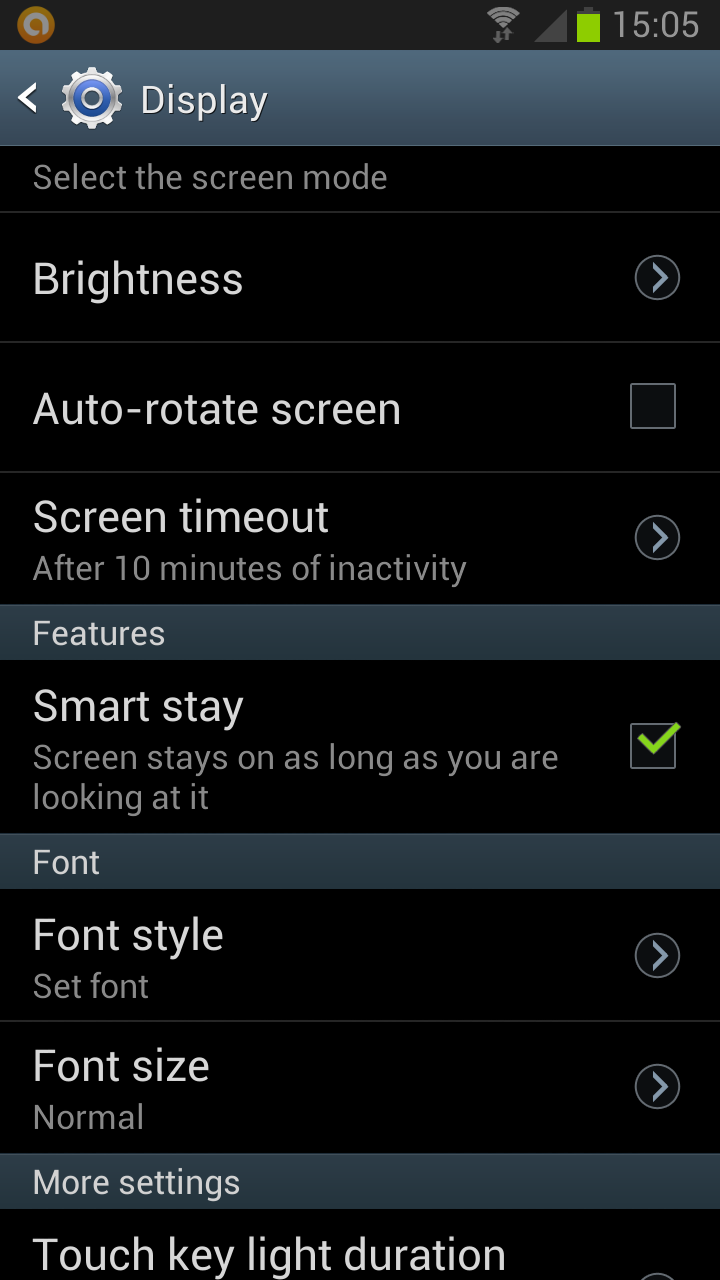
The Smart stay feature is designed to ensure that the screen does not turn off when you are looking at it. You’ll find it in Settings > Display and you can tick to turn it on. You’ll see an eye icon pop up in the notification bar occasionally and the S3 will use the front-facing camera to check that you’re still looking at the screen. If you are looking at the screen, it stays on, if you aren’t then it dims and turns off. How often it checks depends on your Screen timeout setting. A lot of people find that this feature doesn’t work for them at all.
Solution: Your face has to be well lit so the camera can see it. If you are in the dark or in shadow it simply won’t detect you and the screen will turn off. This feature is neat, but it doesn’t work well yet.
Workaround: Change your Screen timeout so that it doesn’t turn off so quickly.
More S3 problems
If you are irritated by unwanted notifications, then check out our guide on how to turn off Android notifications. If you’re sick of waiting for the Android 4.1 (Jelly Bean) update, then check with your carrier. The majority will push it out over the air, but some require you to physically connect your phone to your computer.
There are various other little Galaxy S3 issues and annoyances you might come across as you use the phone so please post a comment to share issues and any fixes you know of.
Article originally published 12-6-2012.
i am having problem with my galaxy s3 gallery when i click on it ,it doesn’t open i have to click out n back again before it open HELP PLEASE
Not loving the battery life. Also I can’t get my GPS to work for ANYTHING!
I am having the same problem!! Did you ever find out how to do it???
GPS issues. You can not just turn the GPS on you have to go into the settings and select the share my location settings. There are 3 options and I have found that it works best when all three are checked.
My phone has none of the issues described above, with the exception of a SLIGHT lag sometimes. My only real issue with it is the screen brightness outdoors – I cannot see a thing on the screen without shielding it from the sun. My Galaxy S before this was fine in the sun!
My biggest complaints are the lack of Jellybean on AT&T and the in ability to pick a custom ringtone for my text message that differs from the one for my phone calls.
Oh, and my complaint isn’t towards the phone, it’s towards Verizon Wireless! Get us our Jelly Bean update now!
help,my phone doesnt start , after rooting it because of an update, while rooting it stuck,then i took off the battery and put it back, after that i cant turn on my phone….. please help me
Go to your carrier and request a replacement. Sounds like the hardware crashed
If you’ve taken the battery out, to restart your phone you must hold down the volume and on buttons simultaneously, ’til the phone vibrates, usually after 3 seconds or so. The phone will then power up, and turn on and off in the usual manner.
I dont have any problems because i have a DROID! Lol Razor maxx next.
Razr Maxx here as well! Rooted of course.
My S3 display blinks at anytime while in standby or on charging..what could be the reasons and how can i control it… plz reply.. :(
This is a problem from one of your application. When you have the internet connection switched off the application tries to connect to interrnet to show you some advertising.
In order to solve the problem you can install AIR PUSH application and perform a scan on your phone. This application will find the spam from your phone and after removing those spams your phone will work just fine :D
Love it!!
I must be extremely lucky with my battery life…I stream Pandora all day through Bluetooth, and the battery isn’t low until bedtime.
Who would have guessed the list would be soooo long! GalaxyGate!!
My S3 keeps downloading apps over night and i don’t no how to stop it! Can anyone help? Cheers.
Re the advice about disabling Samsung’s preinstalled apps: When I try, I get warning messages that if I disable them, the world will come to an end or other dire catastrophes will occur. Does anyone have a list of what some of these cryptically-named apps do, and what is the risk (if any) if they are disabled?
I have had my Galaxy 3 phone less than a month and the screen cracked, even though it was not dropped. Samsung is charging $178 to fix it. What they fail to tell you is that if the battery overheats it can cause the screen to crack. In addition, it has stress points on the screen and if it exceeds that number it will crack. What is that stress value, they did not know.
Hi I have had my s3 for bout 10 months now and used for my work phone.
I had no problems or complaints up until recently when my battery died and then wudnt turn back on at all!!
First of all I can’t seem to get my contacts back as I’m sure I sync with Samsung….can sum1 plz tell me were I can log into to retrieve all them from? (Resorted back to my iPhone for time being)
Second of all is there any program’s I can download that will fix prob or at least allow me to extract all files so I can send away to be fixed (sure it’s under warranty)
I am really worried I’m going to loose important work stuff, business contact details & photo of my newborn daughter as the camera on these phone are absolutely awsum!!!
Plz help!!!!!
I have also now learnt my lesson that Nxt tym I will take effort to get bak up of phone on regular basis
my emails don’t sync automatically, I don’t know how to fix it!!
Hi Simon, I made the switch to android a few years ago and never looked back. so many horror stories. I’ve had the sgs3 (sgh-747m) since last summer and I’ve never had any of those issues, but then again I’m rooted and running various TW and aosp roms. I assume most of or all the people writing are running stock TW. unfortunately they don’t seem to realize the infinite potential of android. There are various development forums available. I myself am a member of xda. I’m sure those people would like to know there’s a whole world of options out there outside the confines of, out of the box. You should tell them about rooting, flashing, cm10, aokp, mods, etc. Anyway you’re doing a great job, just thought I’d chime in.
Thank god, I chose IPHONE 5. Going from android to Iphone is the best thing I ever did. I don’t have to worry about turn this off and turn this on to save battery life. I don’t want to keep charging my phone. Should minimum last me all day. Other major issue with android phone is quality of touch screen experience and lagging. You have to reboot multiple times. You join IPHONE 5, no lagging, touchscreen is flawless. I also got IPAD….wow can’t put it down. Its stunning.
please help me…i can’t turn on my sg3 after rooting it because of an update, while rooting it stuck, so i took off the battery and put it back… after that it doesn’t starts
I love it overall, but the battery is AWFUL. I can’t make it through the day on a single charge. I’ve got power saving on and brightness as low as possible.
And yes, it would be awesome if the new Android versions were pushed out quicker.
That’s why you can replace the battery. Get a second battery. Pop it in and you’re good to go for the rest of the day.
I find the mobile data chews through battery turn it off when not using I now get 2 days. Except 2days ago it started freezing argh. I have spent 1/2 day uninstalling apps and a factory reset. Then I gave up and wiped the lot and started afresh all my data are on clouds ie dropbox google contacts music on jb hi fi etc woke up this morning and yep needed to be reset. It is still under warranty so I will be taking it back on sat.
my phone is just so slow and sometimes does not connect:-( this frustrating.
I love my phone, but my messaging keeps crashing!! For some reason, I would be sending a text and out of nowhere the texting goes blank and I get a screen saying no message history. Help???
To add onto this, my friend also has a galaxy and she has been having the same problem. I have sprint and she has t-mobile, so I don’t think it’s a carrier problem…
I need some major help here!!! I am only getting texts from T-Mobile users and no one else at all. I can send texts to other providers and they get it but cant receive them!!!!! PLEASE HELP!!!
Sounds like a carrier problem, try phoning your carrier’s support.
My one biggest complaint is that the screen always locks after I complete a phone call, whether I placed the call or received it. I should have the option of going right back to what I was doing previously without having to unlock my phone!
This shouldn’t happen, obviously, mine goes back to whatever I was doing after a call ends. You could try changing Settings > Display > Screen timeout and/or Settings > Lock screen > Lock automatically, but I’m not sure that will work. You could always try an app called On Call End, it’s free – https://play.google.com/store/apps/details?id=com.brosix.callend&hl=en
I bought a new galaxy s3 7 days ago, but now while I’m playing games it paused automatically, can anyone help me????
I would like to set reminders with a tone? which is not there and i would like to have a set alarm tone on my phone which is not happening?
Try the tips article for how to change notification sounds – http://www.digitaltrends.com/mobile/galaxy-s3-helpful-tips/
I have just set up my new samsung 3 phone and customised the sound settings and there is a very annoying bell ringing from time to time that doesn’t seem to be about notifications and is not a sound I selected – does anyone know how to sort this? Thanks Elspeth
Try going to Settings > Sound > Default notifications and see what’s selected. You can also hit the Settings menu within an app with notifications (email or whatever) and change the sound. It will be the notification sound for something.
I am using Samsung Galaxy S3. Whenever Someone call, my phone goes to silent mode. Even I have checked the Setting >> Sound >> Volume >> Ringtone. Its volume is full.
This problem starts after updating software Android version 4.1.1
Right now I have Android version 4.1.2 but still after updating the version my issue did not resolve. Can Someone help me ?????
Check if your cell is not on silent mode. Can you hear Music from your speakers? If yes. Then a Factory reset will solve your problem.
in ma galaxy s3.. mobile data isnt wrkng.. y..?? hw cn i use tht.. plzz tell me
Same thing happened with me. But factory reset did resolve it.
Haven’t had any problems and I absolutely LOVE this phone!
Its AOL software issues. Of you flash cyanogenmod without bricking your phone then you don’t have any of these problems… Ever!
Loving my galaxy s3 in every way! Except as I saw more friends using and saw samples at other stores I realized my home button is really soft and doesn’t click. Will the store replace it?
Hi,
I have a problem with my galaxy s3. I have only just bought it and when I go to use the search bar in either the Internet or play store section it does not respond. It allows u to enter what u are looking for as per normal, but when u either hit the search icon or hit he options on the drop down it does not respond.
Has anyone had this problem and if so can someone please help me fix his
I honestly have none of the problems listed on here. And I bought mine (GT-I9300, the international version) in July
does anyone have a problem wiht you speaker making noise like static. This happens every once in a while like if there is static coming over the speaker.
Hi any idea why my S3 has just died on me and won’t even show signs of charging
could be a battery issue. if you have a spare battery, try popping it in. Otherwise, contact Samsung, or have your phone checked up :)
I have the galaxy s3 & every time I try opening my play store, it kicks me out. And if it does let me in I cant download games or apps. What do I do, PLEASE HELP!
I had the same issue. You have to go to your Settings>Application Mannager>click on all tab. At the bottom of the list is Downloader. Click on it and activate it.
my phone have been overheating and restarting over & over for hours if i dont pay attention to it! even after i factory reset it . it is still restarting over & over . what should i do? whats happening to it?
Sounds like a faulty handset, you should contact wherever you bought it or Samsung and get a replacement.
I have just set up my new samsung 3 phone and customised the sound settings However , there is a very annoying bell ringing from time to time that doesn’t seem to be about notifications- and isn’t a sound I have selected …does anyone know how to sort this?
why does the messenger number dose not come in lte galaxuy s3
I am not getting any text messages at all!!! Please help!!!
I haven’t had a chance to return this thing but it is really irritating me. Contacts literally vanish right before my eyes. One day they are there, the next day they are gone.
Next, the volume comes and goes as it pleases. I can be watching a video or playing a game and POOF it’s gone. The worst part is I was using the alarm clock feature and it never went off. Grrrrrrrr
The screen DIMS when I go on the internet and I’ve checked all settings. Nothing seems to be set for that. It dims enough that I can’t read it well.
Shall I go on? I am not happy with this phone.
Oh, and did I mention…. My phone was on the dash of the car and someone was calling. I didn’t want to answer it……. The dang thing ANSWERED ITSELF!!! All of a sudden, it’s on speaker phone and they are saying HELLO??? HELLO???? Grrrrr This has happened twice now.
I had the browser dimming problem and found it is related to 2 things. Firstly, if power saving is enabled it oddly dims the browser much more than anything else, in some cases so that it is barely visible. Turn off power saving and this improves greatly.
Secondly, for some strange reason the browser has it’s own brightness setting that isn’t controllable from anywhere other than the browser. Click on the menu button in the browser and you should see a brightness setting. It’s probably set to automatic, but you can override this and set it manually
Hope this helps.
(Your other issues sound like hardware problems, and may need something more serious to resolve. (although could in theory be related to power saving too if you have that turned on. I only use power saving when absolutely necessary. <10% power.)
Can I please have help?
My Galaxy S 3 will not let me take pictures! it will always say “Warning, Camera failed.” How come?
Try going into Settings > Applications manager, swipe to the All tab and select the Camera app and then tap Clear data and see if that makes a difference.
& yeah force stop camera first. from what Simon mentioned.
when i connect my s3 phone to my laptop it automatically turn off …..wht is the reason
????
Sorry sivanan never seen this, not sure why.
i have samsung galaxy s3. It shows a kind of hang.
a king of screen comes showing “unfortunately, the process com.google.process.gapps has stopped.”
because of this i cannot use my google play services.
I can recommend factory reset for now. I think after updating you didnot do a factory reset. So sometime it can be a problem.
I am using galaxy s3 for last 3 months, I have noticed that the mobile restarts while talking or sometimes when an incoming call is ringing…. even on a good battery charge… I have done a reset to the factory setting.. even then the same problem is on now and then,,,, Why ????? Pl. advice…….
Jacob
Check that if your battery is not loose. That all i can say,
Hi, i dont have much issue with my S3. the only problem i have is that after pressing the contact book, it will take like 1-2secs before the address list shows up. I dont know if this is common or theres something i am not doing right.
what i have done to my phone ;
1)followed the tips on the dev section
2)regularly reset the phone (when i do this the contact list loads faster but after a while slows down a again)
3)clear memory form time to time
4)disable s voice doublick tap option
5)use go launcher with theme but with static wallpaper
* i am thinkin to cause of it is the go launcher theme. can anyone verify this?
Thanx guys… aside from that lag, i pretty much enjoy my ruby red colored s3 :)
Hey M using Galaxy S3, but not able to download any mail attachments and apps from Play store….tried every most possible things…but cant get any resolution….any one have??
Also Darins Battery very fast after JellyBin Update,,,
Help me..
My S3′s screen is acting up…I can see the “keyboard” even when i’m not tying anything…its very faint/light, and more prevalent on a light or white background…any advice?
i cant find my downloaded applications from google play store
The screen on my phone developed a stress crack within 3 weeks of use. The crack is a single line, diagonally across the screen. I believe it was from an internal defect. Has anyone experienced a similar problem?
it is a horrible cel
When sending a text message I get a “failed” message but the message actually went thru. Any solution?
Phone says touch home not responding and restarts phone
After another hour plus with help desk, problem appears resolved. It looks like these phones are being sent out with a wrong internal coding.
I have an new 32 gig S3 from Credo Mobile that operates on the Sprint Network. It has been unable to send photos in text messages. Have spent over 2 hours with tech support, could not get it working. They sent me a new replacement phone, still have the same problem. No photos will send through text. Receiving not a problem, but cannot send. Still unresolved.
Had the same issue on my old phone it would not send or receive MMS, I kept my data turned off because of my data plan and only turned it on when I wanted to check something. 30 mb goes pretty fast.
Upgraded and it still didn’t work, was in chat with TS nothing they had me do worked.
Discovered data had to be turned on even if you are on wifi for MMS to work. After this I was able to send and receive photos
How do you get a hold of tech support???? I need major help with mine!!
Call the carrier you bought the phone through. I got mine from Creedo, they use Sprint network. They replaced phone and now works fine. Good luck.
Complaint Number : 17009 / Contact Number : 9663303618…. First of all the Service center took 2 days to replace the motherboard. Strange to hear that they were not having stock. After my motherboard got replaced the Memory Card is not detecting. So again i had to visit the Service center today to get it fixed but they said the mobile SIM TRAY is not working so they have to get it ordered which will again take 2 more days. I am really disappointed to spend 39000 on this phone for which the motherboard is replaced and that too it is not compatible with the SIM Tray….what a shame……Extremely Dissatisfied…..
grandpa ils son tous LA au eh tu grandpa? aide nous grandpa
Informative and helpful post.. One question? Do you know when verizon plans on updating to jellybean? Att Galaxy s3 has!! Come on Verizon you guys charge more than enough!!
CyanogenMod ;)
Blazer Rom … ;)
I have a problem with lag when i am typing on the keyboard… I don’t get it sometimes its fast and sometimes it has enormous leg.
Apple what?
Jellybean update for ATT
Biggest complaint I’ve heard, “what is this? I wanted an iPhone!”
The galaxy 2 was a joke on sprints. Network ditched sprint and got the s3 and life is back to normal
This isn’t even Engadget you Apple hater.lol
I had to have mine just yesterday completely erased because my text icon disappeared and it kept saying my voice mail receiver was loosing connection. My contact backup wouldn’t transfer my numbers so I spent some of last night and this morning manually putting in over 300+ contacts.
Law de Guzman …what has Apple had anything to do with this? And Apple payed Engadget you said?
The battery life sucks
no so smart!
Ive never experienced any problems with my GS3 and ive had it for a little over three months now
munacunqui cuanachaya phone
Swype has been frustrating at times, but my BIGGEST issue is the lack of Jelly Bean!!! C’mon Verizon Wireless!!!
I’ve had it about 6 weeks and I don’t love it. Either it’s too big or my hands are too small. I can’t wrap my fingers around it and I can’t punch any buttons with one hand – definitely a two-handed operation, which is not always feasible.
Didn’t you try one out at the store? You should have tried it out first before you bought it.
Yes. It was a bad experience. I sold it on gazelle. Got an iPhone 5. Much happier. Worst party was the atrocious battery life, the sometimes unresponsive. It was leggy.
For some reason I can’t get Flash installed?
& why do the top icons (bluetooth, gps, vibrate/sound/mute, mobile data, etc) scroll to the right when you pull the notification menu down??? i don’t like how the keyboard doesn’t change back to letters when using the numbers alt menu, or how some symbol keys that are used frequently are on alt keyboards that take a while to access (needless to say i use a keyboard app), and last but certainly not least – why do i have to have mobile data on to see/download MMS?! my thunuderbolt could do this over wi-fi…
however, i do love the phone, and samsung must be happy i do considering this phone lead me to buy a samsung TV and galaxy tablet. samsung is a strong company imo.
Atts bill.
why can’t I switch app icon locations on homescreens like I could on HTC thunderbolt? C’MON!
Never had any of those problems on my s3. I got the verizon one. My friends with a different carrier doesnt have problem with theirs too.
As far as I can tell, there’s no way to save attachments from MMS messages directly to the external SD card– using 4.1.1 Jelly Bean– the system messaging app has no option setting for saving to the external SD card– VERY annoying to me. Forces me to seek out workarounds or alternate apps (or doing it manually, VERY tiresome, by constantly cleaning out / moving files from “SDcard0″ (internal storage) to external-SD.
Yeah, never understood why Android-powered devices all seem to have external storage in addition to internal. Just one more thing to manage/get annoyed with.
I think the biggest problem is the External SdMicro memory. Google Galaxy S3 Sd Memory problems. The SD cards work fine for some period of time, then suddenly the phone will continuously report that it has been removed and it is preparing it. This drains the battery and makes the phone very hot. Media scans the entire memory chip each time this happens, so if you have a lot of pictures or music on the external card the cpu is busy all the time scanning the memory. Look at which applications drain the most battery. Normally it is the Screen, but once this starts, media drains the majority of the battery.
I don’t like Apple, but in this case, I would recommend the iphone over the S3 or S4…
I have a new galaxy 3 and it was working fine until yesterday. It will sync with my AOL email but will not download or show anything in the inbox. You can write and send email. I have uninstalled and reinstalled the email account a number of times, but it still will not work…suggestions????
My Samsung Galaxy S3 died on me after only six months. They say it is because of humidity issues in the component. I have only carried it in my pocket, been having it in a sports back, else it has been on a table charging. Still Samsung claim it is my fault and that I have to pay the repairs. I don’t think this is right, it is not my fault that Samsung decides to use cheap components made in China to built their phone. Serious where are we if a smartphone cannot handle to be in a pocket or i a bag?
I have been having serious battery issues as well, you can hardly use it for work, because you always need to charge it.
I do not recommend Samsung Galaxy 3.
My Samsung Galaxy S3 Just diet on me, due to humidity issues. I have only carried it in my pocket and in my sports back, the rest of the time it has been charging on a table. Samsung says the warrant is not valid and it is my own fault, so I need to the repair myself, which is not right.
It is not my fault that this phone is built on cheap component made in China.
And yes the battery life is really bad as well.
I do not recommend Samsung Galaxy S3
For the microphone issue where the user makes calls and the other person can’t hear them: to the right of the charging port is a tiny pinhole- this is the microphone. If you hold the phone with your left-hand, your pinky naturally gravitates to sit right on top of the microphone, which renders the other person unable to hear you. I tried changing settings, took the phone back and got another and had the same problem. It’s a terrible design flaw by Samsung, but being aware of the microphone and not covering it with your pinky is the solution to this seemingly unfixable problem.
Bought an s3 and had it a couple weeks when the screen just went black. Everything else seems to function, but I can’t see anything. I sent it back to Samsung thinking they would honor the warranty and fix it. They told me the LCD was cracked under the glass, which is not covered, so they wanted to charge me more than I paid for the phone to fix it.
I never dropped or put any extraordinary pressure on the phone. How can the LCD crack and the glass still be intact? Do I have any options other than having to pay to get it fixed? Feel like Samsung should have done more for me, but they would not budge. Thoughts?
I bought a galaxy s3 and its been two months now but in the last three weeks it began showing unusual actions like the screen timeouts after few seconds and doesn’t follow the timeout time I set plus after it locks the screen when I unlock it , it goes to the home screen of the phone and not where I was before it locked the screen timed out I hope there is a solution to the problems I encounter with my galaxy s3
During phone calls where numerical input is necessary, when I touch on the “keypad” button to show the keypad it shows up but then when I try to use it the keyboard disappears and the screen goes blank right as I am about to touch on a number. If I tip or shake the phone it reappears, but disappears again right as I am about to touch it. What’s the fix for this?? It is so incredibly frustrating!
Have had my Galaxy SIII for nearly 11 months. It suddenly has begun saying my SD card is blank…if I mount and unmount it repeatedly it will sometimes work for a little while, then the same message comes up again. As far as I can tell it only affects my gallery with my saved pictures. Anyone else with this issue? Otherwise I have no complaints about the phone at all.
I’ve been having issues recently with the Samsung keyboard and its autocorrect feature. I’ll be writing an extensive message and when autofill/autocorrect appears and I select the word, sometimes it will delete practically the entire message. Yesterday, I had a different problem where autOcorrect wanTed to capitaLize in the middle of my words as I’ve just shown.
who knows whats the problem with my s3, it turns on and off without any touch, why??
No problems with battery life and so on with my Samsung S3 Mini, but do have very restricted memory for apps (4.54Gb fresh out of the box) and a complete inability to move apps to SD card (a new ‘feature’ of Jelly Bean). This is a totally rubbish idea and wrecks the usability of the phone. Samsung S3 and the new S4 also suffer from the same problem. Is a solution coming? It is the worst thing ever to hit android.
A lot of people have been complaining about this. Samsung is apparently looking at ways of freeing up storage space and there might be an update that helps, but there’s no guarantee. You could look into rooting and get rid of some of that bloatware.
Problem is that if touchwiz etc is removed and bare android left, it still hasn’t enough memory – it used not to be a problem right up to and including ICS. Any reason you know as to why it was decided not to allow moving apps to SD card?
Google seem to think having the storage split is undesirable, they haven’t made it clear exactly why. I’ve seen speculation that it might be a security issue, concern about app stability, or something to do with multi-user support, but the honest answer is – I don’t know. Cynically you might wonder if it’s designed to encourage you to splash out more for the higher storage models of their own Nexus line.
i am so disappointed by Galaxy s3, i am a process analyst, and people ask me regularly I phone, or Galaxy, well after the shocking service at Vodacom, who sold the phone to me in December 2012, i have had numerous problems with the phone, habitual freezing, and don’t start typing a sms, because it will just disappear on you, and then the keyboard also plays hide and seek, its most frustrating, and by far the worst buy and worst service. i will now definitely NOT be recommending VODACOM or Galaxy s3.
after being a loyal vodacom customer for over 14 years, all i can say, is that it probably was about time i try a more customer centric service provider, and GALAXY seriously seriously disappointing!!!
Vodacoms solution is that i give them the phone for 72 hours, and then they will let me know what’s wrong with the phone, the manager was playing solitary on his computer, and oh, yes, you need to buy a cd so they can back up your contacts, so that they can look at a faulty device they gave you.
Cheers Vodacom Cheers
I’ve had my S3 6 months but this last week it’s started cutting voice calls at exactly 4.30 mins each time. Anybody else had this problem or know hoe to solve it? Thanks.
What a great resource – thank you! I wanted to add an additional Verizon/Samsung problem with the Verizon S3 running 4.1.1 – there’s no ability to add/edit APNs, so even though the phone is a global phone and unlocked since latest build, the phone cannot access data using non-Verizon sim cards! This is documented on XDA and other Android support webpages. Sad. :( I hope Verizon issues a software patch.
It may sometimes be very slow.Also it would be very heated and its difficult to use
Have anyone else had email issues. I have had the phone three weeks and can now all of a sudden not receive emails. Have tried reinstalling. Taking Battery in and out. Adjusting settings. Nothing seems to work.
I was having problem #1 – random freezes (exactly as described).
I contacted my carried, they told me to do a factory reset, and if that didn’t work, a motherboard replacement.
In preparation for that, I started getting all the content off my phone.
Voila – the problem went away!
It seems to me the “mystery” of this problem may be either:
* The S3 randomly freezes when the SD card starts getting full
* It may be related to a SD card with some sort of hardware fault that only becomes evident when the card starts getting full
Bottom line – try clearing some of your music, photos, etc, before you go for the more drastic options.
Hello .. i have an issue with the colors seem to be so vanished! I tried to adjust the brightness from Settings – Display – Brightness , but it’s not about the brightness because even though it’s so low , the colors still vanished ! i also checked the screen mode , it’s set normally on standard.I tried the dinamic mode too but still. Honestly this is so annoying to the eyes :( .. plz help me !
Galaxy Note they have taken the spell checker off and also Polaris office Suite which is a pain!!!
Hi Group,
During the incoming call’s…..suppose my friend “Nickle” is calling me. My phone used to say that “Incoming call from Nickle”. Now-a-days, its not saying like that. What could be the reason? Do I need to change the settings? Please suggest.
Thanks
During the incoming call’s…..suppose my friend “Nickle” is calling me. My phone used to say that “Incoming call from Nickle”. Now-a-days, its not saying like that. What could be the reason? Do I need to change the settings? Please suggest.
Thanks.
Hi Group,
During the incoming call’s…..suppose my friend “Nickle” is calling me. My phone used to say that “Incoming call from Nickle”. Now-a-days, its not saying like that. What could be the reason? Do I need to change the settings? Please suggest.
Thanks.
Hi
My S3 is stuck on the initial screen that says Samsung Galaxy S3 GT-19300. If I press the on/off button nothing happens. If I press it for a long time it the screen goes off for about a second then the same screen appears. I tried taking a battery out put it back in switched on and the same screen appears. Hard reset won’t work (Volume up, power button and Home button). It turned on but it will stay frozen at the name Samsung.
I repeated same and I pressed the volume down button, the home button and the power button at the same time to try and fix it, but it gives me a message saying “Warning: a custom OS can cause critical problems in phone and installed applications. If you want to download a custom OS, press the volume up key. Otherwise, press the volume down key to cancel.”
I pressed volume up key, It says: downloading…. do not turn off target!!
The screen is frozen even in this screen, Please help me to rectify this problem..,
Make sure it is fully charged first. If you have Samsung Kies software on your computer you could try plugging the S3 in and see if it can recognize it. If not then try booting into safe mode by turning it off and then holding the Menu key when you turn it on again.
If you can’t get in via Volume up, Power and Home so that you can factory reset and none of the above works then you might have to contact Samsung.
I have a problem in my gallery.
I can open ot but when I open it I cant see any of my photos. I took a picture again and when I was about to view it nothing appears…
I think it has to do with my my battery saver because I was about to scroll for apps that is still running that I wasn’t using, I was about to force stop this app but I accidentaly presses this disable button in the right side and when I view my gallery and thats the time my problem starts….
If you have any idea how to enable this app mayne you could help me please…
Whenever you disable an app it goes to the bottom of the list. Hit Menu > Settings > Applications manager and swipe to All then scroll down to the very bottom of the list and you’ll see any Disabled app listed there.
Thanks……
I need help please, I have a problem with my keyboard when txting!
For example when I’m typing and I make a mistake and try to erase a letter by pressing the X button, instead it types L I have to keep pressing on X, will get like lllllllllll and after it’ll erase, it’s really annoying, anyone experiencing the same bug? Pls help! I have the S3
My system storage keeps filling up even if I don’t install any apps and updates. The phone would eventually tell me that it’s low on memory. I would have to do a factory reset since even after uninstalling apps it would not yield some space. What can I do about that?
What does it say if you look in Settings > Storage?
hi, i have the same issue as angelacunanan.. mine says settings > storage > sdcard – total space 16.00gb and internal storage – 15.85gb
i don’t have an external sd card yet when i try to download from the play store, it can’t download the measly 40mb candy crush app stating that there isn’t insufficient space on the device. i already did a factory reset, sd card reset and still it says the same thing and i just had this phone 3 days ago..
what do you think is the problem? thanks!
Hi
My S3 is stuck on the initial screen that says Samsung Galaxy S3 GT-19300. If I press the on/off button nothing happens. If I press it for a long time it the screen goes off for about a second then the same screen appears. I tried taking a battery out put it back in switched on and the same screen appears. Hard reset won’t work (Volume up, power button and Home button). It turned on but it will stay frozen at the name Samsung.
I repeated same and I pressed the volume down button, the home button and the power button at the same time to try and fix it, but it gives me a message saying “Warning: a custom OS can cause critical problems in phone and installed applications. If you want to download a custom OS, press the volume up key. Otherwise, press the volume down key to cancel.”
I pressed volume up key, It says: downloading…. do not turn off target!!
The screen is frozen even in this screen, Please help me to rectify this problem..,
Sounds like a list of software problems. Luckily I rooted my phone and installed CyanogenMod 10.1 within a few days of having it. It’s never had any of these problems.
My GS3 will not switch on. There is power. I have taken the battery out as the phone was doing all kinds of crazy stuff. Then I tried to turn it back on by holding both side buttons. All that comes up is a black screen with Samsung Galaxy s3 and some numbers in white writing. I’ve connected the power cord and battery comes up but it is grey with a timing circle in it that is not moving. Is this phone dead??? Should I take it back to the place of punches? Is there anything I can do to fix it?.
Ops that should say perches, but punches it what I’d like to give my phone right now :(
Place of punches sounds great, but I know what you mean. Make sure the battery is in the phone and plug in the charger and just leave it for a while, don’t try to turn it on. Does the charging light (should be red at the top left) come on when you do this? If it does then just leave it for a half hour or so and then try to turn it on. If it doesn’t then try another charger. If it still doesn’t then you might have to take it back.
I have the s3 and have loved it until about a month ago. anytime I try to use the keyboard, I have to wait a good 45 seconds for the keyboard to appear. How do I fix that?
i am having messaging issue. it has been almost two weeks that i am having this problem. all of the sudden the messages disappear from the inbox and most of the time the messaging sending fails. mostly i have to restart my phone in order to restore my messags. it is really annoying
i cant get the wi fi to stay on my s3 it says saved: connecting: obtaining IP address then network disabled!!!!!!!!! doing my head in now hubby has the same phone n no issues at all!!!!!! HELP
Have a look in Settings > Wi-Fi and then hit Menu and choose Advanced and make sure Keep Wi-Fi on during sleep says Always. Maybe also try long pressing on your network in the Wi-Fi list and tell it to Forget network and then try setting it up again.
problem with losing service. emergency calls only. all over the internet.
At first, I loved this phone, but as months passed by, trouble started to pop up. It does not sound the alarm any longer. One night I was already in bed for 2 hours but unable to sleep, suddenly, I heard the door of the fridge open and law and behold, it was the s3 opening the fridge! Then it got a can of beer and drank it. No wonder my Galaxy s3 doesn’t sound the alarm every morning.. It’s still sleeping, probably still having a hangover.
Ok so after three or four months after spending 250 and a 24 month contract with verizon the camera fails. It doesn’t work at all!! It started randomly saying camera failed. Now it does it every time. Doesn’t work at all now. Its real frustrating paying an arm and a leg for a product so defective. Now its been a couple more months. What should I do? Doesn’t samsung give a year factory warranty? My problem is my phone is not on my original contract. I couldn’t afford the bill for two phones at the moment. How can I go about getting a replacemtnt?? Through samsung? Also the screen is cracked now will they still give me a refurbished or reacement or even a repair for the camera? I just want it to work right:’(
Try downloading a camera app from the play store. There are lots of camera apps that are way much better than the one that is pre installed by samsung.
Hi, I have had my S3 since Oct. And only recently I’ve been having problems. My screen won’t flip to right or left, so I was hoping someone here could help me figure this out. Thanks.
Hey Guys, Id be grateful if someone could tell me what is wrong with my S3 or if anyone else is having the same issue? I got a brand new s3 and sim in january this year. Every day there seems to be a problem with my text messages to my Girlfriend, Either the message sends to her with some of the message i sent and maybe two lines of a message i sent two months ago OR she never receives the message i sent! She got a brand new sim two days ago because hers was old so i figured that was the problem, but its still happening! Can anyone advise? Thank You
My gs3 keeps going into silent mode. Is there a fix
Are you using a case? Maybe it’s pressing on the volume down button? It could also be a setting in an app that’s causing it, has it always done this or is it a recent thing?
I’ve just bought an S3, but it’s not working at all. I can’t even insert my pin code. When I touch the screen the phone vibrates but nothing else happens. I also have to tap on the turning off icon like 20 times to turn the phone down. I lost all my faith to this device. Does anybody have an idea regarding the above issue? Thank you is advance.
I just got my S3 two days ago and am finding now that when I go to type a long message (about 7-10 lines worth), the texting app backs up to the first line and deletes my entire message. I start over but it does it again. It’s even happened with shorter messages that are only 2-3 lines long. Also, I am not receiving notifications when I get an incoming MMS message. I have to click on messages and it shows up, but I only do that because my old phone (Droid Bionic) had a bad habit of getting messages and not telling me. Fix ideas for either or both problems?
Have you been using another messaging app? If so then check the settings menu in the app. If not then check the Settings > Sound menu and look at your notification settings to see if anything’s wrong. You should also go into Settings in the Messaging app and make sure that Auto-retrieve is ticked, you’ll also see other text message related settings in here so have a browse and make sure it looks right.
My less than two months Samsung Galaxy 3 is falling apart. The volume button has fallen off. No, I didn’t drop it. Just looked at it one day and no buttons. Beware, this is my 3rd Samsung phone. Hanging problems and sudden are typical of Samsung especially if purchased in developing nations.
battery life is not good. also when I play subway surfers, at times it will freeze for a second or so. this messes up my score. my wife has an iphone5 and doesnt have that problem. as a result she has a hhigher high score than me. even my five year old son has a higher high score than me because he plays subway surfers on her phone. this is very demoralising for me. samsung needs to fix this problem pronto. I am sure I am not the only one with this problem. speak up guys!
I hate this phone. My latest issue is with the battery charging. It has been charging for 12 hours now and it has only reached 80% charged. It usually charges in less than 4 hours. When I used my phone for 10 minutes, while still plugged in and charging, it went DOWN to 77%.
I’ve had freezing problems, apps spontaneously starting up themselves when no-one is touching the phone. It’s been a disaster since day one. Oh, how I wish I had stayed with HTC.
You have to use the charger that came with the phone plugged into the wall to activate “fast charge”. Otherwise charging through USB is very sluggish as you described.
I have a problem with my S3 – suddenly the screen gose black and a blue LED light keeps flashing to the top left of the screen. At this stage the phone will not come on – then after a minute or two the screen appears again. Does anyone know houw to solve his problem
That’s your notification light. It keeps track of notifications received that you haven’t yet seen. Your screen probably turned on because of the notification being received.
Big Problem
I know smartphones drain their batteries very quickly. It depends on how one uses it. Agreed.
I usually disable Mobile Data when its not in use. And when I turn it on, I use it for three hours continuosly at the most. And this happens thrice a day. And thus my S3′s battery lasts just a day.
Again I’ve no problems there.
My problem is, it takes usully 6-7 hours for it to charge fully from 10% 100%.
Yes, its a 2100mAh cell. But seriously, 7 hours? Isn’t that way too much time? And I’ve noticed it charges on an average of 12-15% per hour.
Is there something wrong with my phone? Am I the only one with this Battery Charging time problem? (Not Drain)
Please Answer. It would be so grateful.
…
You are not the only one with this problem. My phone until last night charged fine. Now it’s been charging for 12 hours and is only at 80%.
Unfortunately, I’m looking for answers, too.
Make sure you’re using a Samsung brand charger and plugging right into the wall, not a computer or other USB device in order to activate the “fast charge”.
I know smartphones drain their batteries very quickly. It depends on how one uses it. Agreed.
I usually disable Mobile Data when its not in use. And when I turn it on, I use it for three hours continuosly at the most. And this happens thrice a day. And thus my S3′s battery lasts just a day.
Again I’ve no problems there.
My problem is, it takes usully 6-7 hours for it to charge fully from 10% 100%.
Yes, its a 2100mAh cell. But seriously, 7 hours? Isn’t that way too much time? And I’ve noticed it charges on an average of 12-15% per hour.
Is there something wrong with my phone? Am I the only one with this Battery Charging time problem? (Not Drain)
Please Answer. It would be so grateful.
Hi, I got my Samsung s3 a month ago and so far I have two little issues with my phone: I usually have the mobile data off to save battery (as I dont need the internet connection to be on the whole time). The problem is that almost every second time I try to connect and turn it on – the feature doesnt respond. The icon will turn green indeed but it wont connect to the internet, so Ill need to restart the phone or to turn flight mode on for a minute and then back off, and then it will finally work, but only for about 12 hours and then its the same story… its not something terrible but it does get a bit annoying to always go through that procedure to turn on the mobile data… and my second problem which also happens once in a while is about the weather widget – sometimes (even though Im connected on wifi) it wont load the current weather.. and the cure for this issue is the same as with the mobile data problem (in fact they mostly also happen at the same time, so they might be connected). Any idea what could be the issue and how to fix it?
I’ve got a random question… is there any way to make notification sounds ONLY go through bluetooth when I have it connected? I’m guessing the phone has even overridden my setting on some voice apps because I set those to only speak through bluetooth and now they are only through the phone or occasionally will go through both…
You can try this app to get round the problem – https://play.google.com/store/apps/details?id=com.woodslink.android.wiredheadphoneroutingfix
When I play my mp3 music, the sound stutters. On the internet I see that’s a big problem for many people. The only thing that works is to put the time out screen on the maximum(display options)and during that 10 minutes it does not stutter.
But that’s a strange solution for only 10 minutes. Do you have a good solution for this???
Hi,
Hi I have an S3 a couple of months now. I m very disappointed with lock screen of my s3. Its keep on irritating me.
Issue : Lock screen
What is happening with lock screen? Actually my s3 will be locked once I locked it, but after a while it will be in unlocked mode (without unlocking) . Also at this stage my home button won’t work at all.
Frequency ? the issue comes up on daily basis. Also now a days it happening twice in a day.
Workaround? I need to follow the below steps.
I will have to change the screen lock setting.
. setting->lock screen->screen lock->pattern( mostly I select the pattern lock)
Then again I reset the lock screen setting to default as swipe.
Any alternate ? restart the phone .
Request you to help me on the same to overcome with this issue.
my s3 problem is take long time to full charge . i went to samsung center twice and change the charger cable but still cannot solve the problem . Btw,the battery life spand also bad,only can survive one day . i feel so sad
Hi, I love my new phone and all, and I don’t have any errors or anything but how do I turn off the retarded notice that constantly appears when my mobile data is turned of? I prefer keeping mobile data off to save airtime, and the phone keeps saying “no networks detected, turn mobile data on for best performance” or something like that.. its irritating -_- any advice?
It’s probably an app trying to sync, do you have Wi-Fi turned off as well? You could try turning off automatic syncing in Settings under Accounts (you’ll need to check each one to see what sync settings it has).
really having huge issues with error message saying that I don’t have a valid sim card and that it needs to restart. It keeps cycling through this sequence. very frustrating and it is not the sim card…it works just fine in the loaner phone I have been using while my phone is supposedly being fixed.
Huge problem with my keyboard and predictive text. After typing a whole sentence if I tap on a word it inserts and deletes most of the sentence near beginning.
I am having a problem with the keyboard and predictive text, I have typed a whole sentence then pick a word and it inserts and replaces most of the sentence near the beginning.
After the update a few days ago, my phone has locked up a few times and I had to take the battery out once because it wouldn’t power off to restart. That’s the first time in 5 months I’ve ever had to do that. Is there any way to remove the update? The very first time I used it after the update, the Samsung keyboard locked up and shut down. Since then I will be typing a message and it will randomly delete part of my message. The gallery keeps locking up as well. I have bragged on this phone due to it having zero problems and now within the last few days it has gotten ghetto and is causing major frustration. I love my phone and want it back the way it was!!!
You can roll back, but the way to do it depends on your carrier and exact model. The XDA developers forum is a good place to find information on this.
My S3 takes too long to charge. What seems to be the problem?
Use the charger that came with the phone, plugged into the wall.
Two days back I was clicking pics in a hall and inside the temperature wasn’t very high… must be around 25 degree Celsius… just after clicking 5-6 pics the phone started giving an error ” Flash turning off , temperature too high” .
Is there anyone else facing the same issue ? What is the solution to this ? Also my S3 lags a lot while exiting any application , while opening the keypad and pressing the home button.
Third issue it is giving is that the applications (eg. facebook) they keep crashing , it says “unfortunately has stopped working.
Can someone please help me with the following issues ?
Thanks you !!
Two days back I was clicking pics in a hall and inside the temperature wasn’t very high… must be around 25 degree celcius… just after clikcing 5-6 pics the phone started giving an error ” Flash turning off , temperature too high” .
Is there anyone else facing the same issue ? What is the solution to this ? Also my S3 lags a lot while exiting any application , while opening the keypad and pressing the home button.
Third issue it is giving is that the applications (eg. facebook) they keep crashing , it says “unfortunately has stopped working.
Can someone please help me with the following issues ?
Thanks you !!
Flash usually makes for poor photography, it’s best to leave it off. Sorry I can’t help with your error though, I’ve never experienced that on my own.
Have had issues with two Galaxy S3 losing contacts, have done both a soft and a factory reset. Had sent both phones back to Verizon, going to stay away from anything Samsung makes. Verizon offered to replace Galaxy 3 with a new one.. No thanks send me a new i phone 5…
why does the screen get red usually when I enter a number to make a call.
Can someone help me
Does anyone have a proble with you speaker sounding staticy. Seems as if the external speaker makes noise (static) every once in a while when msg are coming over etc….
I got a replacement because mine was stolen… I never had an issue with the old one and now my replacement will shut down with every screen timeout. Any suggestions folks?… or should I keep mailing it in until I get one that acts accordingly?
Thanks Joshua
How do I get out of safe mode?
Just reboot the phone.