Aside from a rocky launch, Outriders is proving to be an entertaining co-op experience. Produced by Square Enix and developed by People Can Fly, Outriders combines the gunplay and combat movement of Gears of War with Destiny‘s looter-shooter mechanics. You’ll explore linear areas of your new home planet, Enoch, as you try to bring humanity back from the brink of its second extinction. With newly found superpowers, you, the Altered, will need to find and upgrade the gear best suited to each character. Crafting will be a major component of Outriders‘ endgame. Here is our complete Outriders crafting guide and everything you need to know.
See more:
- How long does it take to beat Outriders?
- 8 essential tips for starting out in Outriders
- The best co-op games for 2021
How to unlock crafting in Outriders
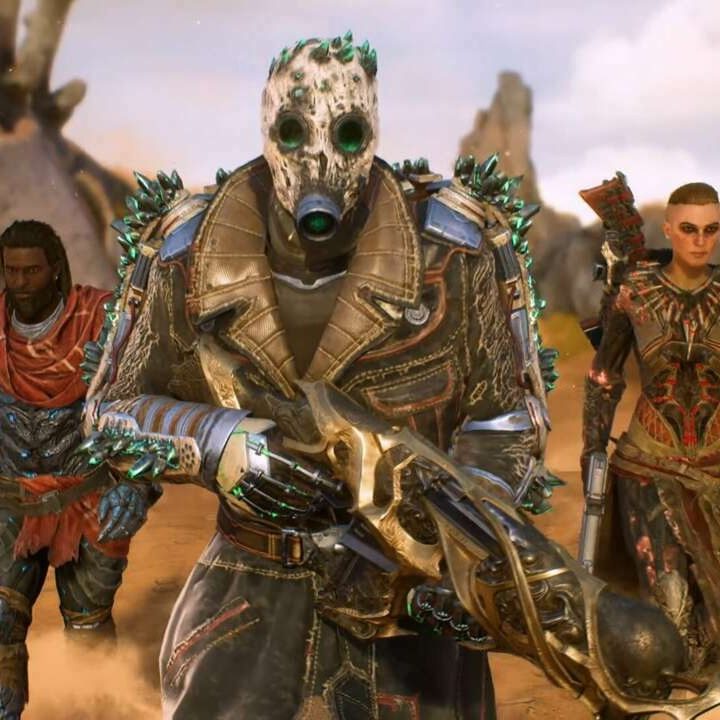
To kick off our Outriders crafting guide, let’s talk about how to unlock crafting in general. You won’t be able to craft off the bat. Progress the main story along until you meet a man named Dr. Zahedi. Once you’ve completed Zahedi’s leg of the main quest, you’ll unlock the ability to upgrade your gear and weapons at the doctor himself. Approach Zahedi in your camp and speak to him. Select the I need to upgrade my gear dialogue option to open the crafting menu.
Navigating the crafting menu
On the left-hand side of the crafting menu, you’ll see your currently equipped gear on top, followed by your complete inventory below. Select the piece of equipment you wish to upgrade to place it in the center ‘crafting’ slot. On the right, you’ll see the following list of crafting options:
Improve Rarity: Improve gear rarity to increase its primary parameter (firepower or armor) and receive an additional mod slot. You can only improve the rarity of Unusual and Rare items.
Raise Attributes: Raise the attributes of selected gear using Shards. Attributes are the passive traits of a piece of equipment between its firepower or armor and mods. You’ll use Shards to increase overall attributes. Shards, however, can be convoluted. We’ll touch on them later on.
Mod Gear: Change the currently equipped mods on a piece of gear. However, only one mod slot can be changed. Once you change one, the other locks. Be sure you’re happy with the locked mod. Mods of the same name do not stack. More on the best mods and mod combinations later.
Level Up: Raise an item’s level to increase its primary parameters (firepower or armor) and re-roll attributes. An item’s level cannot be raised above the equippable item cap. As you level up your character, your cap increases.
Swap Variant: Change the weapon’s variant to another that is currently available for this weapon type. Weapon variants unlock as you reach higher levels.
Quick dismantle
You’ll be obtaining most of your crafting materials by dismantling your unused weapons and armor. However, it can get tedious marking the items you’d like to dismantle. In the lower right-hand corner of the inventory screen, you’ll see three colored boxes: Green, blue, and purple. Click the green box to auto-mark every piece of Unusual gear in your inventory. The blue will mark all your Rare gear, and purple will mark your Epic gear. Now, go and unmark the pieces you wish to keep, then dismantle the rest.
Crafting materials: What they’re for and where to find them
There are four crafting materials we’ve deemed essential to the Outriders crafting guide. Each can be found while exploring different areas of Enoch. You’ll also find these materials when disassembling weapons, completing quests, and killing elite enemies.
Leather
You’ll find Leather more than any other piece of crafting material in Outriders. Leather drops when you are killing creatures on Enoch and dismantling armor. You’ll use Leather to upgrade your armor level, improve the rarity of Unusual items to Rare, and equip armor mods.
Iron
Iron can be obtained in a slew of different ways. Primarily, you’ll find Iron by dismantling weapons. However, Iron veins are scattered all over Enoch, identified as blue mineable markings on walls. Keep an eye out; these Iron veins can also grant coveted Titanium. Finally, you’ll find Iron as a common drop from human enemies. Use Iron to increase the rarity and level of weapons. You’ll also use Iron to equip weapon mods.
Titanium
Titanium is the most coveted piece of crafting material in Outriders. It’ll be used to upgrade Rare gear to Epic and increase the overall level of Epic gear. You can grind Titanium by mining Iron vein deposits, dismantling Epic and Legendary gear, and killing mini-bosses and Elites. Replay side quests with multiple Elite enemies to farm Epic gear and Titanium drops. Either way, you’ll be swimming in Titanium reserves before you know it.
Anomaly Shards
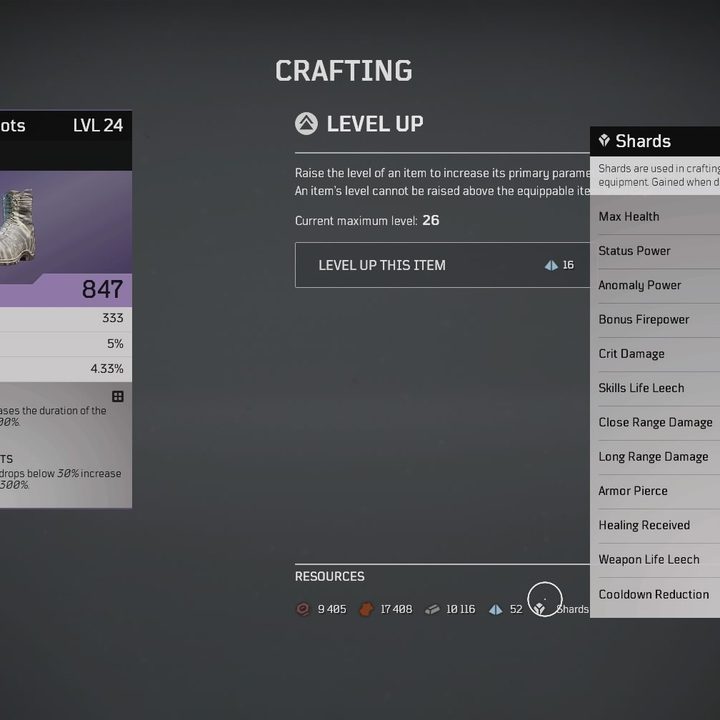
Gain Shards by dismantling weapons and armor. However, you must hover over the Shards icon in the crafting menu to pull up the full list. Shards increase weapon and armor attributes. In the Raise Attributes menu, you’ll be told how many Shards it costs to raise a specific attribute. There are 12 different attributes in total that you’ll be obtaining Shards for.
Best mods in Outriders


When it comes to choosing which mods to equip, it’s important to examine your class and play style. For example, the Technomancer will heal by dealing damage. They basically have a passive life leech effect active at all times. It wouldn’t make sense to stack more life leech mods on top of that. Instead, Technomancer players may opt for more status damage (Bleed, Burn, Freeze, etc.).
While mods of the same name do not stack, players can still manipulate mods to play off each other should they mention similar effects. Take the above images, for example. The currently equipped Outrider’s Britches are modded with Thirst for Blood. This mod buffs weapon leech by 40% when an enemy inflicted with Bleed is killed. Now, the Voodoo Matchmaker has been modded to have Bleeding Bullets, which inflict Bleed on enemies. Coupled with the Voodoo Matchmaker’s 9% life leech attribute, Thirst for Blood heals this build considerably when they shoot at and kill an enemy afflicted with Bleed. This combo proves helpful when Trickers are forced to fight from mid or long range and need to heal. Additionally, if the Pyromancer has exhausted their skills and is low on health, a life-leech boosting mod combo will come in clutch.
Most of the mods in Outriders are relative to how you play each character. Keep track of your currently equipped mods and make them work together like a well-oiled machine. However, we have compiled a few of the best weapon mods in Outriders.
Weapon mods vs. armor mods
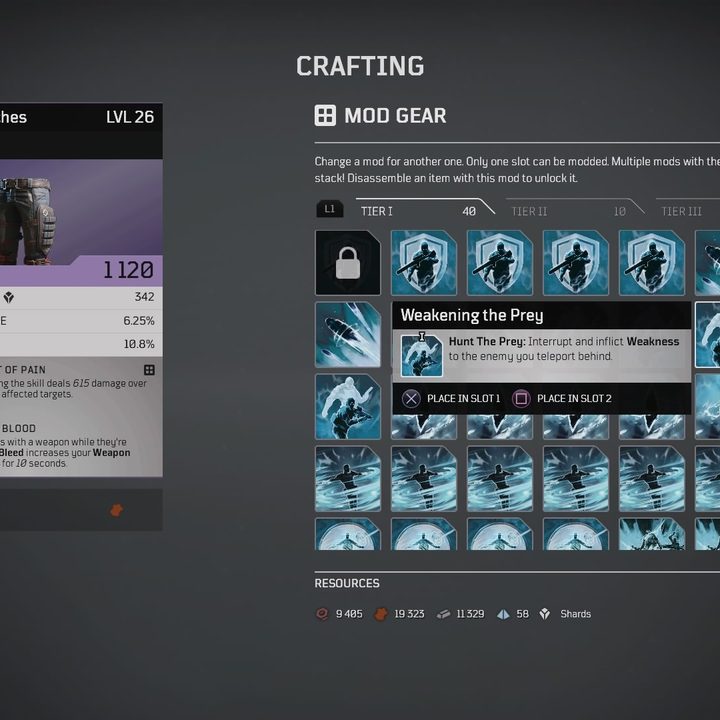
Weapon mods of all tiers can be used across all classes. Armor mods, however, vary. All tier one armor mods are class-specific. They have buffs and effects based on your class skill. For example, the above screenshot is of the Trickster’s tier one armor mod page. Tier two armor mods can be used between all classes. These are the ones you’ll be pairing with your status weapon mods to make them work in harmony. Finally, tier three armor mods can be either-or. However, you won’t be unlocking any of these until later in the game.
Unlocking new mods
You’ll find new mods to equip by dismantling gear with that mod attached. Grind mods the same way you’d grind any other piece of valuable material in Outriders: Kill Elites and replay missions on high world tiers. This increases your Epic weapon drops, thus increasing your chance at new mods. There’s no way of knowing which mods you’ve yet to unlock, as hovering over a locked mod tells you nothing. Let them come as pleasant surprises as you continue to find and dismantle gear in Outriders.
Buy or sell unused gear?
Most of your crafting needs will come from dismantling unused gear. The only thing players will gain from selling gear is Scrap. Scrap is the currency on Enoch and can be used to buy new weapons and armor from vendors. However, there is no reason to ever buy anything in Outriders until you’ve reached the endgame or soft cap. In short, dismantle everything you’re not using and stockpile your crafting material. You’ll see why below.
When to craft and upgrade
Looter-shooters like Outriders, Destiny, and Marvel’s Avengers all have identical leveling mechanics. As you progress the game, you’ll find better pieces of gear to equip to increase your overall level. It’s your Light Level in Destiny; in Outriders, it’s your Firepower, Anomaly Power, and Armor. As you equip better weapons and armor, these numbers will increase.
You’re free to craft, mod, and upgrade all you’d like in Outriders, but we advise not doing so in the early and mid-stages of the game, especially if you’re not regularly finding Epic gear. The number one rule to remember in looter-shooters is “There’s a better piece of gear in the next mission.” The worst thing players can do is fully upgrade and mod their equipped items only to find better gear around the next corner, leaving them out of valuable crafting material. Save the upgrades and mods for the endgame.
However, if you find yourself wearing counterintuitive armor that doesn’t work with your equipped weapons, it’s okay to spend a little bit of Iron or Leather to swap out mods. Iron and Leather are easy to come by; Titanium is not. Mod combos are essential for surviving higher world tiers, and higher world tiers are necessary for finding better gear.