1. Home
  2. Computing
  3. News

Lenovo’s new ThinkVision monitor comes with Thunderbolt 4 port, Ethernet jack

Add as a preferred source on Google

At its Tech World conference, Lenovo took the wraps off of three new monitors, including two new panels for gamers under its G brand and a professional-grade ThinkVision P27u-20 display with support for Thunderbolt 4.

With its ThinkVision brand, the P27u-20 comes with many features that enterprise and businesses seek, including support for 4K UHD resolution on its 27-inch screen, VESA DisplayHDR 400 certification, and factory-calibrated panels for color accuracy.
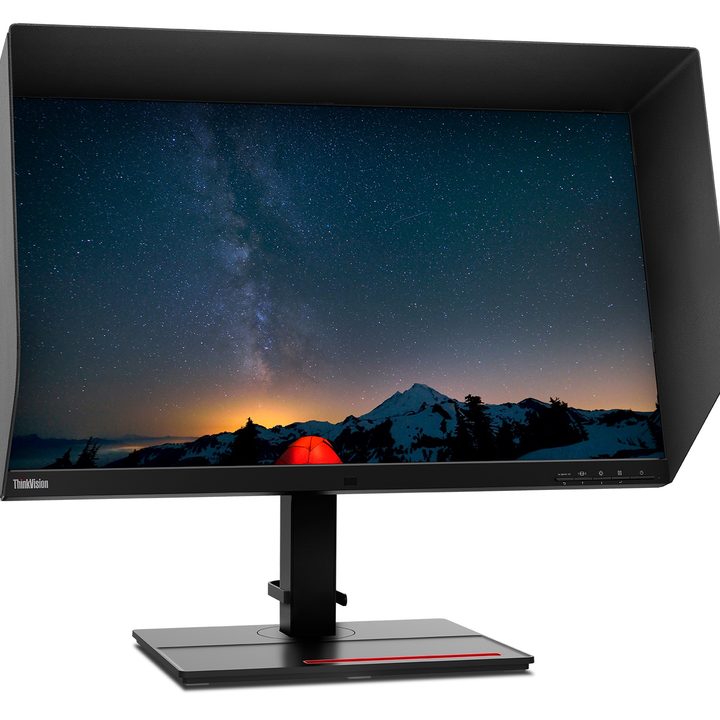
Lenovo's new ThinkVision P27u-20 monitor comes with Thunderbolt 4 support.
Image used with permission by copyright holder

The highlight of the ThinkVision is its Thunderbolt 4 port, which provides for a single-cable docking solution that allows you to connect to the display’s built-in USB hub.

Recommended Videos

The RJ45 Ethernet port is another port not commonly found on rival monitors and facilitates fast network connection, the company claims. Thunderbolt 4 support means this monitor is ready for systems sporting Intel’s 11th Gen Tiger Lake processors, as well as the next-gen Alder Lake platform.
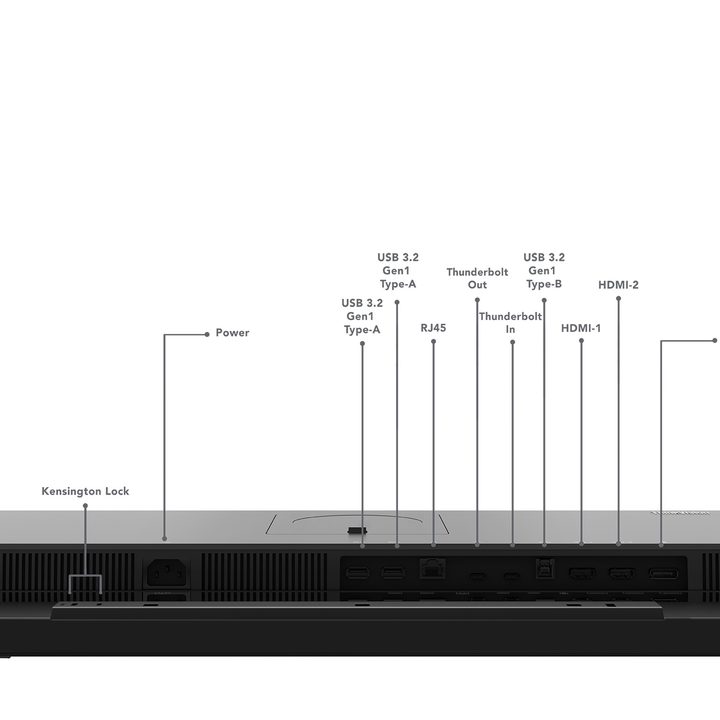
The Lenovo ThinkVision P27u-20 supports plenty of ports.
Image used with permission by copyright holder

The Thunderbolt 4 cable will also connect you to multiple USB ports on the bottom of the panel, though older desktops and laptops can also connect to the screen via HDMI or DisplayPort.

The ThinkVision P27u-20 comes with built-in speakers, which can be combined with an optional webcam for easy videoconferencing. The ergonomics of the monitor’s stand unlock support for lift, tilt, pivot, and swivel capabilities.

Lenovo G27e-20 and G24e-20
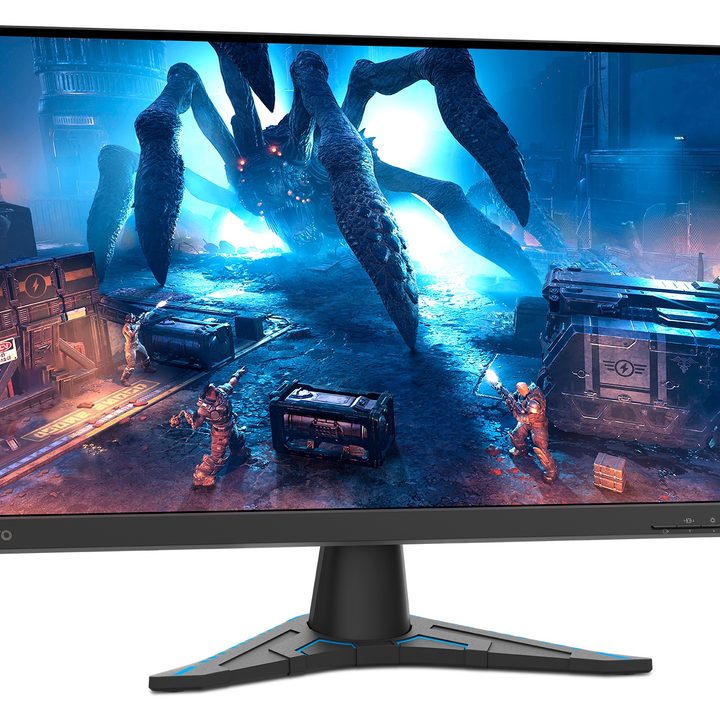
Lenovo's G27e-20 is an affordably priced monitor designed for work and play.
Image used with permission by copyright holder

The company also unveiled two new G-series monitors designed for gaming and use in homes and home offices. The company claims that these monitors, with a more discrete and understated black design, are made for college students, gamers, and young professionals. The larger G27e-20 comes with a 27-inch display, while the smaller G24e-20 comes with a 23.8-inch panel with antiglare coating.

Both panels are based on the VA screen technology, rather than IPS, and support AMD’s FreeSync for fast 1ms Moving Picture Response Time for responsive gaming and a 100Hz refresh rate that can be overclocked to 120Hz.

“VA panels use vertically aligned liquid crystals which tilt when lit to control colors and contrast shifts from multiple viewing angles,” Lenovo said. “Plus, the innovative Lenovo Artery software platform provides a simple graphical interface for users to quickly control display attributes and adjust color settings for a more comfortable experience.”
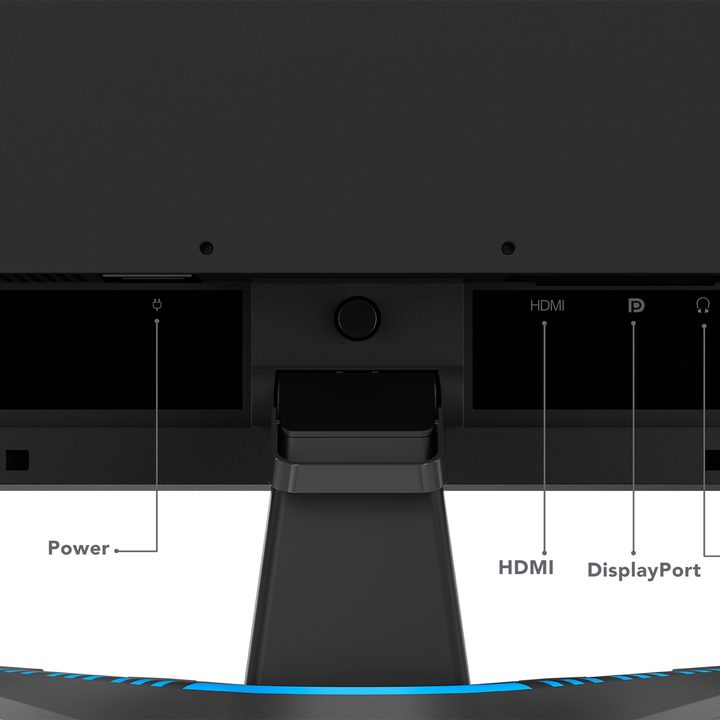
Given its price, you won't find too many ports on the back of the Lenovo G27e-20.
Image used with permission by copyright holder

Resolution is set to HD, which makes these monitors more affordable, and display brightness comes in at 300 nits. Both models also support up to 95% of the SRGB color space for color accuracy. You can connect your PC to the panel using either HDMI or DisplayPort.

Both gaming monitors will be available in October, and pricing starts at $209 for the smaller model. The larger G27e-20 will be priced at $239. For professionals, the ThinkVision P27u-20 will be available in December for a starting price of $769.


Chuong Nguyen
Silicon Valley-based technology reporter and Giants baseball fan who splits his time between Northern California and Southern…
HP has a new $799 mini PC for fans of the Mac mini form factor
The OmniDesk Mini puts Wildcat Lake inside a tiny desktop that starts at $799
HP OmniDesk Mini Desktop

HP has a new mini PC on sale in the U.S., and it is difficult to look at the machine without thinking of Apple's Mac mini. The OmniDesk Mini has a similarly compact footprint and starts at $799.99, making it $100 cheaper than the recently announced M6 Mac mini.

The similarities mostly stop there. The base OmniDesk Mini is powered by Intel's Core 3 304, a five-core, five-thread Wildcat Lake processor. It comes with 8GB of LPDDR5X memory and a 256GB SSD. HP also offers Core 5 320 configurations with up to 16GB of memory. So, despite the Mac mini-like dimensions, this is better viewed as a compact Windows PC than a direct rival to Apple's latest desktop.

Read more
Exclusive: Microsoft explains why RTX Spark’s Prism emulation is about more than higher FPS
Because an erratic 80 FPS will always feel worse than a silky-smooth 60.
ARC Raiders with Anti-Cheat Support running on NVIDIA RTX Spark Laptop

NVIDIA’s RTX Spark may pack a powerful Blackwell GPU, but its ability to run the massive library of existing PC games on Arm depends on a quieter piece of technology: Microsoft’s Prism emulator. Prism allows x64 Windows games and applications to run on RTX Spark’s Arm-based CPU without requiring developers to immediately rewrite them for ARM64.

During an exclusive conversation at NVIDIA’s private IFA 2026 demo, Microsoft’s Peter Dawoud explained that the latest Prism work isn't just about pushing emulated workloads to higher FPS. Microsoft is also focused on performance consistency, particularly in GPU-heavy games where the CPU still has to coordinate frames, physics, and rendering. Because a higher average FPS doesn't always mean a smoother experience, that could prove to be one of Prism’s most important improvements yet.

Read more
The best screenshot app for Mac just became a screen recording powerhouse
CleanShot X already made screenshots easy. Now it wants to make screen recording and editing just as painless.
CleanShot-X-version-5-running-on-Mac

CleanShot X is the best screenshot app for Mac. It's one of my favorite Mac apps, and I've already covered all its features in a previous article. The app just received its 5.0 update, and it's such a massive release that I had to write about it.

CleanShot X already had a built-in screen recording feature, but it was pretty bare-bones. With this update, the app has grown into a proper screen recording studio. You can now record your Mac's screen, edit that recording, add zooms and backgrounds, and do a whole lot more without ever leaving the app.

Read more