While the last-gen Xbox One isn’t as powerful as the Xbox Series X, it’s still a worthwhile console and has a huge library of great games.
If you’re looking to stay competitive while playing online multiplayer games versus next-gen console and PC players or are just looking to avoid some wonky console interface that’s difficult to navigate, you may want to try using a keyboard and mouse with your Xbox One. A keyboard and mouse will give you better precision than your standard Xbox One controller so you can keep up in cross-platform games without shelling out money for a top gaming PC.
These are all the games that support a mouse and keyboard on Xbox One.
Xbox One games with mouse and keyboard support
- Aery: Dreamscape
- Age of Empires 2: Definitive Edition
- Aliens: Fireteam Elite
- Among Us
- ANVIL: Vault Breaker
- Ark: Survival Evolved
- Arma Reforger
- Art of Rally
- Asphalt 9
- Astroneer
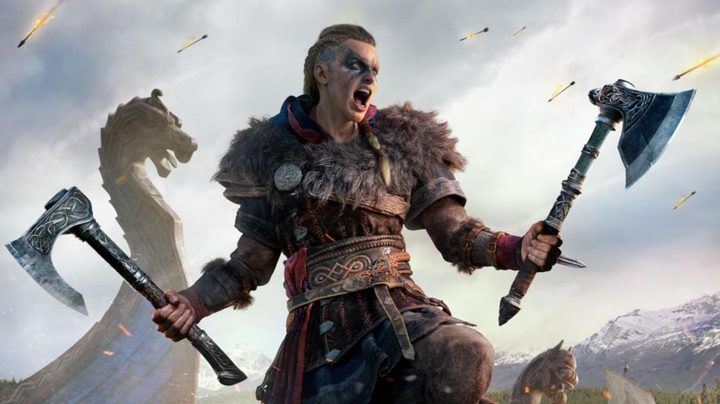
- Assassin’s Creed Valhalla
- Atlas (Game Preview)
- Atomic Heart
- Block Dropper
- Bomber Crew
- Boyfriend Dungeon
- Bridge Constructor: The Walking Dead
- Bright Memory
- Call of Duty: Black Ops Cold War
- Call of Duty: Modern Warfare
- Call of Duty: Modern Warfare 2
- Call of Duty: Vanguard
- Call of Duty: Warzone
- Call of Duty: Warzone 2.0
- Call of the Sea
- Car Mechanic Simulator 2021
- Century: Age of Ashes
- Chivalry 2
- Cities: Skylines
- Commandos 2: HD Remaster
- Craftopia
- Cyberpunk 2077
- DayZ
- Dead Space
- Deep Rock Galactic
- Deliver Us The Moon
- Destroy All Humans!
- Destroy All Humans! 2: Reprobed
- Disney Dreamlight Valley
- DJMax Respect V (Keyboard only)
- DOOM 64
- Dreamscaper
- Evil Genius 2
- Eville (Limited)
- Five Nights At Freddy’s 1-4
- Floppy Knights
- Football Manager 2022 Xbox Edition
- Fortnite
- Gears 5
- Gears Tactics
- Ghostrunner
- Grounded
- Halo Infinite
- Halo: The Master Chief Collection
- Heavy Metal Machines
- Hello Neighbor 2
- High on Life
- Hogwarts Legacy
- Horror Of The Deep
- Hot Wheels Unleashed
- House Flipper
- Hyperdot
- Hypnospace Outlaw
- Immortals Fenyx Rising
- Industria (Limited)
- Jurassic World: Evolution 2
- Kill It With Fire
- Lamentum
- Lapin
- Last Oasis
- Loot River
- Maid of Sker
- Maneater
- Medieval Dynasty
- Metro Exodus
- Microsoft Flight Simulator
- Minecraft
- Monster Sanctuary
- Moonlighter
- Moonscars
- Mount & Blade 2: Bannerlord
- MultiVersus
- Myst
- Neoverse
- Norco
- Octopath Traveler
- Operencia: The Stolen Sun
- Orcs Must Die! 3
- Outriders
- Paladins
- PC Building Simulator
- Pentiment
- Phantasy Star Online 2
- Phantom Abyss
- Pikuniku
- Planet Coaster: Console Edition
- Potion Craft: Alchemist Simulator
- Praetorians – HD Remaster
- Project Wingman
- Psychonauts 2
- Quake
- Relicta
- Remnant: From The Ashes
- Roblox
- Roboquest
- Rogue Company
- Scorn
- Sea of Thieves
- Shotgun Farmers
- Slime Rancher
- Smite
- Sniper Elite V2 Remastered
- Sniper Elite 5
- Solasta: Crown of The Magister
- Space Warlord Organ Trading Simulator
- Spellbreak
- Splitgate
- Star Wars Jedi: Fallen Order
- State of Decay 2
- Strange Brigade
- Surviving Mars
- Surviving The Aftermath (Game Preview)
- Tainted Grail: Conquest
- Terraria
- The Anacrusis
- The Ascent
- The Forgotten City
- The Gunk
- The House Of The Dead Remake (Mouse only)
- The Last Kids on Earth and the Staff of Doom
- The Medium
- The Riftbreaker
- The Sims 4
- They Are Billions
- Tokyo Warfare Turbo
- Tunic
- Undungeon
- Untitled Goose Game
- Valfaris
- Visage
- War Thunder
- Warframe
- Wargroove Double Trouble
- Warhammer Vermintide 2
- Weird West
- What Remains of Edith Finch
- World of Tanks
- X-Morph Defense
- Yes Your Grace
- Zombie Army 4: Dead War
You can play with a mouse and USB keyboard if your game supports it. First, plug the mouse and keyboard into the USB cable ports on the Xbox One. Next, go to the Settings menu and select Kinect & Devices, at which point you’ll have options for swapping button mapping and configuring the pointer speed of your mouse.
It should also be noted that both a wireless mouse and a wireless keyboard are compatible with the Xbox One.
Your gaming keyboard should work immediately after plugging it into the USB port on your Xbox One, as well, with certain game pad functions automatically mapped to keys. The keyboard commands are pretty straightforward and easy to adjust to, like using Enter as the A button and the arrow keys substituting for the directional keys on a typical game controller.
What about using an adapter?
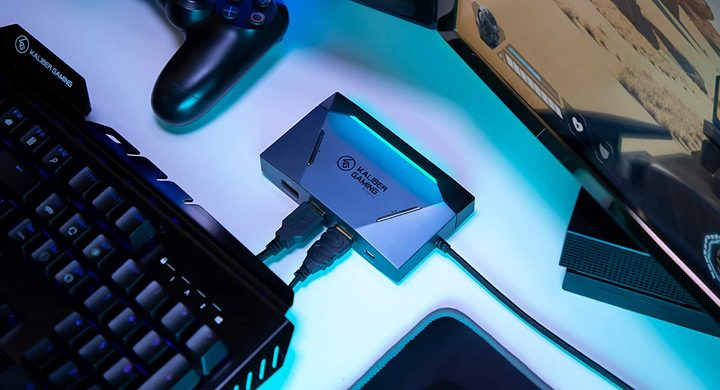
Adapters do exist to bridge support for all Xbox One games, like the IOGear Kaliber Gaming KeyMander 2. You can play all games on an Xbox console using these adapters, as long as they are compatible with your keyboard and mouse, but there’s a catch or two you may not like. The quality can deteriorate if you’re using adapters, leading to delays in gameplay. If you’re playing a first-person shooter game, using an adapter can interfere with your shooting accuracy.
Using an adapter for your keyboard and mouse may give you an unfair advantage over regular game control players, many console game manufacturers have realized. Consequently, some console games prohibit the use of adapters, while some restrict the use of mice and keyboards altogether to maintain a fair playing field for all users. Before you play a popular game that involves opponents or teamwork, test and see if you can use adapters or if the game does not support them.