


“If sheer performance is your foremost concern, you can leave this machine off your list of contenders. Fortunately for HP, the Spectre boasts plenty of other reasons for us to recommend it.”
- Beautiful design
- Great display
- High-end feature set
- Generous and genuinely useful software bundle
- Expensive
- Glass likely to shatter if dropped
- Heavy for its size
- Fan turns noisy under load
“Why you can trust Digital Trends – We have a 20-year history of testing, reviewing, and rating products, services and apps to help you make a sound buying decision. Find out more about how we test and score products.“
Rahul Sood founded Voodoo PC in 1991 and quickly grew the boutique manufacturer into an iconic brand, producing a number of trend-setting desktop and notebook PC designs. HP acquired Voodoo — and Sood’s services — in 2006, probably in the hope of combining Sood’s money-is-no-object design ethos with HP’s global manufacturing presence to produce boutique-style machines at mass-market prices. It never really happened.
The first ultraportable to emerge from the collaboration—the Voodoo Envy 133—was a carbon-fiber beauty; unfortunately, it was widely panned for being underpowered and way too expensive. Sood and HP parted ways two years later, and HP now seems to have dropped the Voodoo brand altogether. Looking at the Envy 14 Spectre, however, we can see that some of Sood’s juju lives on in at least one little corner of HP.
Design
The Envy 14 Spectre is a beautiful machine that could easily be mistaken for Apple’s MacBook Pro when it’s open. But you’ll never confuse the Spectre for Apple’s notebook when it’s closed, because HP has encased the entire top of the lid in Gorilla Glass. And when you look closer at an open Envy, you’ll discover the same material covering the entire wrist rest. You might think this would render this ultrabook as fragile as an unprotected iPhone, but HP maintains that it’s actually more resistant to scratches than an aluminum shell. Dropping any portable computer is bound to result in trauma, but a device enveloped in glass will suffer compound damage. Then again, perhaps it would just remind you to handle the machine with care.
The glass certainly renders the chassis extremely rigid, but it likely contributes to its weight, too. At 4 pounds, 0.8 ounces (4 pounds 13.8 ounces when you factor in the power supply), the Spectre weighs nearly as much as a MacBook Pro (4 pounds 7.8 ounces, or 5 pounds 0.4 ounces with its power supply), which includes an optical drive that the Spectre does not.
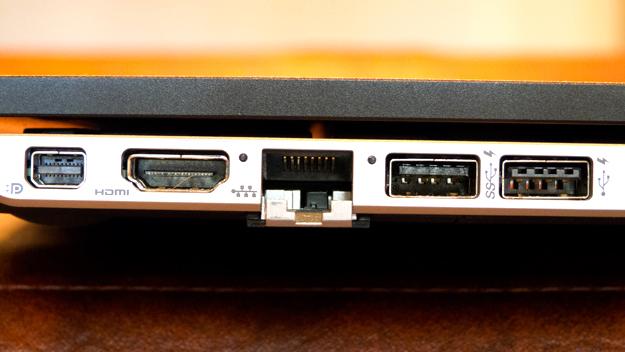
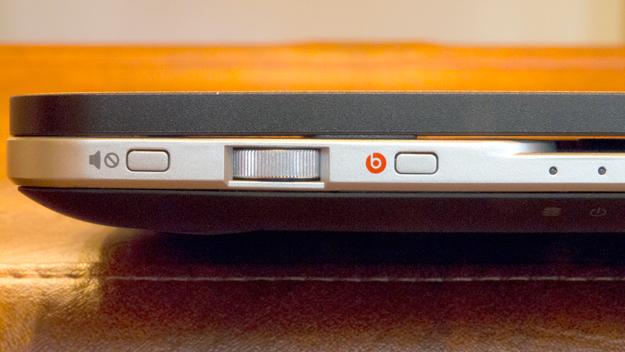
HP does manage to cram a complete array of ports into the Spectre’s thin form factor (it measures just 0.79 inches high when closed). On the left side, there’s both a Mini DisplayPort and full-size HDMI, two USB ports (one of which is USB 3.0), a memory card reader, and gigabit Ethernet (the port is ingeniously hinged to shrink its profile when it’s not in use). The right side harbors the connection for the power supply and an honest-to-goodness analog volume control (this is one of those few situations where analog is vastly superior to digital). Two buttons flank this thumbwheel: One toggles HP’s BeatsAudio on and off, and the other mutes and unmutes the sound.
Keyboard and trackpad
Each key on the Spectre’s keyboard is backlit by an individual LED, and the light shows through just the letter on the key. The backlight automatically dims when you’re away from the computer, and it comes back when you approach. This is not only a cool feature, it preserves battery life, too. We like the look very much; more importantly, we like the way the keyboard feels under our fingers. The keys don’t travel far, and they hit home with a satisfyingly solid thud. They’re spaced just far enough part that we were able to touch type quickly without making a lot of mistakes.
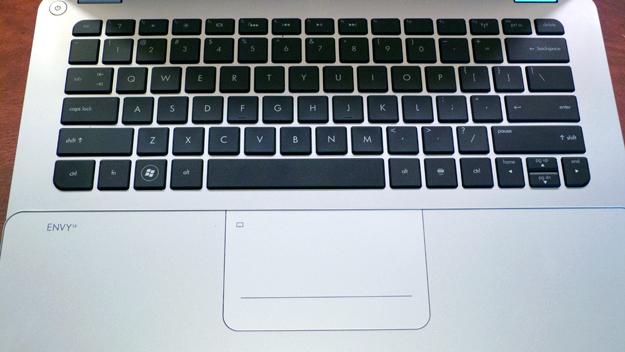
Like the wrist rest, the Spectre’s trackpad is covered by glass. Fortunately, it doesn’t seem to interfere with the trackpad’s performance. The pad responds to taps as well as button presses, and it distinctly recognizes one-, two-, and three-finger strokes. You can use two fingers to scroll a page, for example, and you can pinch to zoom. The bottom quarter of the pad has embedded right and left mouse buttons.
Video quality
We’ve seen enough crappy TN panels on laptops to last us a lifetime. Why do so many manufacturers cheap out on the one component their customers will stare at for as long as they own the product? While HP didn’t go whole hog and build an IPS panel into the Spectre, they did find a glorious TN panel. Colors are rich and faithful with very wide viewing angles. The unusually wide 14-inch screen boasts maximum resolution of 1400 x 900, but the Spectre can send a 1080p video to a TV through its HDMI port or wirelessly to an HDTV with Intel’s Wireless Display technology.
You can also stream audio wirelessly to any speakers sporting SMSC’s KleerNet technology. We didn’t have any such speakers on hand to test this feature, but we’ve been impressed with other KleerNet implementations. It’s a handy feature if you have the right speakers, and having it built in means you’ll never need to plug in a USB dongle to use it.
Audio quality
The Spectre is outfitted with a pair of stereo speakers and a subwoofer, and they actually sound pretty good. You wouldn’t want to use them during a party, but they won’t chase you out of the room with your hands over your ears. You’ll get a much better experience with external powered speakers or set of good headphones (we used B&W’s P5 for our evaluation). We don’t know if HP purposely cripples its standard audio to make BeatsAudio sound better, but a MacBook Pro sounded just as good with headphones as the Spectre did with BeatsAudio enabled. With that sound processing disabled, the Spectre sounds positively lifeless.
Performance
Under the hood, the Envy 14 Spectre looks identical to Ultrabooks from Acer (the Aspire S3 series), Asus (the Zenbook UX21 series), Dell (the XPS 13 series), and several others. Like those machines, this one is powered by Intel’s Core i5-2467M CPU, which runs at 1.6GHz, and it’s outfitted with 4GB of DDR3 memory and a 128GB SSD. This is a mid-range CPU with a relatively weak integrated GPU, so if you’re looking for something to play games on, this isn’t your candidate; in fact, no current Ultrabook will fit that bill. Intel’s new Ivy Bridge series feature a much stronger, DirectX 11-compatible GPU, but Ivy Bridge Ultrabooks aren’t expected to reach the market until early June.
In terms of benchmark performance, the Envy 14 Spectre is no barn burner. The SiSoft Sandra Processor Arithmetic test returned 28.09 GOPS, which puts it slightly ahead of the Acer Aspire S3 (27.2 GOPS), but far behind Toshiba’s Portege Z835 (35.3 GOPS). 7-Zip, our other CPU benchmark, told a similar tale. The Spectre scored 5,773 MIPS, compared to the S3’s 5,623 MIPS and the Portege’s 7,543 MIPS.
Intel’s HD Graphics 3000 GPU doesn’t support DirectX 11, so we stepped back to 3DMark 06 to evaluate its graphics prowess. The Spectre scored a relatively low 3,451 3DMarks on this metric, indicating it will have trouble playing hardcore games. If that’s a deal-breaker for you, and you still want an Ultrabook, look for a model with a discrete GPU (Acer’s Aspire Timeline Ultra M3, for instance). This benchmark revealed one major negative: The Spectre’s fan becomes surprisingly loud when the system is under load. The machine is otherwise quiet as a tomb.
Conclusion
None of the competitors mentioned above is as drop-dead sexy as the Spectre, they all have smaller displays (with the exception of the Ultra M3), and none have integrated media-streaming features. On the other hand, each one of them is less expensive (by several hundred dollars, in some cases), and several are considerably faster than the Spectre.
If sheer performance is your foremost concern, you can leave this machine off your list of contenders. Fortunately for HP, the Spectre boasts plenty of other reasons for us to recommend it. Audacious style sits atop of that list, but that exquisite 14-inch display, fantastic keyboard, integrated media streaming, and generous software bundle (including Adobe Photoshop Elements, Adobe Premiere Elements, and a two-year subscription to Norton Internet Security) follow closely behind.
Highs
- Beautiful design
- Great display
- High-end feature set
- Generous and genuinely useful software bundle
Lows
- Expensive
- Glass likely to shatter if dropped
- Heavy for its size
- Fan turns noisy under load


