  1. Home
  2. Mobile
  3. Emerging Tech
  4. Legacy Archives

Crowdfunding to make crazy smell-o-vision accessory the oPhone a reality in June

Add as a preferred source on Google

Are you ready to send and receive messages which use scents instead of words to convey their meaning? You better be, because the technology to do so is almost here. It’s called the oPhone, and along with an app called oSnap, a new world of smell-based communication is upon us. We first took notice of the oPhone at the start of 2014, when it was little more than an art project, albeit a very cool one. Now, the company has released new information about the system, and confirmed its impending arrival on the Indiegogo crowd-funding website.

Here’s how it will work. The oSnap photo app will be available to download for iOS from June 17, and it’s here where you’ll be able to create an oNote, which is your scented message. Once you’ve taken a picture with oSnap, instead of adding a hashtag or other word-based message, you add a scent. The app contains 32 different smells, and it’ll be possible to combine up to eight at one time, giving a grand total of 300,000 different smells. Once you’ve finished stinking it up, the message can be shared by email or through social networks.
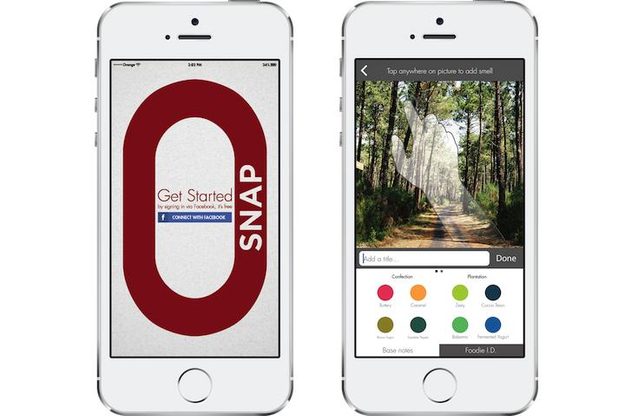
oSnap oPhone App
Image used with permission by copyright holder

Now comes the hard part, because at the moment, your iPhone can’t reproduce the smell of an oNote. You’ll be able to check out the message and attached smells using the onotes.com website, but to actually breathe it in, you need the oPhone accessory itself. At first, you’re going to have to make a real effort to get a whiff of your oNote, because the only public oPhone available for use will be in Paris. Handy if you live there, not so much if you’re a few thousand miles away. Other public oPhone experiences will open up during the year, including one in Cambridge, Massachusetts.

Recommended Videos

If you want an oPhone of your own, you’ll need to look out for the Indiegogo crowd-funding campaign which starts on June 17, and will run to July 31. An oPhone accessory will cost $150 to pre-order, with deliveries expected to take place early next year, which is slightly later than originally expected. If you really want one, buying it through Indiegogo will save you $50 off the standard $200 retail price.

The oPhone is described as the world’s first scent-based messaging platform. The question is, are our noses ready to be assaulted with whatever concoction our friends cook up?


Andy Boxall
Andy has written about mobile technology for almost a decade. From 2G to 5G and smartphone to smartwatch, Andy knows tech.
Snapchat Planets Meaning: Order, Rankings, and How Friend Solar System Works
Snapchat Planets turns your best friends list into a solar system, and yes, your orbit says a lot
Snapchat Planets being shown on the Snapchat app on iPhone.

Snapchat+ includes several exclusive features, but few have generated as much curiosity as Snapchat Planets. Part of the app's Friend Solar System, it transforms your Best Friends list into a planetary ranking, assigning each of your top eight friends a planet based on how often you interact.

From Mercury, which represents your closest friend, to Neptune, which represents your eighth closest, the system offers a quick visual snapshot of your interactions. But what do the different planets actually mean, and how does Snapchat decide who gets which one?

Read more
How to use WhatsApp Web
We'll show you how to use WhatsApp on your desktop or laptop
WhatsApp Web

As one of the most popular messaging services, you’ve already heard of WhatsApp. From its humble beginnings in 2009—two years before Apple introduced iMessage—to its acquisition by Facebook (now Meta) in 2014, WhatsApp has become the dominant messaging platform around the globe.

In recent years, it's grown even more potent with new features like video messages, self-destructing voice messages, the ability to edit sent messages, and more. We even finally got an WhatsApp iPad app in May 2025.

Read more
What is WhatsApp? How to use the app, tips, tricks, and more
From setting it up to mastering hidden features, here is your complete guide to WhatsApp.
WhatsApp app store listing open on iPhone

There's no shortage of messaging apps out there. The past decade has given us more options than we know what to do with, largely because smartphones demanded something better than plain old SMS.

Both the App Store and the Play Store are packed with apps that promise to revolutionize the way we communicate. Most of them didn't make it. The truth is, a messaging app is only as good as the number of people using it, and most apps never cross that threshold.

Read more