

One of the things that appears clear from some of the changes at Microsoft is that Steve Ballmer is pulling down some of the traditional siloes, and forcing groups to work together more closely. On stage at CES, Steve showcased four products, Windows 7 with an ARM future, Windows Phone 7, Xbox Kinect, and Surface. While he didn’t specifically talk about the new Windows 8 (the name for the next generation of Windows has not yet been decided), the proximity of these technologies has many of us wondering whether Windows 8 could be the Mother of all Microsoft OS offerings.
This is purely speculative, as none of what we’ll be covering has been announced. Let’s have some fun thinking about the next version of Windows today.
 Embedded Xbox
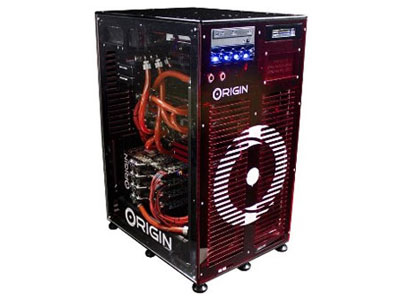
When the latest version of Xbox first came out, it was a powerhouse of technology, but over the last four years there are relatively low cost PCs that could easy outperform it. Microsoft has a huge virtualized system push, and because the money in a gaming system is in game and accessories subsidies not in selling hardware, you would think that the firm would have created a Virtualized Xbox experience for the PC. In fact, Microsoft does have an Xbox experience Windows Phone 7, and while it doesn’t play the same games, the company didn’t bring out a dedicated hand held gaming platform. So, might Microsoft not revisit what it did with the PC, and bring it more in line with what it’s doing for Windows Phone 7 and the Zune MP3 players?
You might think this was a long shot, but one of the product features at CES was the Origin gaming PC which has an integrated, wait for it, Xbox inside. This is one cool system in that all core components, including the Xbox, are watercooled. They went on for some time about why both gamers and professionals liked the idea of an Xbox and a PC in the same box. It could have been a hint of things to come.
Kinect
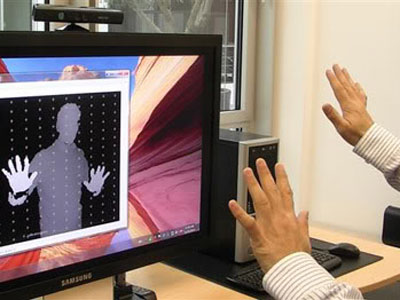
Touch on PCs has never been a very good way to interface with them, largely because on a desktop PC, the issue is the separate monitor and the lack of touch-enabled monitors. On laptops, pushing on the screen tends to cause the laptop to tilt back, leaving the most successful use of touch to tablets so far. But Kinect doesn’t require you touch anything, and folks are already experimenting with Kinect on PCs for people with disabilities, and making a lot of progress. It would be a relatively inexpensive additional interface, with clear advantages where PCs are used for presentations or gaming. It would be particularly for manipulating 3D objects, like for CAD/CAM, architecture, or hardware design. This interface could prove to be superior to the alternatives.
This may seem like a stretch, but Steve Ballmer actually said this was coming.
Surface
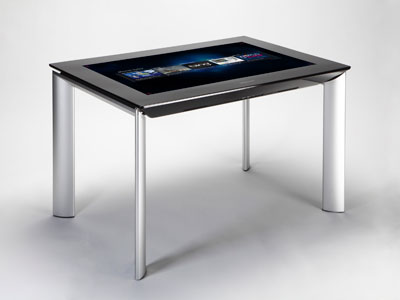
The new Surface product is incredibly cool, and it was one of two products I’m actually going to try to buy this year. I’ll let you know how that goes. However the new Surface uses a next-generation LCD screen as both camera and display. Each pixel is also a camera, and the surface of the display is one massive sheet of Corning Gorilla Glass. I got a chance to play with one (which is now why I want to buy it) and chat with the Surface folks. Like any LCD, this panel can be made in any size, and because the interface is camera-driven, not touch-driven, the need to press on the screen is reduced. In addition, the overall touch experience is not only vastly improved, the overall product is vastly more resilient to damage.
This could be the beginning of the touch interface for Microsoft’s answer to the iPad.
Windows Phone 7
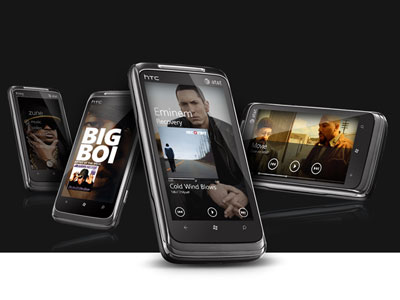
That gives us two physical interfaces, but what will the screen look like? Given Microsoft updated the Zune interface for Windows Phone 7, and this new phone interface is getting a substantial amount of positive coverage (both because it doesn’t copy Google’s copy of iOS and because it is very intuitive), might it not be the baseline for Windows 8’s interface? I do think that Microsoft has learned its lesson: An interface that goes from a small screen to a big one and visa versa needs to change dramatically, so I’m not expecting it to be identical.
Given Apple is rumored to be taking design elements from the iPhone and iPad, and driving them into the new version of the MacOS, it seems logical that Microsoft would do the same. This would create an OS with a far flatter architecture, and one that was vastly easier to navigate to both new and old features, and otherwise wouldn’t be found or used. If you think this is farfetched, remember that Microsoft did announce it was moving Windows, at least partially, to ARM, and that is the neighborhood where Windows Phone 7 lives.
Wrapping Up
Microsoft hasn’t brought out a version of Windows that represented the entire company since Windows 95. After that version, Windows was dropped into a large Microsoft division, and the power of the company behind it was far reduced, even as Microsoft itself became far more powerful. It looks to me like Windows 8 may be able to pull technology from across Microsoft, which could make it the most powerful offering that Microsoft has ever brought to market. It is already breaking a tradition and going to be moving to ARM, which was a huge surprise, and I expect many more over the next few months as we learn about this new OS.



