Viruses, malware, and ransomware pose an ever-present threat to modern internet users. That’s why it’s more important than ever that you know how to back up your computer. Making sure all of your most important files and folders are locked away somewhere safe means that should disaster strike, you have a plan to restore everything to how it was before.
Backing up your system need not be daunting. There are many ways of doing it. Some are more effective than others, but none are overly complicated. So if you’re looking to make sure your most important digital files, folders, photos, and documents are well protected, read on to discover the best methods for how to back up your computer.
If you’re looking to learn how to back up your Mac or iPhone, we have a guide to iCloud backups, too. This guide is, however, focuses on Windows backup solutions. If that’s you, read on!
Do also check out our guide to the best external hard drives and cloud storage solutions. These two guides will be handy as you move along with these steps.
Explaining local backups
While there are benefits to backing up your files and folders in the cloud, there are many benefits to backing up locally, too. Local backups take less time, aren’t susceptible to network outages, and are certain to retain your privacy. Only you can access the information you back up because nobody else can connect to it.
That said, although you can simply drag and drop your most precious digital assets onto a secondary drive, there are a number of utilities that can make the job a lot easier for you.

Windows 10 and Windows 11 File History
Microsoft is one of a few major tech companies on the front lines of protecting digital assets, and it does so in a number of ways. Beyond making sure that its regular updates protect millions of users, it also implements a number of safety and security features into Windows itself. Although they don’t cut the problem off at the source, Windows’ built-in backup utilities are some of its most important.
Windows 10 and Windows 11 users will be able to make use of File History for general backups (and it can even help you reinstall Windows itself). It allows you to schedule regular backups of your files to another drive. That means you’ll need either a secondary storage drive — hard drive or solid-state (SSD) — in your PC or externally. Drives located outside of your PC are safer, as they are less likely to be susceptible to any problems your PC itself faces.
Step 1: To access File History on Windows 10, navigate to the Update and security menu within Windows settings or search for "file history" in your Taskbar and click Backup settings. On Windows 11, you can search for it in the Search box and then choose the option, taking you to the control panel.
Step 2: To begin, plug in an external hard drive, click Add a drive, and choose the one you want to handle your backed-up files from the list that pops up. You might also have to turn File history on if it has never been used before.
Step 3: If you want to leave things up to Windows to handle from there, you’re done. However, if you want to be a little more hands-on, head back to that same Backup menu and you’ll see things have changed a little. There’s now a new toggle switch to have backups take place automatically or not.
Step 4: Although leaving automated backups enabled means you don’t need to worry about the backups yourself, you can trigger them manually if you so choose. There are also a number of settings you can tweak if you click the More options blue link.
On the following screen, you’ll be presented with an overview of your backup. It will tell you its current size (it will be at 0 bytes if just enabled), the total space of your storage drive, and the current status of your backup. You can choose the frequency of automated backups and how long they remain, and you can even have older backups automatically deleted to save space.
Most crucially, you can choose what files and folders are backed up by File History.
The folders that File History backs up without your say-so are ones found in your personal documents — folders like your saved games, downloads, contacts, desktop, and pictures, among others. You can add new files and folders to that list yourself and specifically exclude folders if you don’t want them to be backed up. From that menu, you can also restore files from a current backup and change the storage drive you’re using.

Free third-party backup software
Although there are a lot of third-party backup programs out there, one that consistently tops the list of best backup software is the EaseUS ToDo Backup. Although it does offer home and professional versions which must be paid for, the free version has a lot of great features that make it a worthy recommendation.
Just watch out for some of the bloatware during installation. Make sure to untick all boxes as you go.
ToDo Backup is a clean and intuitive piece of software with plenty of options available. You can backup individual files or opt for a full-disk backup solution if that’s what you’re looking for. Here’s how to get started:
Step 1: Click the System backup option on the main page, and you’ll be taken to a new panel that asks you for some specifics.
Step 2: Choose the drive you want to backup from and the drive and folder you want to backup to.
Step 3: Using the optional links at the base of the panel, you can make additional choices, like whether you want the backup to be scheduled, automatic, or manually triggered. There are also options for encryption to obfuscate your files, how fast you want the backups to be, and whether you want notifications of their completion, among others.
Step 4: Whichever ones you pick, once you hit proceed, you’ll be taken back to the main page and given a progress bar, giving you all the information you need about your ongoing backup, including when it will finish.
Step 5: For those who want them, ToDo Backup has a number of more advanced options, letting you clone partitions and whole systems, select specific files and folders for backup, create emergency discs, and more. You can dig into all of that if and when you become more interested in the specifics of backups, but know that with the basic options, ToDo Backup offers everything you need.
Remote cloud backups
Backing up your files or folders to an entirely different part of the world is a great way to protect your important data. It means that even if your PC fails or is stolen or your home is destroyed, your information will be protected. Better yet, it puts the responsibility of backing up your data and protecting that data in the hands of professionals.
There are some privacy concerns with this solution, especially when you consider some of the hacks we’ve seen in recent years. However, if you observe proper practices with strong passwords and avoid potential phishing links, most of those pitfalls can be averted.
If you’re looking for a simple remote drive to store a few files, Microsoft’s OneDrive offers 5GB of free space with no strings attached. If you subscribe to Microsoft 365, though, you'll get 1TB of storage, which includes access to a File Vault and backing up critical files on your PC. Our guide to OneDrive has more on this.
Google Drive has free storage plans for up to 15GB of space, while Mega offers up to 50GB and automatic encryption. Deego offers the most we could find at 100GB. However, all of these apart from Deego are more for storage than they are for backups, and none of them feature some of the scheduling and automation tools that make backups simple.
While the above will get you started with remote backups and work well for a few files or folders that you wish to manually backup on occasion, if you’re serious about saving your important data somewhere remote, we recommend paying for it. The service you get is far superior.
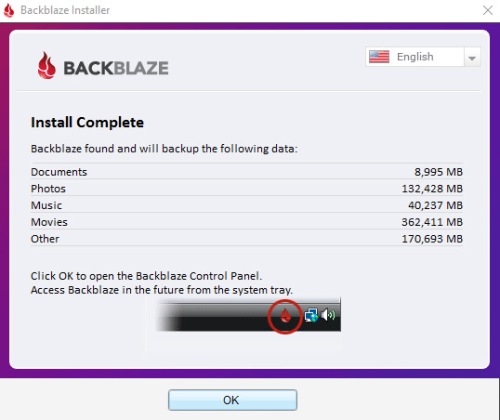
Although there are many different cloud backup providers with different feature sets, storage plans, and pricing options, one that finds its way to the top of almost everyone’s recommendation list is BackBlaze. As one of the few applications out there offering unlimited storage space at a relatively low cost of $50 a year or $5 a month, it’s our recommended commercial cloud backup solution.
The personal version of the software comes with a 15-day free trial, so you can have a play with it first if you’re unsure, and you can manage your backups through the local software or online account. All backups are encrypted as standard, and there are options for an additional passphrase to hide your private key should you want extra protection.
Step 1: To get started, download the free trial from BackBlaze’s website and install it like you would any other piece of software.
Step 2: Once it’s ready, it will link up the account you created and automatically select files and folders it believes are worthy of backing up. Clicking OK begins the process and takes you to the simplistic control panel, where you can make adjustments of your own.
Step 3: Within the Settings menu, you can change the name of the computer you’re backing up, which drives you want to back up from (including external sources), how fast you want the backup to be, and any particular exclusions you want.
Step 4: The only caveat with BackBlaze is that files 4GB in size or larger are not backed up automatically. You can, however, back them up manually, so make sure you do so if you have a number of particularly large files.
Another neat feature of BackBlaze is that, while you can download all your data from its remote storage, you have other options. For a set fee, BackBlaze can send you a hard copy backup of your files on a pen drive or hard drive.
While the backup solutions listed above are great in their own right, we always recommend at least two backup solutions for your most important files and photos. In an ideal scenario, three backups are best, utilizing at least two different storage mediums: one offsite, one offline, and one using a different storage platform altogether.
Although not many people subscribe to this stringent method of protecting their files, it’s a sure-fire way to guarantee that whether your house burns down, the power goes out at your remote data center, or electromagnetic interference hits your neighborhood, your digital information is safe and secure.
Editors' Recommendations
- How to check the storage space on your Mac
- How to choose an external hard drive
- How to create folders and move files in Google Drive
- How to change your Zoom background on Mac and Windows
- How to back up Windows 11 and keep all your data safe