Clinging to a heavy DVD or Blu-ray collection can make for some trying times when your collection grows too large. What if you have to move? After all, finding a place to keep hundreds (or thousands) of discs and cases is hard work, as is keeping all your discs in tip-top shape while making the move.
Thankfully, for those of us willing to part with some of our lauded physical media, there’s another option — digitizing, or “ripping,” your DVDs and Blu-rays to a home computer. The process itself is fairly straightforward, but it involves some hardware, software, and a bit of patience. To help you transcode your enormous collection of flicks, we’ve compiled this how-to guide.
Warning
Technically, if the work is copyright protected, it’s illegal to do so, even if you own it. To be clear, we do not condone or encourage the unlawful ripping and/or reproduction of copyrighted materials. That said, if you’ve got home videos (or, really, anything that’s not copyrighted), you’re free to do whatever you want with them, and that includes digitizing them.
See more
- How to fix a scratched DVD or CD
- How to convert your vinyl to a digital format
- Best 4K Blu-ray players
What you need to rip a DVD or Blu-ray and what to know
We've listed above the items you need, but here are more details:
Your DVD or Blu-ray(s)
A DVD or Blu-ray disc drive on your computer — You won’t be ripping anything without one. If your computer lacks the proper disc drive, an external DVD or good Blu-ray drive can be purchased for as little as $25.
Enough storage on a hard drive to save the ripped files — Blu-rays can take up a large amount of storage, so we recommend you have 30GB-60GB of free hard drive space if you’re looking to rip one.
A program to rip the files — We’ll be using MakeMKV in this guide, which is available for both Windows and MacOS.
A program to transcode the file after it’s ripped — We recommend Handbrake, which is also available for both Windows and MacOS.
A VLC media player to watch your video
How to rip a DVD or Blu-ray with MakeMKV
Whether you’re using Windows or MacOS or ripping a Blu-ray or a DVD, the process is identical for all of them.
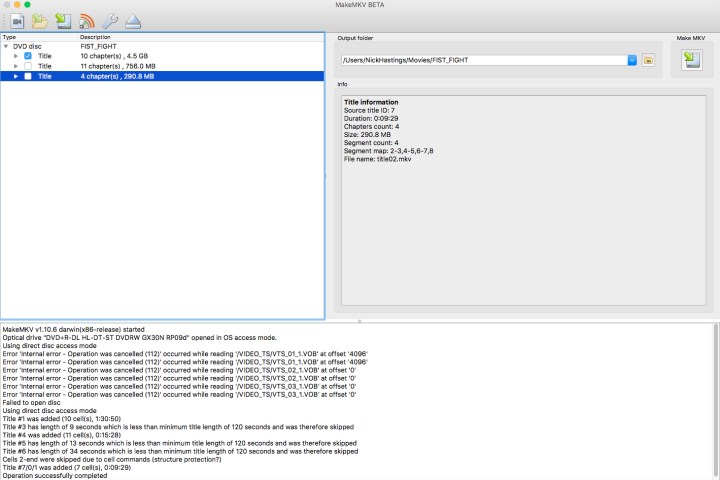
Step 1: Download and install MakeMKV, and open the application once completed.
Step 2: The app will say “MakeMKV BETA” at the top — ignore this and insert your DVD or Blu-ray into the optical drive.
Step 3: Once the program recognizes your disc, click the big disc drive icon to begin the ripping procedure. Theoretically, this process could also remove copyright protections from a disc, but again, that’s not something we condone or encourage.
Step 4: After you’ve selected your disc, MakeMKV will return a list of chapters and segments that you can rip. To rip only the movie and not extras or bonus material, select only the movie chapter or segment (usually the longest title or biggest file) and uncheck all the other boxes.
Step 5: Designate an Output Folder where you’d like the file to end up once it’s been ripped.
Step 6: When you’re all ready to go, hit the Make MKV button on the right. This process can take anywhere from two minutes to half an hour depending on your computer’s specs and the size of the file, but when it’s done, you should have an MKV file waiting in the specified folder.
Exceptions
In some cases, you don’t even need to convert this file, as MKV files are compatible with the desktop and mobile versions of VLC, as well as Plex’s media server. If those are your primary methods for watching videos from your library, you can stop here. Still, it may be advisable to convert these files to save space. Blu-ray files, in particular, tend to be massive. That’s why you’ll want to employ a transcoding program, which will minimize file size and/or play the file on multiple devices.
A note on 4K Ultra HD Blu-ray discs
With 4K increasingly becoming the standard for both movies and TV series, many of you are likely amassing a whole new collection of Ultra HD Blu-rays. Many of these movies come with digital copies, but what if yours didn’t, or what if you simply prefer an alternative delivery system to the apps these codes require?
One of the biggest things you’ll need should you decide to embark on this achy journey is patience. If you’re looking to rip a 4K Ultra HD Blu-ray disc, it’s possible, but be prepared to spend precious time troubleshooting any weird issues that may arise. As good as MakeMKV has gotten over the years — it now supports thousands of UHD discs — there are still lingering issues with certain combinations of disc drives and firmware, and not all Blu-ray discs are created equally.
Just because you successfully ripped your copy of Star Wars: Episode IV doesn’t mean you’ll have the same result with a comparable copy of The Dark Knight. Some of you may run into trouble extracting HDR data and finding the formula to crack proprietary codecs like Dolby Atmos, which has proven to be a substantial hurdle.
If you’re prepared to deal with all of that, just remember that we’re still in the early days of this, so it isn’t exactly easy, even for those familiar with ripping other discs. First, you need a specific 4K Blu-ray drive to rip these discs, and chances are you don’t own one. There might also be a few extra advanced steps to go through, like creating a text file with the decryption keys in it or downgrading the associated firmware.
Ultimately, this may prove to be more trouble than it’s worth, but if you’re unshaken after all these warnings and decide you want to forge ahead with ripping your 4K Blu-ray discs, see the MakeMKV forums for more information. The UHD FAQ thread, in particular, is a good place to start.
How to transcode with Handbrake
After you’ve successfully ripped your DVD or Blu-ray, you’ll likely have a large file that needs to be transcoded for use on different devices. Before transcoding, however, it’s a good idea to make sure your video looks OK. We suggest using VLC to do so.
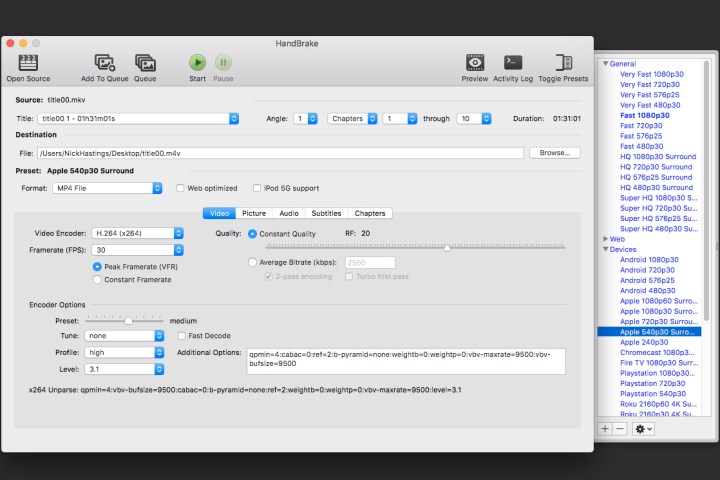
Step 1: To get started, install and open HandBrake (which you can get here for free), click on Source in the upper-left corner, and find the file you just ripped.
Step 2: Now you get to decide where you want to watch your video. The app’s developers have already created presets for lots of products.
Step 3: There are a few different options for iOS and Android devices, as well as Sony and Microsoft consoles, in addition to several streaming devices. You can also modify any of these presets and save them with new names or create custom presets from scratch.
Step 4: Selecting one of these presets will automatically adjust all the settings to fit whatever you choose.
Use HandBrake to resize files
You can also use HandBrake to resize files.
Step 1: If you’ve got a huge MKV file, for instance, you can choose a preset under the “Matroska” subset (MKV stands for Matroska Video) and run the program to shrink said file down.
Step 2: If you’re transcoding a Blu-ray disc, the process works the same way, but you’ll want to select different settings to avoid any unnecessary compression and to preserve the video quality.
Step 3: For DVDs, there’s no reason to select a resolution above 480p. This will just increase file size without boosting quality. For Blu-ray discs, you’ll want to choose between 720p and 1080p — to save space, we recommend selecting 720p for anything that won’t take advantage of full HD. For videos with more visual substance, it’s probably worth choosing 1080p.
Step 4: Generally speaking, the “High Profile” preset — located in the Legacy subset — is a good place to start, with passthrough audio codecs selected (pick an HD audio option for lossless, if that’s your bag) and a Constant Quality value of RF 18 or so. This is mostly personal preference, so you should experiment to find out what works best.
Step 5: Once you’ve settled on the desired output, choose a file destination and click Start.
Step 6: This part will take a while, so sit back, relax, and let HandBrake do its thing. Once the process is complete, you’ll have a new file ready for playback on your chosen device. This process is repeatable, too.
Step 7: If you have several different devices, you can simply change presets and run the program for the same DVD or Blu-Ray again (as long as you’ve selected a new destination to avoid overwriting the previous result).
That’s it! You’ve successfully ripped and transcoded a DVD or Blu-ray disc. Now get to viewing either using a media server like Plex or your favorite media player.
Editors' Recommendations
- Best Samsung TV deals: Save on 4K TVs, QLED TVs, OLED TVs, 8K TVs
- Best Vizio TV deals: Cheap smart TVs starting at $90
- Best OLED TV deals: Save on LG C3, Samsung S90C, and more
- Discovery Plus free trial: Stream for a week for free
- Best 75-inch TV deals: Get a big screen from $500