  1. Home
  2. Gaming
  3. How tos

How to create a shared world in Lego Fortnite and play with friends

Add as a preferred source on Google
Fortnite characters run together in Lego Fortnite.
Epic Games

Of all the collaborations Fortnite has seen, none are quite on the same level as Lego Fortnite. Unlike the traditional game, this is a purely PvE experience rather than a Battle Royale, and is more like a Minecraft game where you are attempting to survive, build, and defeat enemies. But just because you won’t be fighting other players doesn’t mean you have to play alone. The game does support co-op with up to seven other friends, but getting your squad together works a little differently in Lego Fortnite.

How to create a shared world
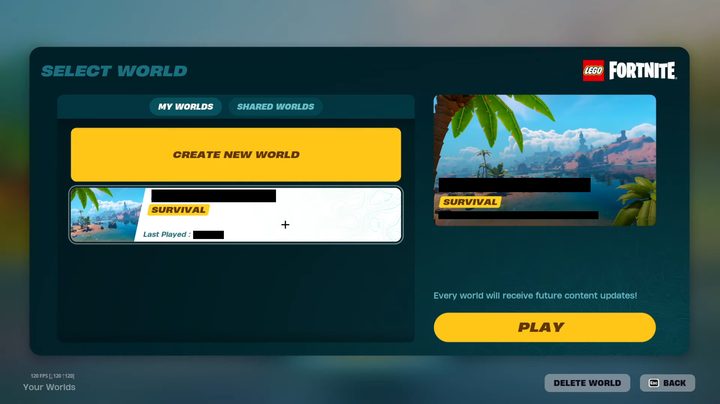
The world creation screen in Lego Fortnite.
Epic Games

The easiest way to get friends into your game is to do so right from the start of Lego Fortnite. When you select this game from within Fortnite itself, press either up on your controller’s D-pad or tab on your keyboard. On the right will be the Players menu, where you can select and invite anyone on your list to join you in the lobby.

Recommended Videos

Once as many or as few friends as you want are ready. select Create World > Start to create your shared world.

How to invite friends

If you want to bring friends into a world you’ve already started alone, the process is slightly different.

Open your menu and go into the Social tab. From here, simply find the friend you want to invite and choose to invite them to your party.

How to make friends Key Holders
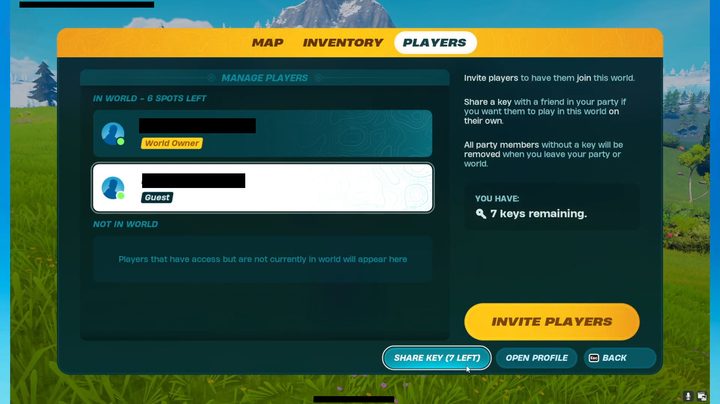
Giving players keys in Lego Fortnite.
Epic Games

In both cases, it is important to note that if the one who created the world leaves, everyone invited to it will be forced out. If you want to give any of your friends the ability to continue playing in your world even when you’re not present, you need to make them a Key Holder. Whoever creates the world will have seven keys they can give out to allow players to keep playing on that server.

To make a friend a Key Holder, they must be in your server with you already. From there, open your menu and go to the Players tab. The bottom option next to Open Profile is Share Key, with an indicator telling you how many you have left. Select this option, followed by the friend(s) you want to grant keys to.

Jesse Lennox
Former Digital Trends Contributor
Jesse Lennox covers all things gaming but has a specific interest in all things PlayStation, JRPGs, and experimental indies…
Ghost Recon could finally be making the comeback fans have been asking for
A three person squad stands on a bridge in Ghost Recon Frontline.

If you're a Ghost Recon fan, you've probably gotten used to one thing over the past few years: waiting for rumors to turn into announcements, waiting for leaks to be acknowledged, waiting for Ubisoft to say... well, anything at all about the future of one of its biggest tactical shooter franchises. Thankfully, that silence finally seems to be ending.

Ubisoft has confirmed that it will share Ghost Recon news on August 6, when the series celebrates its 25th anniversary. The announcement arrived shortly after fresh leaks began circulating online, prompting the company to post a brief message telling fans that more information is just around the corner.

Read more
The AI game-dev boom has a dark side: fewer jobs for the people starting out
Solo creators are thriving with tools like Claude Code and Copilot, but entry-level game roles are disappearing.
Man playing a video game on a desktop with glowing red and blue lights

AI is making it easier than ever for a single person to build a game. That sounds like a win for creativity, and in many ways, it absolutely is. But there is a catch. As generative AI tools help solo developers and small studios do more with fewer people, the same shift is making life tougher for writers, artists, concept creators, and junior programmers trying to break into the gaming industry.

AI is giving solo developers superpowers

Read more
ONEXPLAYER’s new handheld packs AMD Ryzen AI Max+ 388 and liquid cooling at an eye-watering price
The X2 Mini Pro is now available directly from the company with premium specs to match its premium cost.
ONEXPLAYER X2 Mini Pro Featured

Gaming handhelds have become more powerful every year, but they're also getting increasingly expensive. The new ONEXPLAYER X2 Mini Pro takes that trend to an entirely new level. Following its crowdfunding campaign, ONEXPLAYER has begun selling the X2 Mini Pro directly through its online store. The premium handheld starts at $2,499, while the fully loaded configuration with 64GB RAM, a 2TB SSD, and the optional Frost Bay liquid cooling system climbs to a staggering $3,229. Deliveries are expected to begin in August.

Desktop-class hardware in a handheld

Read more